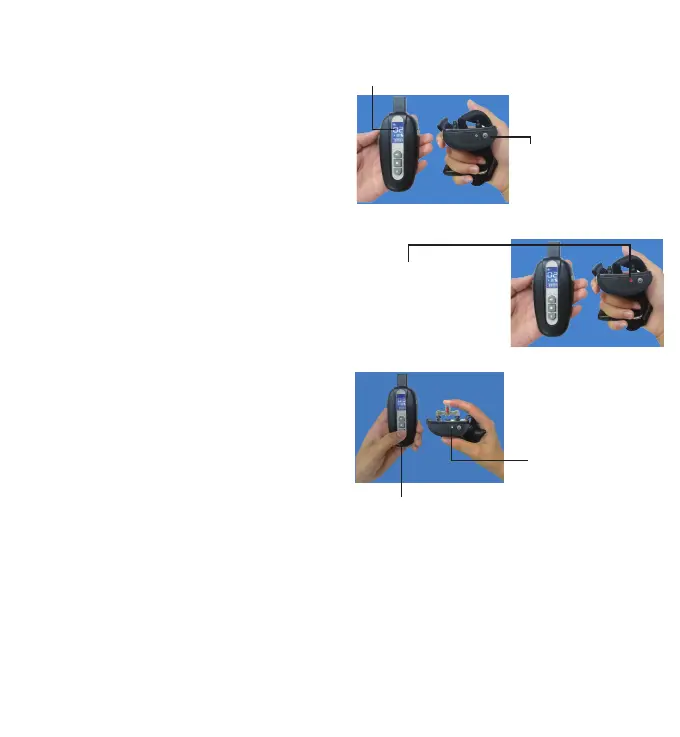
2. To turn the Transmitter on
1) Press any button to active the Transmitter. The backlight on.
2) Backlight will stay for about 5 seconds. if no operation then,
backlight off.
3) LCD display will stay for about 5 seconds. if no operation
then, LCD display shuts off.
3. Charge the collar receiver
1) Connect the charger cable to the Micro USB port.
2) Plug the charger into a standard wall outlet.
3) The red light will flash on the receiver
(If not or green light ,please plug the charger again).
4) Charge the receiver for about two hour for the first charge or
until the light indicates charging complete.
4. To turn the Receiver Collar on
Press the power button once, the blue light will flash
5. To turn the Receiver Collar off
Press the On/Off Button until the blue light is gone, it means the
receiver is turned off.
7. How to use the Test Light
1) Turn the Receiver Collar on.
2) Hold the Test Light Contacts to the Contact Points.
3) Press the SHOCK Button on the Remote Transmitter.
4) The Test Light will flash.
Note: At higher Stimulation Levels, the Test Light will flash
brighter.
5) Turn the Receiver Collar off.
Save the Test Light for future testing.
Note: If the Test Light does not flash, recharge the Receiver
and re-test.
6.Connect transmitter and receiver
1) With the Receiver Collar off your pet, turn on the receiver
collar.
2)Press the power button of the receiver continuously for three
times, and the red light will always on.
3) Press the TONE, VIBRA or Static Stimulation(any of them) on
remote, the blue light on receiver will flash, it indicates pairing is
completed.
4) Press the TONE button, the receiver receives the command
and makes a sound.
5) If the pairing were not successful, please repeat the 1-3 steps.
6) To match the second receiver, press the "A B"button and
select for the second receiver and follow the same procedure.
Two Dog System
NOTE: If you wish to add another Receiver Collar to the training
system, extra Receiver Collars are available where you bought
your unit.
5.How to Connect transmitter
and receiver
Note:
1)If the pairing were not successful, please repeat the 1
-4 steps.
2) To match the second receiver, press the "A B"button
and select for the second receiver and follow the same
procedure.
3)If you wish to add another Receiver Collar to the
training system, extra Receiver Collars are available
where you bought your unit.
1.Turn on the transmitter
2.Turn on the receiver
3. press the power button once.
Test Light
4.Press the TONE, VIBRA or Static Stimulation(any of them)
on remote, the blue light on receiver will flash, it indicates
pairing is completed.
-5- -6-



 To Next Page