34 35
Date and Time
Hardness
Manual Regen.
Dealer Information
Main Menu
Regen. Now?
Regen. Tonight?
Press To Cancel
Press
To Conrm
Backwashing ...
Any Key 3s To Next
13:59
89 Downow 89 UpowAuto On
18%
Brine Drawing ...
Any Key 3s To Next
063:59
50%
Rinsing ...
Any Key 3s To Next
00:00
90%
Relling ...
Any Key 3s To Next
00:00
98%
Relling ...
Any Key 3s To Next
Regen. Now?
Regen. Tonight?
Press To Cancel
Press
To Conrm
Brine Drawing ...
Any Key 3s To Next
103:59
68%
Backwashing ...
Any Key 3s To Next
13:59
88%
Rinsing ...
Any Key 3s To Next
12:09
90%
Relling ...
Any Key 3s To Next
03:59
98%
Relling ...
Any Key 3s To Next
Date and Time
Hardness
Manual Regen.
Dealer Information
Main Menu
QUALITY WATER
666 3 AVE
CHIGAGO IL
TEL 12345678
Setting Complete
Press To Return
Date and Time
Hardness
Manual Regen.
Dealer Information
Main Menu
= Date and Time =
17-Feb-2016, 12:25PM
Press To Cancel
Press
To Conrm
Setting Complete
Press To Return
Standby
interface
Auto On
Auto On
Auto On
Dealer
information
input letter
by letter
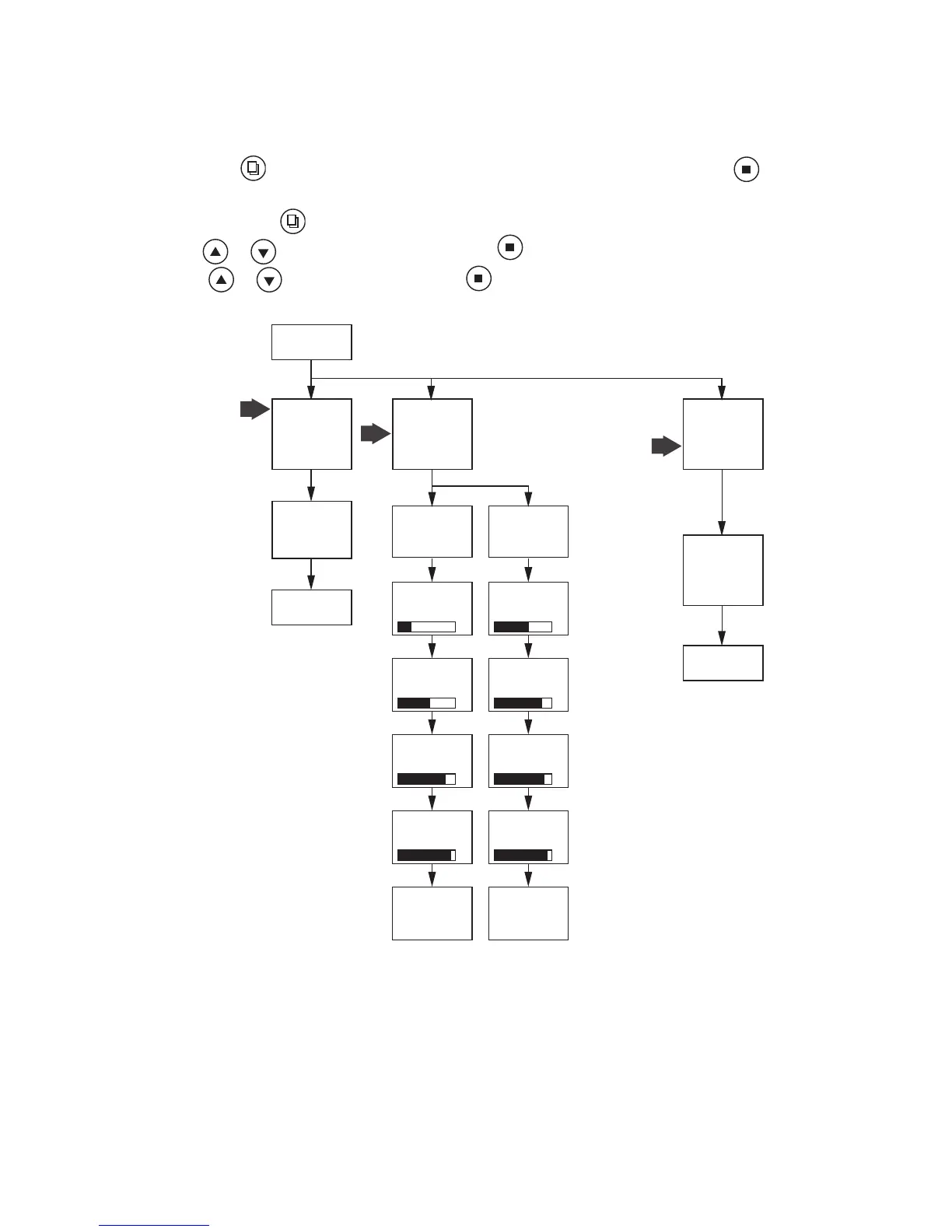
PRESS “MENU” KEY
AND SCROLL TO “MAIN MENU”. THEN PRESS “SET”
TILL IT BEEPS.
HOW TO SET DATE AND TIME, MANUAL REGENERATION AND
DEALER INFORMATION
DATE AND TIME
Time of day is for normal operation of system and the scheduling of the regeneration
time. The date is used in a diagnostic function to track the last time the system
regenerated.
HARDNESS
This value is the maximum compensated water hardness in grains per gallon of the
raw water supply. It is used to calculate the system capacity. If Ferrous Iron is present
add 4 gpg for every 1 ppm of Ferrous Iron.
MANUAL REGENERATION
To start an immediate regeneration select the Manual Regen option. This setting
determines the time of day to perform a scheduled regeneration.
DEALER INFORMATION
This is optional. Dealer information can be added.
Press “MENU” key
Press or
to change menu option. Press “SET” to enter.
Press
or
to change value. Press “SET” to accept.


 To Next Page