49
Phantom Flex Manual
48
Phantom Flex Manual
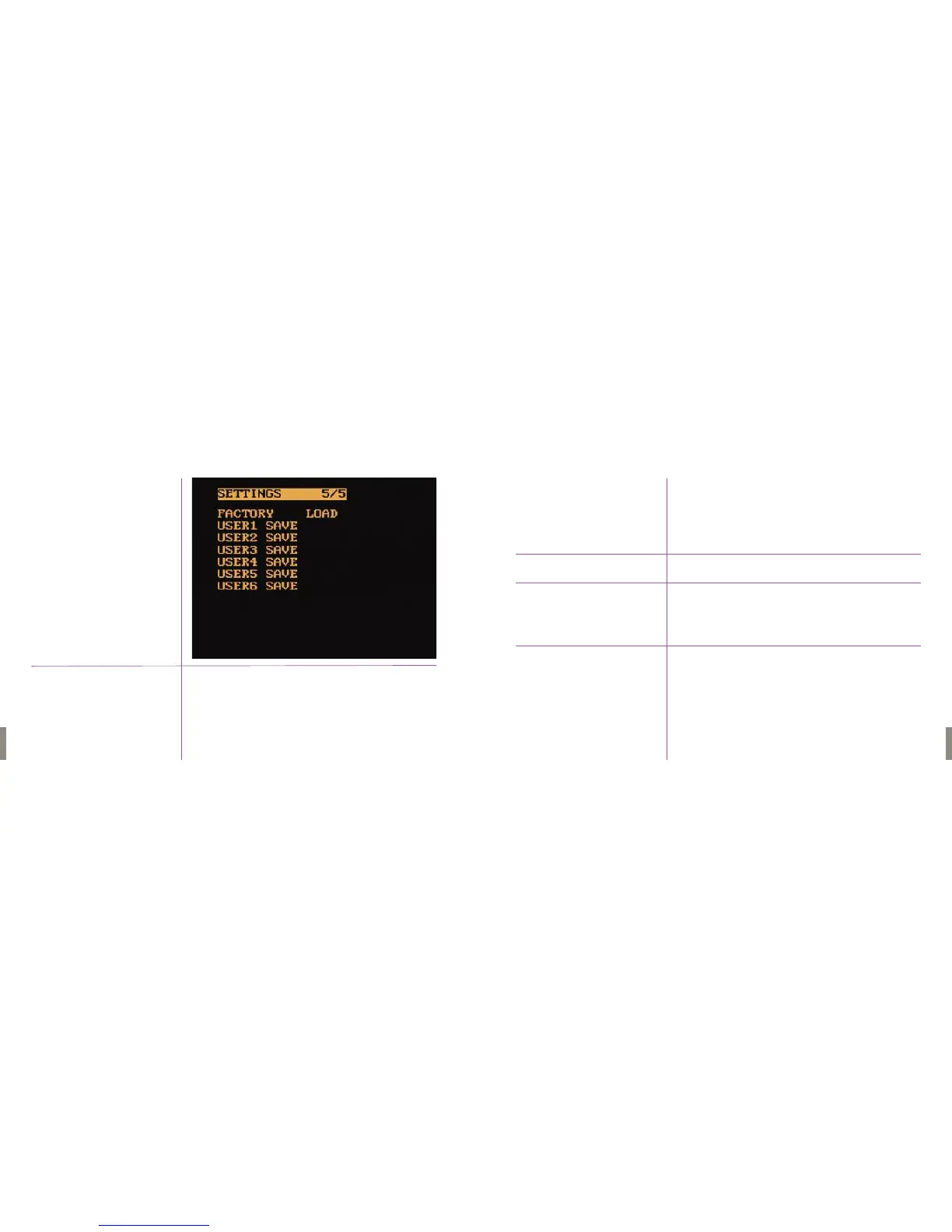
This menu allows the user to load factory default settings and save 6 different
custom user files.
1. Highlight LOAD, which is immediate right of FACTORY.
2. Push & hold the Menu Knob, while turning clockwise until
OK appears.
3. Release Menu Knob.The default factory settings will load.
6 different user files can be created which save all the user adjustable options
in the menu.
1. Select which user file to save (USER 1-6) & highlight SAVE
2. Push & hold the Menu Knob, while turning clockwise
until OK appears.
3. Release the Menu Knob. LOAD will now appear immediately right.
The user file will now be saved into memory.
1. Select which user file to load (USER 1-6) & highlight LOAD
2. Push & hold the Menu Knob, while turning clockwise until OK appears.
3. Release the Menu Knob.The user file will now be loaded onto the
camera settings.
To Load Factory
Settings
User 1-User 6
To Save a User file
To Load a Saved User File
Menu Five
Settings 5 /5


 To Next Page