Vision Research, Inc. | Phantom Ultrahigh-Speed Camera Manual
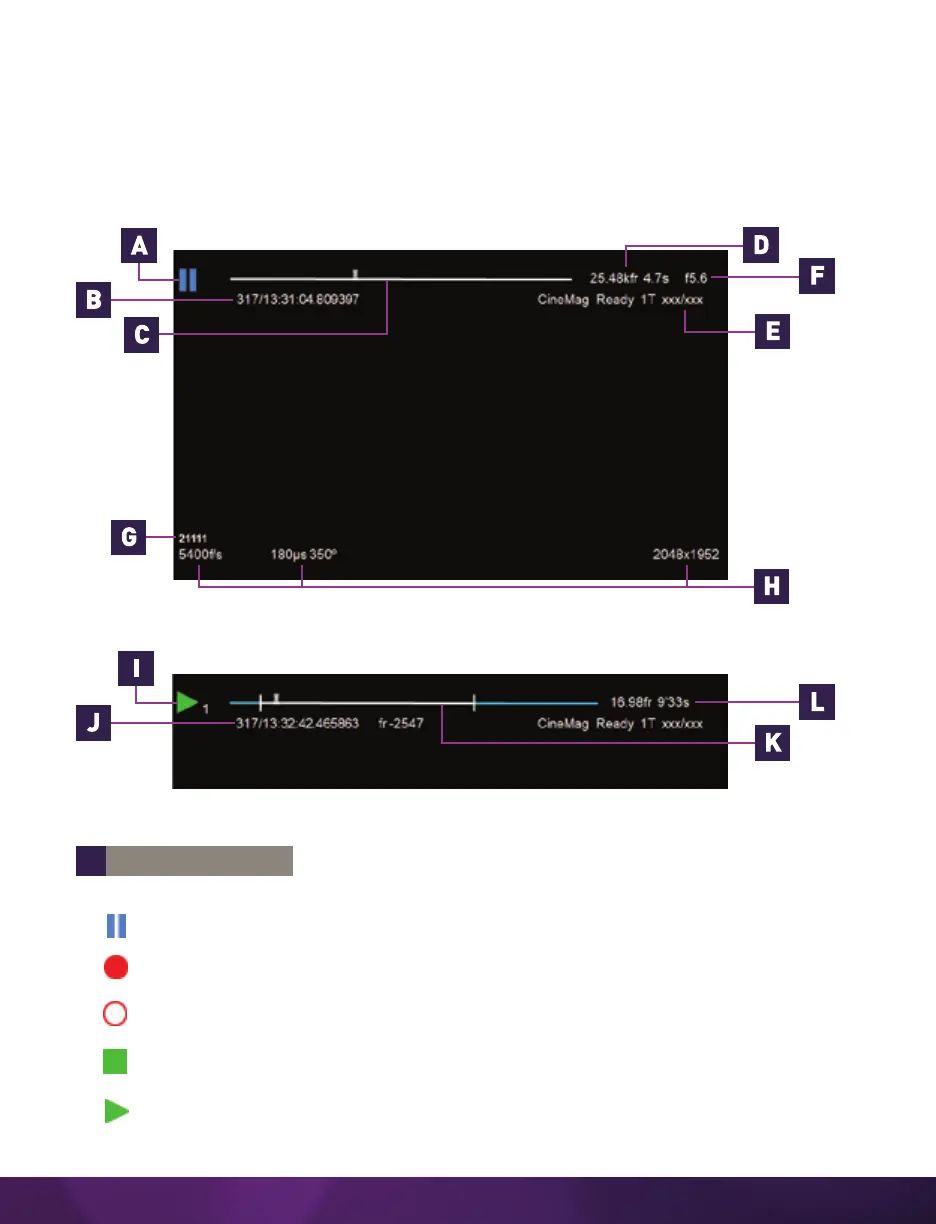
ON-SCREEN DISPLAY (OSD) OVERVIEW
The On-Screen Display (OSD) provides valuable information about the camera’s
current status over the video outputs along with the live or playback images.
VIDEO DISPLAY, ‘LIVE’ MODE
VIDEO DISPLAY, ‘PLAYBACK’ MODE
A
CAMERA STATE
The symbol changes based on the camera’s state:
Live: The camera is not recording and a live image is displayed from all SDI ports.
Capture: The camera is recording to internal memory (RAM) and awaiting a
trigger signal.
Triggered: The camera has been triggered and is filling RAM memory
(‘Post-Trigger’ frames).
Cine Stored: Recording has ended and a Cine is stored in RAM memory. The Cine
must be erased from the RAM to begin recording again.
Playback: The camera is in ‘Playback’ mode. RAM Cines can be reviewed, edited
and saved to flash.



 To Next Page