Chapter 8: Measurements | 53
Your choice of origin will be largely dependent on the subject and the type of motion being
studied.
Once the origin point is set, activate ‘Instant Measurements’ and select one of the available
options for Distance, Angle, Speed and Angular Speed.
INSTANT MEASUREMENTS
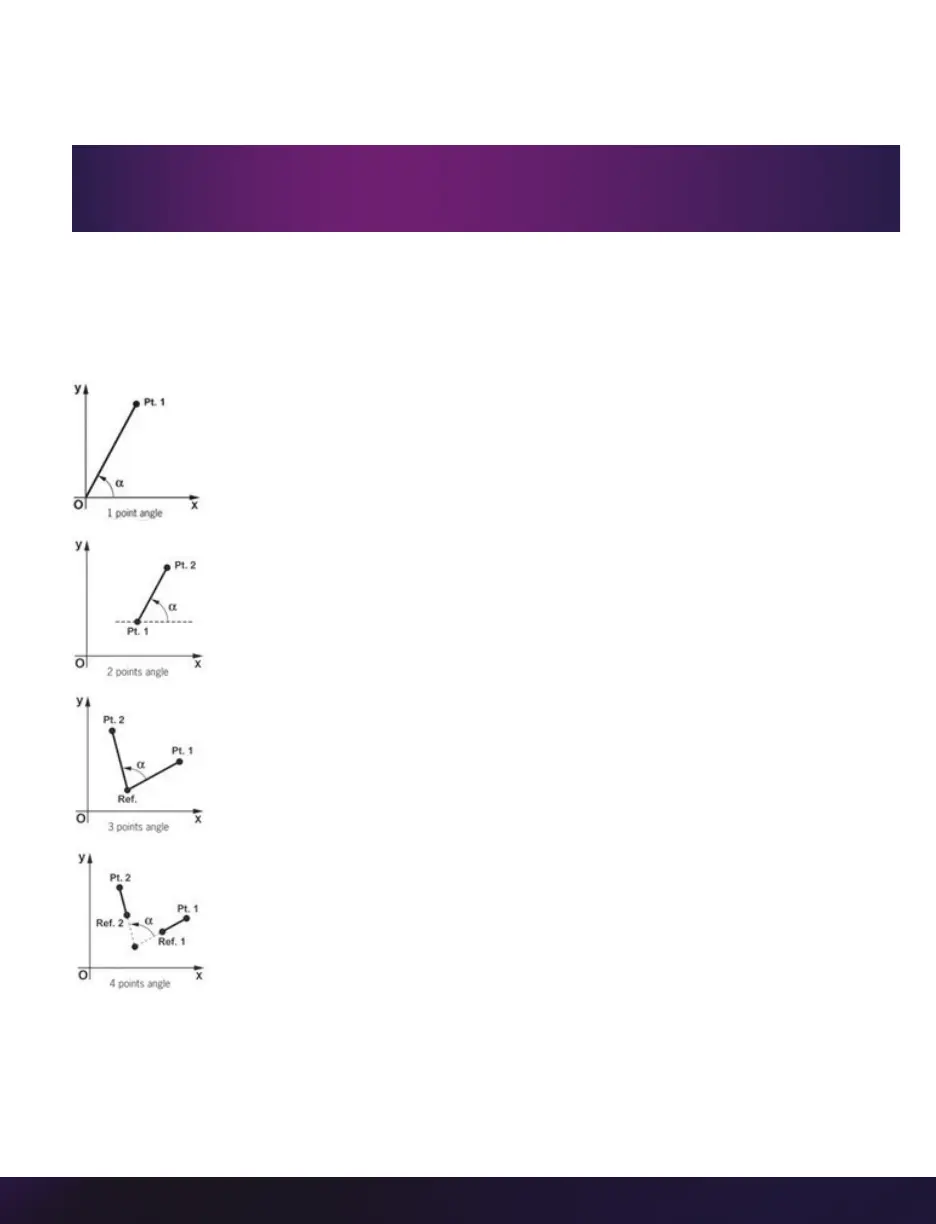
Consists of four unique motion analysis tasks, including:
Each of these is calculated by selecting a point (or points) in one frame,
then forwarding the Cine and selecting the same point (or points) in the
subsequent frame. Results are posted in the ‘Results’ area.
All ‘Instant Measurements’ can be used in conjunction with a ‘Report
File’ or without. With a ‘Report File’ opened, the image number, elapsed
time from trigger, unit of measurement, distance, dimensions, speed and comments are
automatically saved in the comma-separated text-delimited file.
1. Distance, Angle & Speed: Origin + 1Point: Used to measure the
distance and speed of linear motions with respect to a fixed point of
origin, the angle formed with respect to the x-axis or the speed of
a rotational motion (computed with respect to the horizontal axis of
the picture screen) when only one point is known.
2. Distance, Angle & Speed: 2Points: Used to measure the dimensions
of an object or space, the displacement and speed of an object in
one image with respect to its new position in any subsequent image,
angular speed (computed with respect to a horizontal axis) or the
speed of a rotational motion when two points are known.
3. Angle & Angular Speed: 3Points: Used to measure angles when the
vertex and the two end points of the angle are visible.
4. Angle & Angular Speed: 4Points: Used when the vertex or the center
point of rotation is unknown or outside of the image area. The
angular speed can be found by comparing the position of an object
in one image to its position in the next image.
The ‘Default Origin’ and ‘Set Origin’ buttons will be disabled if any of the ‘Instant
Measurements’ or ‘Collect Points’ options are active.


 To Next Page
 Loading...

