Need help?
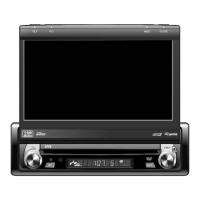
Do you have a question about the Phase Linear SD1411 and is the answer not in the manual?
Crucial safety step instructing to disconnect the vehicle's battery negative terminal before installation.
Outlines the initial steps required before commencing the main installation procedure.
Details the process of installing the unit using a universal mounting sleeve.
Instruction to remove any transport screws that secure the unit during shipping.
Instructions for mounting the radio using a vehicle-specific installation kit.
The final step of reconnecting the vehicle's battery negative terminal after wiring is complete.
Diagram and description of all electrical connections required for the unit.
Information on the correct type and amperage of fuses for replacement.
Instructions on how to turn the unit on and off, including auto-on functionality.
Procedures for detaching, reattaching the front panel, and using the reset button.
Covers automatic, manual, and scan tuning for finding radio stations.
Guidance on inserting compact discs and initiating playback.
Details on acceptable media types (CD, USB, SD) and file formats (MP3, WMA).
Important restrictions and recommendations for playing MP3/WMA files.
Instructions for connecting and playing MP3/WMA files from a USB device.
Instructions for connecting and playing MP3/WMA files from an SD card.
A guide mapping each button on the remote control to its function on the unit.
A table detailing common issues, their causes, and corrective actions.
Details amplifier power output according to CEA-2006 standards.
Information on warranty limitations, liability, and the process for obtaining service.
 General
| Brand | Phase Linear |
|---|---|
| Model | SD1411 |
| Category | Car Receiver |
| Language | English |

 To Next Page