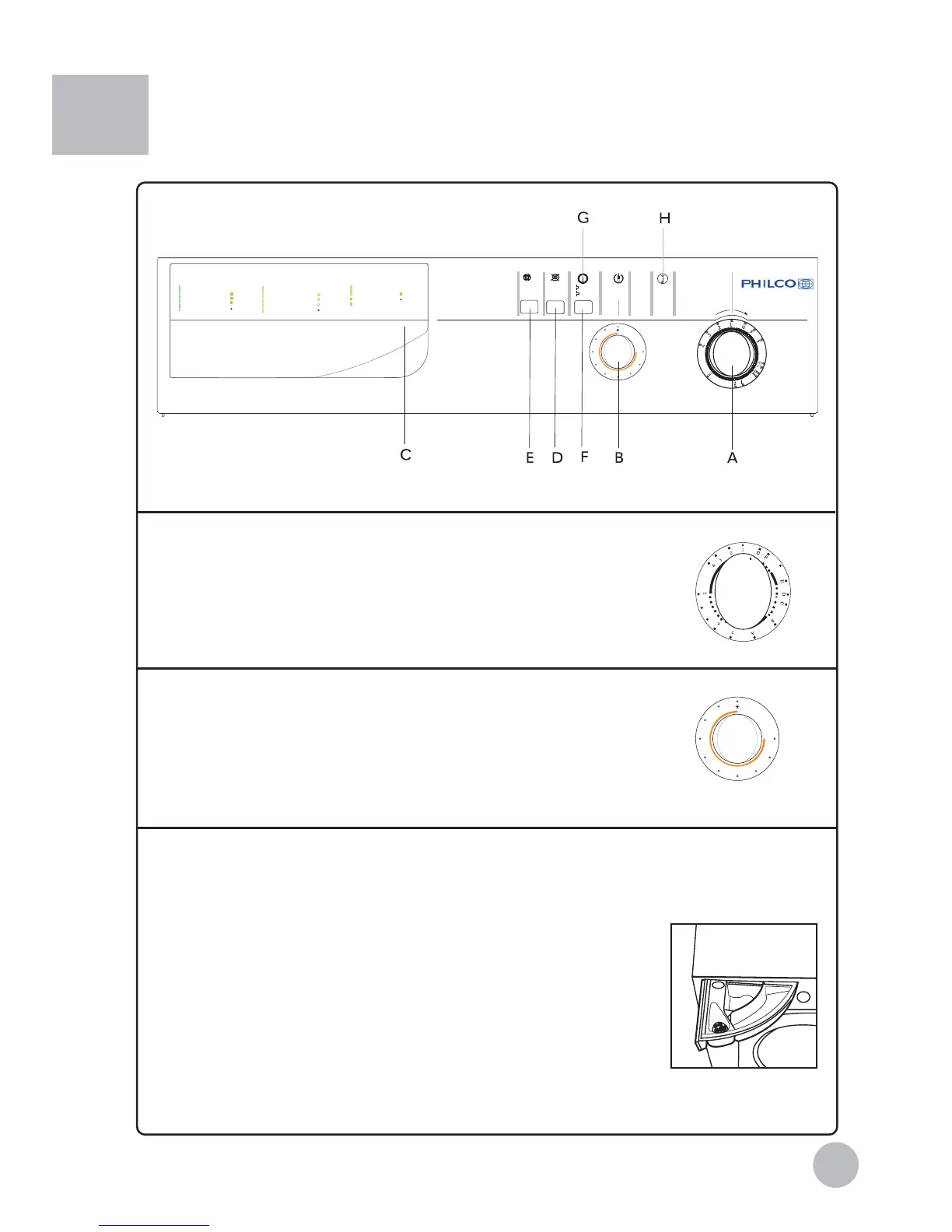
A Washing program
Turn the knob clockwise to set the desired wash program .
Caution: Turn off the power and turn the program knob clockwise
for setting desired wash program.
B Washing temperature
Turn the knob clockwise to set the desired temperature.
Temperatures between 30
O
C-max can be setted , No
heating wash is selected when the knob is set at *.
C Detergent distributor
Program discription are printed on the handle of the detergent
distributor,there are three detergent compartments numbered 1,2,3
Box 1: Pre-washing detergent
Box 2: Standard washing - extra-fast washing
Box 3: Softening agent, adjusting agent, perfume
1
3
2
7
Control Panel
ANTI-CREASE SOAK
ON
OFF
NO SPIN
TEMPERATURE
DOOR LOCK
PROGRAM SETTING with power off喈喉
Normal wash
Quick wash
Super quick wash
Delicate wash
Normal wash
Quick wash
Super quick wash
Rinse
Soften
Spin
End
Soften
Spin
End
Spin
End
Strong action-main for cotton
Middle action-main for synthetic Delicate action-main for wool
1
2
3
4
A
B
C
D
E
F
G
G
5
6
7
Delicate wash
Rinse
Soften
Prewash
Rinse
D
E
F
PD[
AB600TX
PD[


 To Next Page