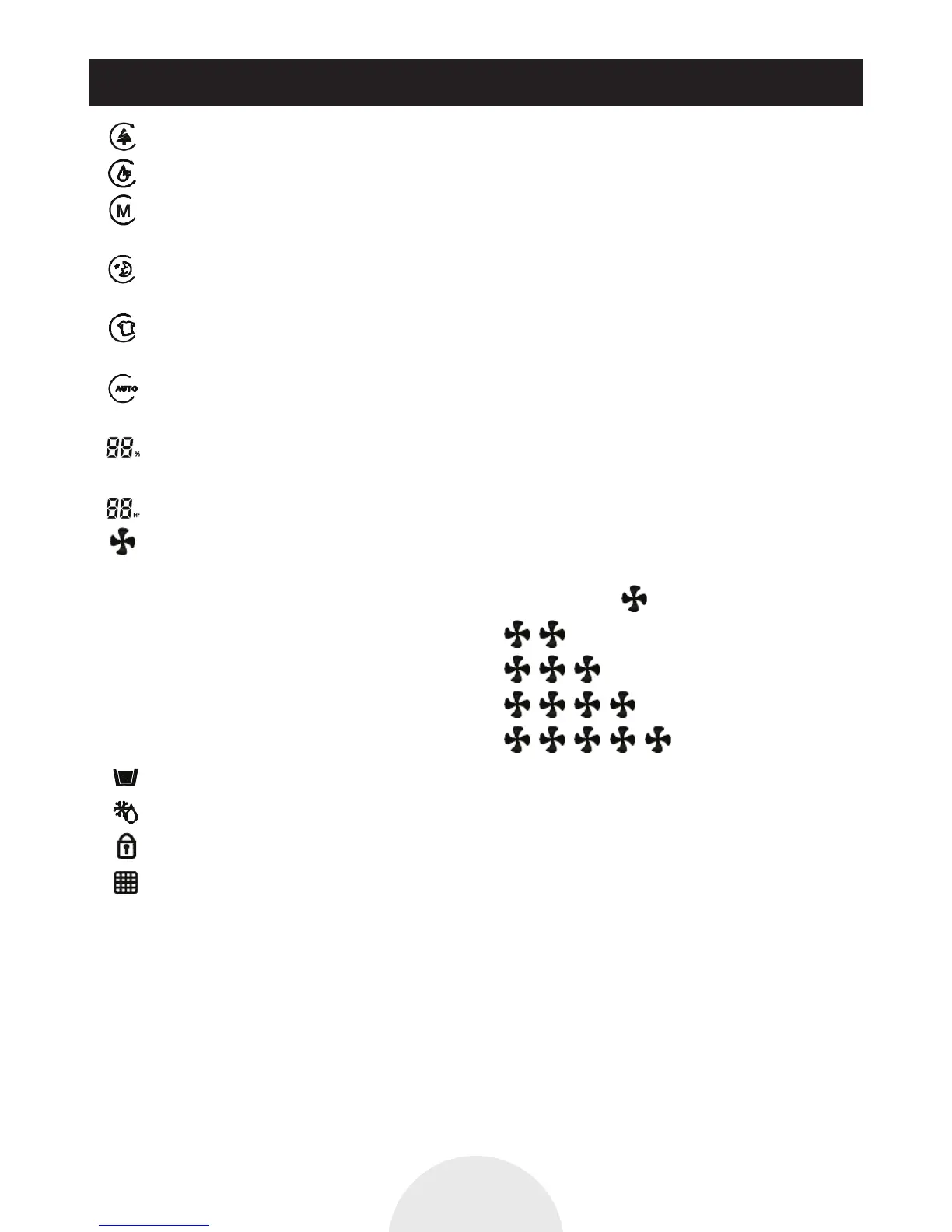
1. Air purification display
2. Dehumidifier
3. Manual mode indication, In this mode can be according to the needs to set fan speed
Dehumidifying operation can set 4 kinds of speed. Air purifying can be set 5 kinds of speed.
4. Quiet mode indication In this mode, Fan motor speed in the most low-grade operation and
can not be adjusted, the air quality indicator lights is off.
5. Clothes dry mode indication, In this mode, the machine is running continuous dehumidification,
Fan motor at maximum speed 5 and can not be adjusted.
6. Automatic control operation indication, In this mode, the fan speed will be adjusted
automatically according to the detection results of machine
7. Display relative humidity, Set Working Humidity Ratio when operate machine after setting
to display current humidity.
8. Display shutdown machine time, Can be setting from 1 - 12 hours and no timing
9. Fan speed indication According to different motor speed to set LCD display corresponding
fan icon.
When setting speed 1 and mute mode, LCD display 1 icon …
When setting speed 2, LCD display 2 icons …
When setting speed 3, LCD display 3 icons …
When setting speed 4, LCD display 4 icons …
When setting speed 5, LCD display 5 icons …
10. Water full indication
11. Defrosting indication
12. Child lock indication
13. HEPA filter replacement tips
14. Air purifying quality display, The outlet indicating light will display different color
according to gas sensor detect air quality good or bad.
Air quality is very good, the indicator light shows green
Air quality is good, the indicator light shows blue
Air quality is the mild pollution, the indicator light shows yellow
Air quality is heavily polluted, the indicator light shows purple
Air quality is seriously polluted, the indicator light shows red.
How To Operate
P9


 To Next Page