
 Need help?
Do you have a question about the Philips 14PV111/01 and is the answer not in the manual?
Warning about the risk of electric shock; do not attempt to repair.
Covers ventilation, liquid ingress, flammable items, child safety, and maintenance.
Ejects the cassette from the VCR.
Starts recording the selected TV channel or point recording.
Stops the tape and displays a still image.
Selects program numbers.
Temporarily mutes the sound; press again to restore.
Sets the sleep timer in 30-minute increments.
Turns the appliance on or off, or cancels menu functions.
Accesses the main menu and navigates settings.
Turns Teletext on/off or selects Teletext pages.
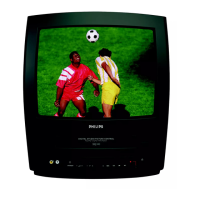
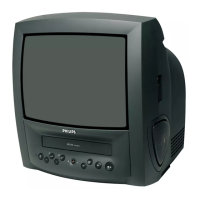
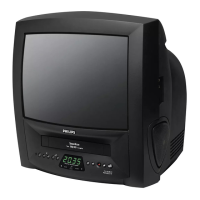
Details on buttons, switches, and input/output sockets on the front panel.
Describes the antenna input and SCART connections on the rear panel.
Explains the meaning of the standby and recording indicator lamps.
Details on recording capacity for SP and LP modes.
Instructions for preparing and using the remote control.
Steps for connecting the antenna and power cables.
Procedure for setting the display language.
Information on connecting external devices like decoders via SCART.
Instructions for turning the TV-Video on and off using the button.
Notes on data retention during power outages.
Explains how to navigate and operate the menu system using the remote.
Guides through initial setup and automatic channel search.
Steps to link a decoder to a specific TV channel.
Instructions for manually searching and storing TV channels.
How to receive channels from a satellite receiver via SCART.
Procedure to find and store all available channels automatically.
How to rearrange or remove stored TV channels.
Manual procedure to set the correct time and date.
How to select the desired language for the on-screen display.
How to select TV channels using the remote control.
How to select the SCART input (AV1).
How to select the front AV input (AV2).
Adjusting the sound volume using the remote or device buttons.
Adjusting picture quality settings like brightness, color, and sharpness.
Instructions for turning on/off and navigating Teletext pages.
Details on special functions like text enlargement and hidden information.
How to program the unit to switch off automatically.
Instructions for playing VHS video cassettes.
Playing cassettes recorded with NTSC signal system (e.g., from USA).
How to fast forward or rewind to a specific scene during playback.
How to manually adjust tracking using the remote control.
Overview of spontaneous and automatic stop recording.
Steps for starting and manually stopping a recording.
Procedure for starting a recording that stops automatically.
How to select recording speed for normal or extended playback time.
Information required to set up automatic recording schedules.
Understanding Video/Programme Delivery Control for accurate recording.
Solutions for common problems like the unit not responding or cassette issues.
Steps to program a one-time, daily, or weekly recording.
How to program recordings from connected external devices.
How to check the list of programmed recordings and delete them.
How to change existing programmed recording details.
How to show and hide the status screen.
How to enable or disable the blue background feature.
Setting the unit to play a cassette repeatedly.
How to lock all front panel buttons to prevent unauthorized use.
Solutions for problems like no response, no picture, or recording failures.
Troubleshooting steps for the Smart Clock feature not functioning correctly.
 General
| Category | TV VCR Combo |
|---|---|
| Brand | Philips |
| Model | 14PV111/01 |
| Screen Size | 14 inch |
| Display Type | CRT |
| Tuner | Analog |
| Audio Output | Mono |
| Weight | Approx. 15 kg |
| Remote Control | Yes |
| VCR Head | 4-head |
| Input Ports | Composite Video, Audio L/R |







 To Next Page
