EasyManua.ls Logo

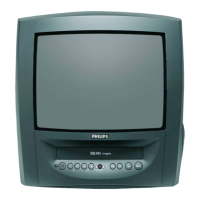
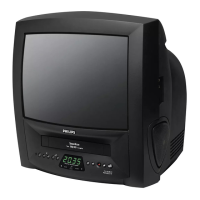
Philips 14PV340/05 - User Manual

Philips 14PV340/05
28 pages
Print Icon
To Next Page IconTo Next Page
Loading...
1. CONNECTING YOUR TV-VIDEO COMBI 4..............
Connecting the cables 4.............................
Connecting a decoder or other equipment 4............
2. INSTALLING YOUR TV-VIDEO COMBI 5................
Initial installation 5..................................
Allocating a decoder 5..............................
Manual TV channel search 6.........................
Manual radio channel search 7.......................
Satellite receiver 7..................................
Special installation functions 7.......................
Automatic TV channel search 7......................
Channel Number Allocation 8........................
Delete a TV Channel 8...............................
Setting the language 8..............................
Setting the time and date 9...........................
3. IMPORTANT NOTES FOR OPERATION 10..............
SUMMARY OF USER GUIDE 10.......................
User guide (OSD) 10.................................
4. TV SET FUNCTIONS 11..............................
Selecting a TV programme 11........................
Automatic volume control (AVL) 11....................
5. RADIO FUNCTIONS 12...............................
Selecting a radio channel 12.........................
Searching a radio channel 12........................
6. PLAYBACK FUNCTIONS 13..........................
Playing a cassette 13................................
Playing NTSC cassettes 13...........................
Tape position indication 13...........................
Searching for tape position with the picture (picture
search) 13.........................................
Still picture 13......................................
Searching for tape position without the picture (wind
and rewind) 14.....................................
Instant View 14.....................................
Automatic search for a tape position (index search) 14..
Picture interference 15..............................
Cleaning the video heads 15.........................
7. MANUAL RECORDING 16............................
Recording without automatic switch-off 16............
Recording with automatic switch-off (OTR
one-touch-recording) 16.............................
Protecting your recordings 16........................
Auto-assembling 17.................................
8. PROGRAMMED RECORDING (TIMER) 18...............
’VPS’ (Video Programming System) and ’PDC’
(Programme Delivery Control) 18.....................
Programming a recording (with ’VIDEOplus’) 18........
Programming a recording (without ’VIDEOPlus’) 19.....
How to check or change a TIMER 20..................
9. ADDITIONAL FUNCTIONS 21.........................
How to read TELETEXT 21............................
Selecting the display brightness 21...................
Parental control 22..................................
Switching the On-screen display (OSD) on or off 22.....
Switching to 16:9 wide screen picture 23..............
Continuous playback 23.............................
Switch off function (SLEEP TIMER) 24.................
Switch on function (WAKE-UP TIMER) 24..............
10. Before you call an engineer 25.......................
Technical terms used 25.............................
3

Table of Contents

Question and Answer IconNeed help?

Do you have a question about the Philips 14PV340/05 and is the answer not in the manual?

Summary

1. CONNECTING YOUR TV-VIDEO COMBI

Connecting the cables

Step-by-step guide to connecting aerial and power cables to the TV-VIDEO Combi.

Connecting a decoder or other equipment

Guide for connecting external devices like decoders or camcorders to the Combi.

2. INSTALLING YOUR TV-VIDEO COMBI

Initial installation

Procedures for setting up the TV-VIDEO Combi for the first time.

Allocating a decoder

How to connect and configure a decoder for coded channels.

Manual TV channel search

Manual process for finding TV channels not found automatically.

Manual radio channel search

Manual process for finding radio channels.

Automatic TV channel search

Automatic search for all TV and radio channels.

Satellite receiver

How to receive channels from a satellite receiver.

Automatic Channel Installation

Automatic installation of TV channels using ACI.

Channel Number Allocation

Allocating programme numbers to TV channels.

Delete a TV Channel

Procedure to remove unwanted TV channels.

Setting the language

Selecting the language for the on-screen display (OSD).

Setting the time and date

How to manually set the time and date on the Combi.

Automatic clock and date setting (SMART CLOCK)

Automatic time and date setting via TELETEXT.

3. IMPORTANT NOTES FOR OPERATION

SUMMARY OF USER GUIDE

Overview of OSD menu functions.

User guide (OSD)

Explanation of how to navigate and use the On-Screen Display menus.

4. TV SET FUNCTIONS

Selecting a TV programme

How to choose TV channels using programme numbers or channel list.

Picture settings

Adjusting picture parameters like brightness, contrast, and sharpness.

Volume control

Adjusting sound volume and muting the audio.

Sound settings

Accessing and modifying sound preferences.

Automatic volume control (AVL)

Minimizing volume changes during commercials.

5. RADIO FUNCTIONS

Storing a radio channel

Saving preferred radio channels for easy access.

Selecting a radio channel

How to choose radio channels.

Searching a radio channel

Scanning for available radio channels.

Showing the frequency

Displaying the frequency of the currently tuned radio channel.

6. PLAYBACK FUNCTIONS

Playing a cassette

Steps to insert and play a video cassette.

Playing NTSC cassettes

Playing cassettes recorded in the NTSC format.

Tape position indication

Displaying the current position on the tape.

Searching for tape position with the picture (picture search)

Locating specific points on tape with visual preview.

Still picture

Freezing a single frame from the video playback.

Searching for tape position without the picture (wind and rewind)

Fast winding and rewinding tape without picture display.

Instant View

Picture search function during wind and rewind.

Automatic search for a tape position (index search)

Automatically finding recorded sections using index marks.

Picture interference

Troubleshooting poor picture quality during playback.

Cleaning the video heads

Procedure for cleaning the video heads to improve picture.

7. MANUAL RECORDING

Recording without automatic switch-off

Manual recording that requires stopping the recording manually.

Recording with automatic switch-off (OTR one-touch-recording)

One-touch recording that stops automatically after a set time.

Protecting your recordings

How to prevent accidental erasure of recorded cassettes.

Auto-assembling

Function to join individual recordings smoothly.

Selecting the recording speed (SP or LP)

Choosing between Standard Play (SP) and Long Play (LP) recording speeds.

8. PROGRAMMED RECORDING (TIMER)

VPS (Video Programming System) and PDC (Programme Delivery Control)

Using VPS/PDC for automatic recording adjustments based on broadcast signals.

Programming a recording (with VIDEOplus)

Recording using the VIDEOplus+ system with program codes.

Programming a recording (without VIDEOPlus)

Manual programming of recordings without using VIDEOplus+.

How to check or change a TIMER

Viewing and modifying programmed recording timers.

How to clear a TIMER

Deleting programmed recording timers.

9. ADDITIONAL FUNCTIONS

How to read TELETEXT

Instructions for accessing and viewing TELETEXT services.

Extra TELETEXT functions

Using advanced TELETEXT features like sub-pages and zoom.

Selecting the display brightness

Adjusting the brightness level of the display.

Parental control

Enabling parental lock to restrict access to certain functions.

Switching the On-screen display (OSD) on or off

Controlling the visibility of on-screen information displays.

Switching to 16:9 wide screen picture

Adjusting picture format for widescreen content.

Continuous playback

Setting the cassette to play repeatedly.

Switch off function (SLEEP TIMER)

Programming the Combi to switch off automatically after a set time.

Switch on function (WAKE-UP TIMER)

Programming the Combi to switch on at a specific time.

10. Before you call an engineer

Combi Unresponsive to Buttons

Diagnosing issues when the device is unresponsive to button inputs.

Cassette Jammed

Solutions for a jammed video cassette.

Remote Control Issues

Troubleshooting steps for a non-functional remote control.

No Picture During Playback

Identifying reasons for missing picture during cassette playback.

Poor Picture Quality

Addressing issues with picture quality during playback.

Recording Failures

Troubleshooting recording failures.

Timer Recording Problems

Resolving problems with timer-based recordings.

Smart Clock Setting Errors

Diagnosing issues with the automatic clock and date setting.

Unusual Nighttime Noise

Explaining the soft noise related to Smart Clock function.

TELETEXT Page Display Issues

Troubleshooting TELETEXT page display issues.

Technical Terms Glossary

Glossary of technical terms used in the manual.

Philips 14PV340/05 Specifications

General IconGeneral
BrandPhilips
Model14PV340/05
CategoryTV VCR Combo
LanguageEnglish

Related product manuals