Initial installation
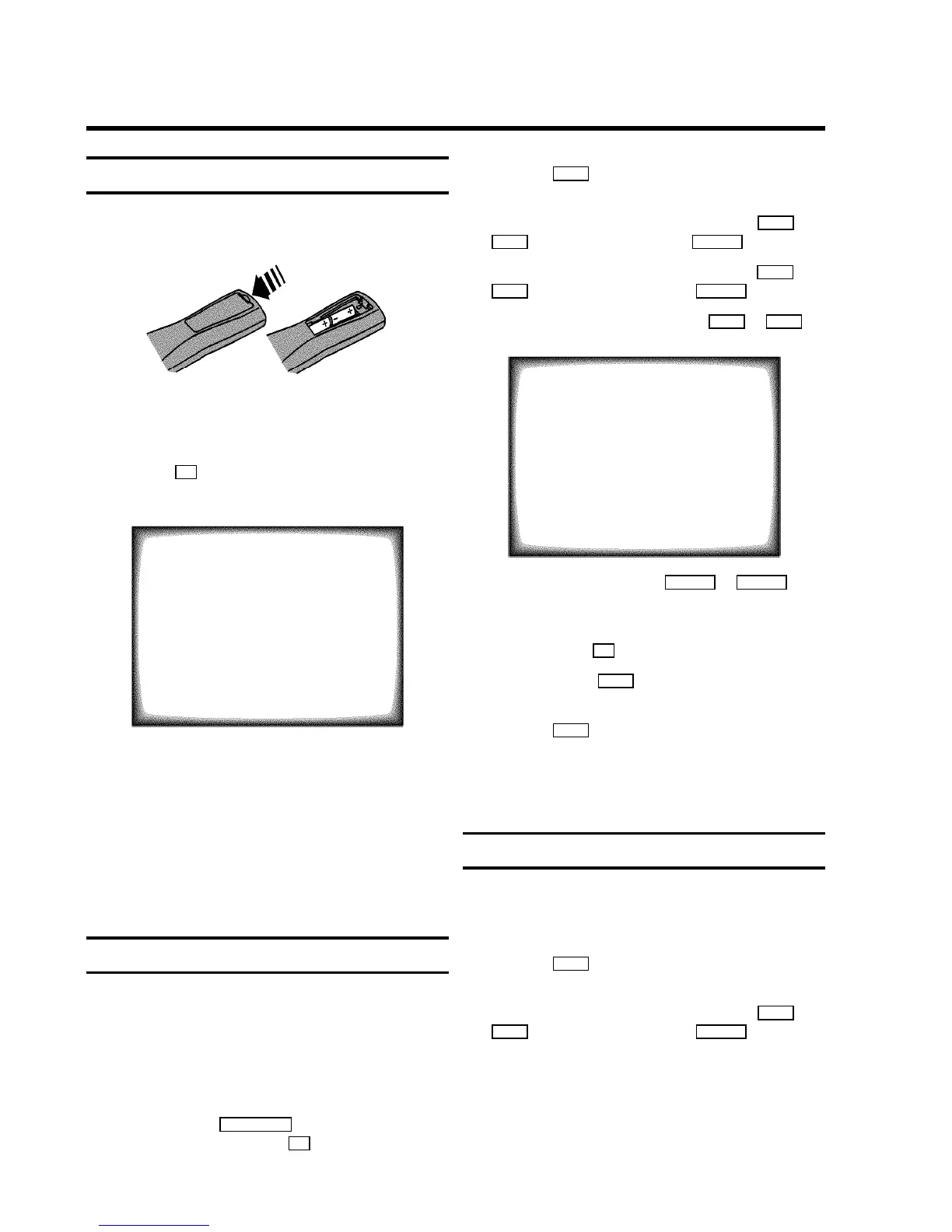
a Open up the battery compartment of your remote control
and place the batteries in it as shown in the picture.
b Close the battery compartment.
c If the aerial (antenna) has been connected to the
TV-VIDEO Combi and the radio aerial has been adjusted,
press the OK button.
’Automatic TV channel search’ starts. This picture will
appear on the screen:
Searching...
CHANNELS FOUND: 06
Radio channels stored: 7
//////,,,,,,,,,,,,,,,,,,,,,
Wait until all TV channels have been found. This can take
several minutes. When the TV channel search is ready,
’Installation comp.’ will briefly appear on the
TV screen.
DIf you have connected a decoder, you must install it
as described in the next section.
DIf you have connected a satellite receiver, please
read the section ’satellite receiver’.
Allocating a decoder
Some TV stations will send coded TV channels, that you can
only watch when you use a decoder. You can connect such a
decoder (descrambler) to your TV-VIDEO Combi. With the
following function, the connected decoder will automatically
be activated for the TV programme you want to watch.
a Select the TV channel for which you want to use the
decoder with the ABP q/r button on the TV-VIDEO
Combi or the number buttons 0-9 on the remote control.
b Press the MENU button on the remote control. The main
menu will appear.
c Select the line ’Installation’ with the P- B or
AP+ buton and confirm with the SqC button.
d Select the line ’Manual store’ with the P- B or
AP+ button and confirm with the SqC button.
e Select the line ’Decoder’ with the P- B or AP+
button.
MANUAL STORE
Channel/Frequency FREQU.
Search 123
Fine tuning (,,,,=,,,,$
Name edit xxx
Programme number 01
Decoder OFF
ã Exit:
« press MENU
f Select function ’ON’ with the DSr or SqC
button. When you select ’OFF’, the function will be
switched off.
g Confirm with the OK button.
h To end, press the MENU button.
Your decoder has now been allocated to this TV channel.
i Press the MENU button again.
DIf you have programmed a recording (TIMER), a
wake-up timer or a sleep-timer, you can’t select the
function ’Manual store’.
Manual TV channel search
In certain cases the ’Automatic TV channel search’ may not be
able to find all of the TV channels (e.g. coded TV channels). In
that case, use this manual method to set the channels.
a Press the MENU button on the remote control. The main
menu will appear.
b Select the line ’Installation’ with the P- B or
AP+ button and confirm with the SqC button.
2. INSTALLING YOUR TV-VIDEO COMBI
5


 To Next Page
 Loading...