11
Go to cover page
170B6 LCD
Mechanical Instruction
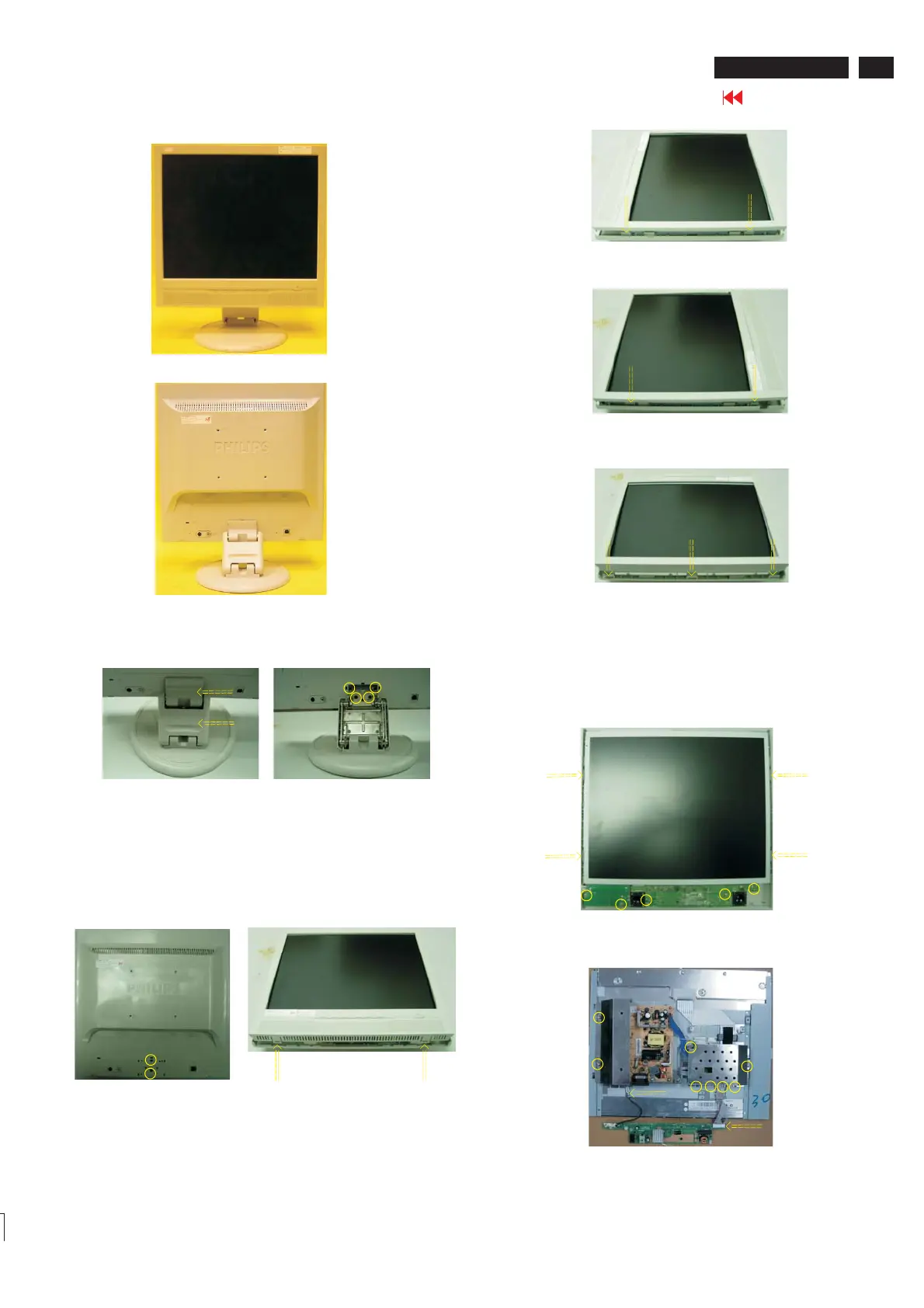
Front view
Back view
Step 1. Remove the stand.
a. Remove the hinge covers
b. Remove the four screws as Fig.4
as Fig.3
Fig.3
Fig.2
Fig.1
Fig.7
Fig.8
Fig.4
Step 2: Remove the front bezel
a.
b. Open 2 clicks on bottom side as shown in Fig.6.
c. Open 3 clicks on right and left side as shown in Fig.7 and Fig.8.
d. Open 3 clicks on top side as shown in Fig.9.
Remove the two screws as shown in Fig.5.
Fig.5
Fig.6
Fig.9
Step 3: Remove the Back Cover Assy
a. Remove 5 screws as shown in Fig.10.
b. Remove the Control&Audio Board from the Back Cover Assy
c. Open clicks on left and right side, Remove LCD Panel from
Back Cover Assy shown in Fig. 11.as
Fig.10
Fig.11


 To Next Page