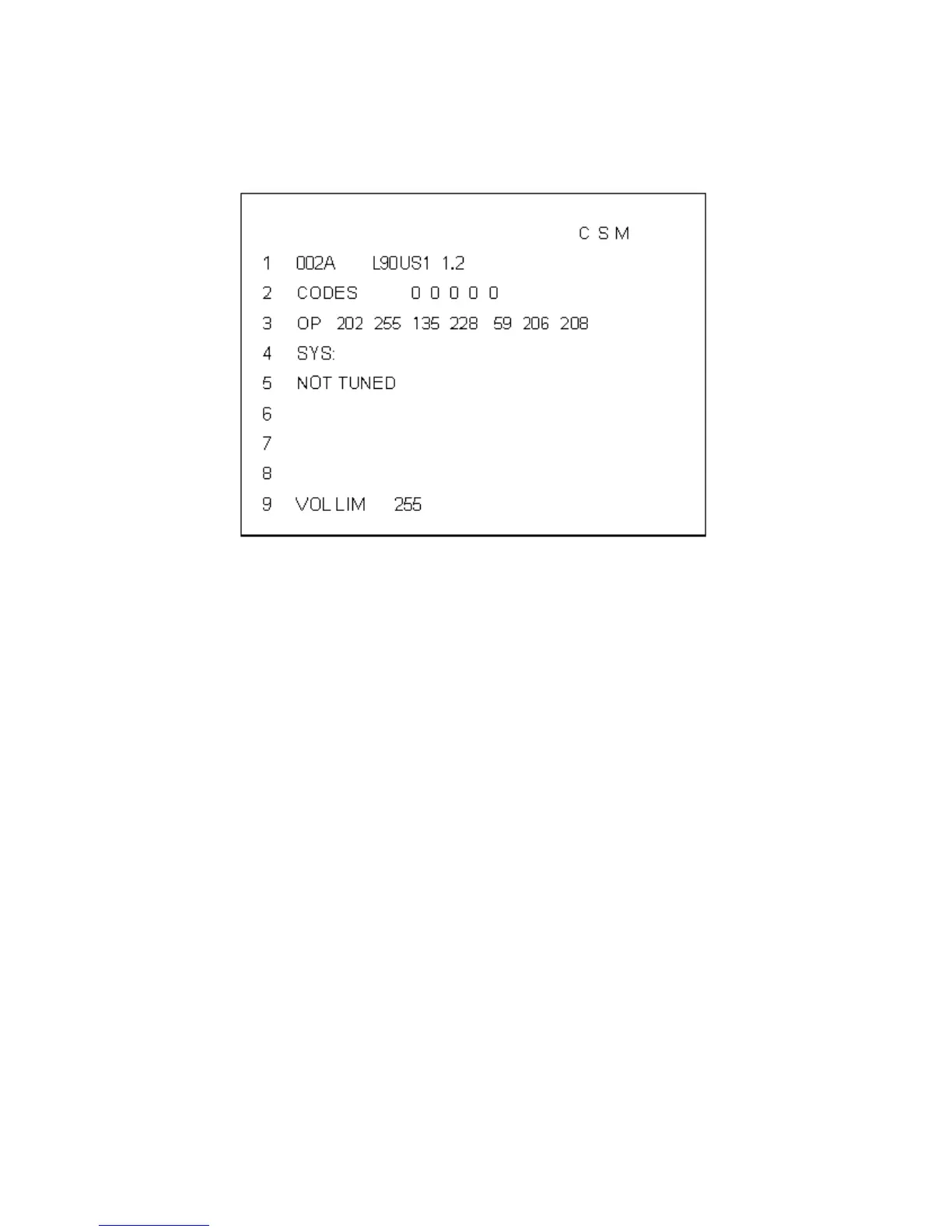
Explanation of CSM Display Screen
The following information is displayed on screen:
• Text ”CSM“ on the first line
• Line number for every line (to make CSM language independent)
• To view multiple CSM pages (such as lines 8 and 9), use the Channel Up or Channel Down keys
• For more information on lines 1, 2, and 3, see SDM section ”Explanation of Display“
• Line 1 displays the run timer and the software identification, cluster, and version
• Line 2 displays the error buffer contents (the word ”error“ is not used on this screen, instead ”codes“ is used)
• Line 3 displays the option code information
• Line 4 displays SYS: (This is not used)
• Lines 5 through 8 display information on active service unfriendly modes
• Line 5 displays the text ”NOT TUNED“ if no television station is tuned
• Line 6 displays the text ”TIMER“ if the sleep timer or ”on“ timer is active
• Line 7 displays the text ”LOCKED“ if one or more channels or presets is locked via child lock
• Line 8 displays the text ”HOSPITAL“ if hospital mode is active, or ”HOTEL“ if hotel mode is active
• If the volume limiter is active, line 9 displays the text ”VOL LIM“ and the set value of the volume limiter. If the
volume limiter is inactive, the displayed value will be 255 (the maximum volume allowed).





 To Next Page