1
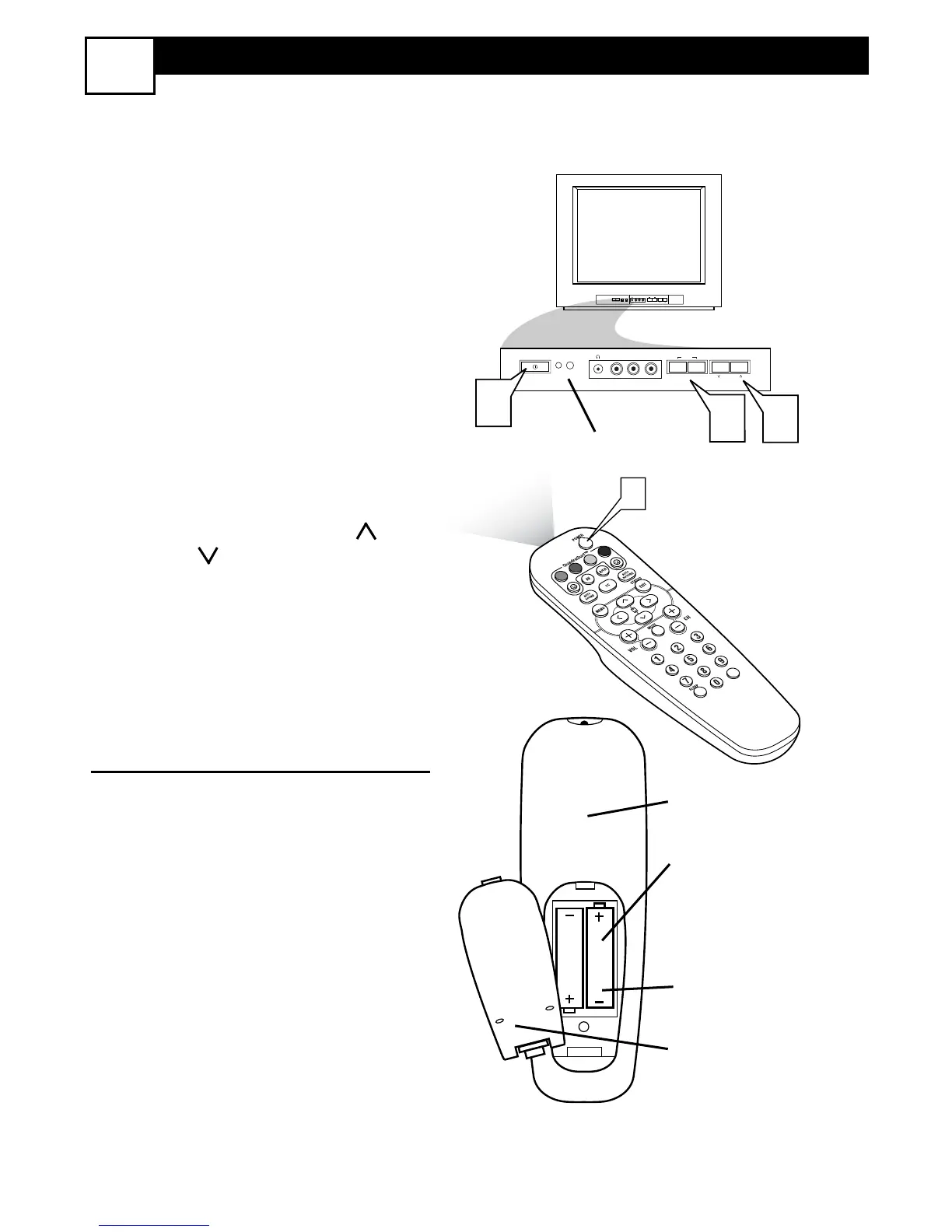
Press the POWER button to
turn the TV ON.
Note: You can also press any
button on the front of the TV to
turn the TV ON.
2
Press the VOLUME + button to
increase the sound level, or the
VOLUME – button to lower the
sound level.
Pressing both buttons at the same
time will display the on-screen
menu. Once in the menu, use these
button to make adjustments or
selections.
3
Press the CHANNEL UP or
DOWN button to select TV
channels.
REMOTE CONTROL
4
Point the remote control
toward the remote sensor win-
dow on the TV when operating
the TV with the remote.
T
o load the supplied batteries into the
remote:
1. Remove the battery compartment
lid on the back of the remote.
2. Place the batteries (2-AA) in the
remote. Be sure the (+) and (-) ends of
the batteries line up correctly (inside of
case is marked.)
3. Reattach the battery lid.






 To Next Page