9
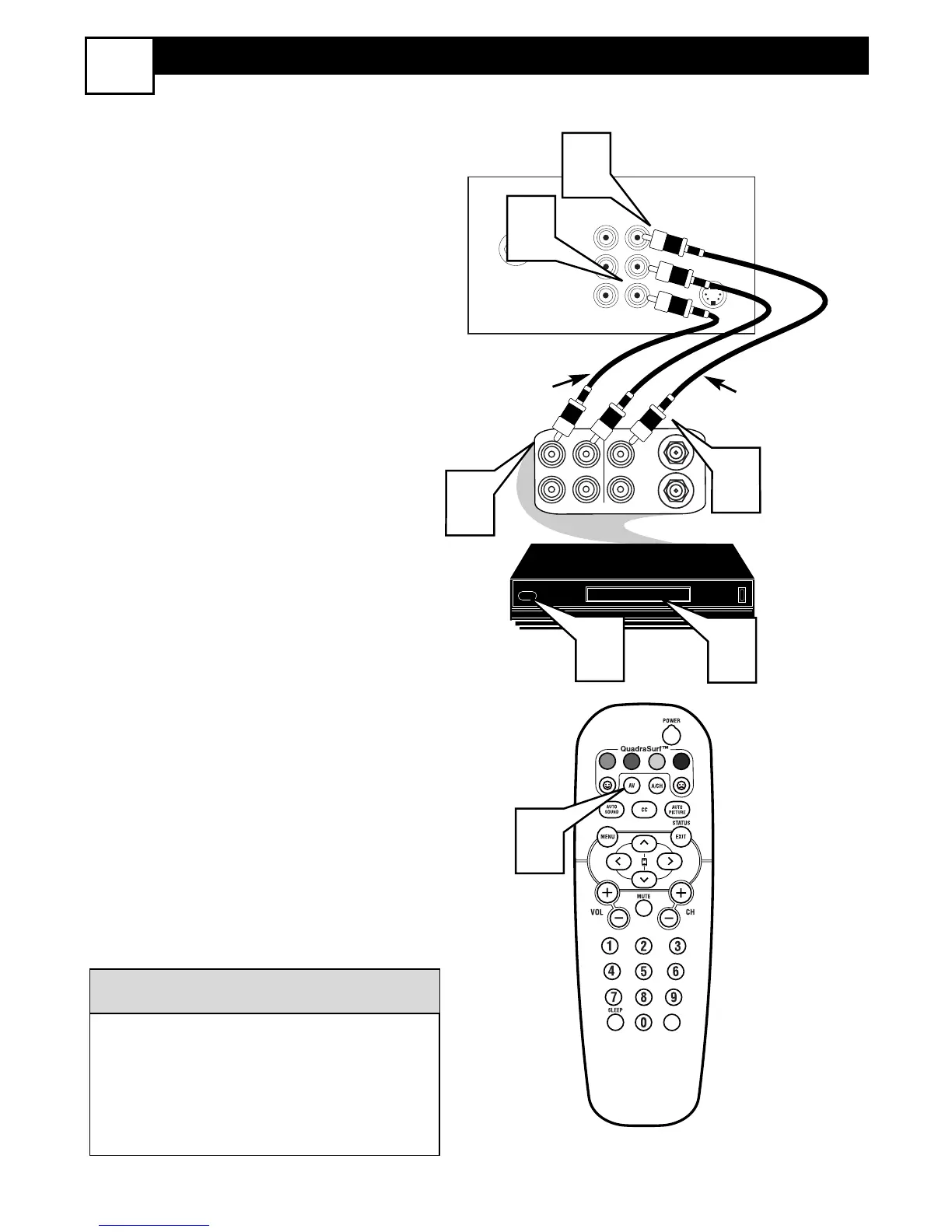
AV1 AUDIO/VIDEO INPUT CONNECTION
5
T
he TV’s audio/video input jacks are for
direct picture and sound connections
between the TV and a VCR (or similar
device) that has audio/video output jacks.
Follow the easy steps below to connect an
accessory device to the AV 1 Input Jacks
located on the back of the TV.
1
Connect the VIDEO (yellow) cable
to the VIDEO AV1 in jack on the back
of the TV.
2
Connect the AUDIO (red and white)
cables to the AUDIO (left and right)
AV1 in jacks on the rear of the TV.
3
Connect the VIDEO (yellow) cable
to the VIDEO OUT jack on the back
of the VCR.
4
Connect the AUDIO (red and white)
cables to the AUDIO (left and right)
OUT jacks on the rear of the VCR.
5
Turn the VCR (accessory device)
and the TV ON.
6
Press the AV button on the remote
control to select the AV1 channel. AV1
will appear in the upper left corner on
the TV screen.
7
With the VCR (or accessory device)
ON and a prerecorded tape (CD,
DVD, etc.) inserted, press the PLAY
button to view the tape on the tele-
vision.
All the AV channels can be selected by
pressing the Channel + or – buttons.
The AV channels can also be added to
the QuadraSurf™ buttons for quick
access.
HELPFUL HINT





 To Next Page