EasyManua.ls Logo

Philips 20PT643R - Page 19

Philips 20PT643R
68 pages
Print Icon
To Next Page IconTo Next Page
To Previous Page IconTo Previous Page
Loading...
Using
the
Zoom
Function
This
camera
is
equipped
with
3x
optical
zoom.
The
lens
moves
during
the
optical
zoom
photography,
allowing
you
to
capture
telephoto
and
wide-angle
shots.
By
using
the
optical
zoom
function;
images
appear
closer
by
pressing
the
4
button,
or
smaller
away
by
pressing
the
Ml
button.
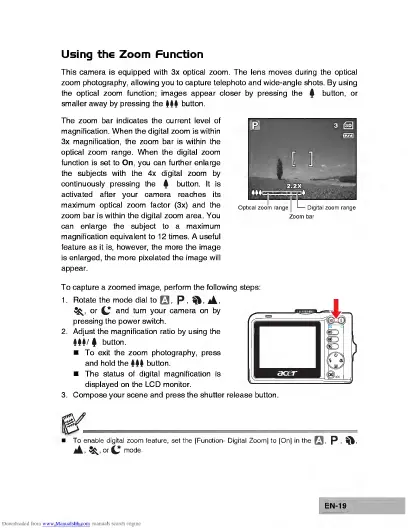
The
zoom
bar
indicates
the
current
level
of
magnification.
When
the
digital
zoom
is
within
3x
magnification,
the
zoom
bar
is
within
the
optical
zoom
range.
When
the
digital
zoom
function
is
set
to
On,
you
can
further
enlarge
the
subjects
with
the
4x
digital
zoom
by
continuously
pressing
the
4
button.
It
is
activated
after
your
camera
reaches
its
maximum
optical
zoom
factor
(3x)
and
the
zoom
bar
is
within
the
digital
zoom
area.
You
can
enlarge
the
subject
to
a
maximum
magnification
equivalent
to
12
times.
A
useful
feature
as
it
is,
however,
the
more
the
image
is
enlarged,
the
more
pixelated
the
image
will
appear.
To
capture
a
zoomed
image,
perform
the
following
steps:
1.
Rotate
the
mode
dial
to
P
A
Sf^,
or
^
and
turn
your
camera
on
by
pressing
the
power
switch.
2.
Adjust
the
magnification
ratio
by
using
the
Ml/
button.
To
exit
the
zoom
photography,
press
and
hold
the
Ml
button.
The
status
of
digital
magnification
is
displayed
on
the
LCD
monitor.
3.
Compose
your
scene
and
press
the
shutter
release
button.
To
enable
digital
zoom
feature,
set
the
[Function-
Digital
Zoom]
to
[On]
in
the
P
j4,*.orCmode.
EN-19

Related product manuals