Technical Specs, Diversity, and Connections
EN 3TPM10.1HE LA 2.
2013-Dec-13
back to
div. table
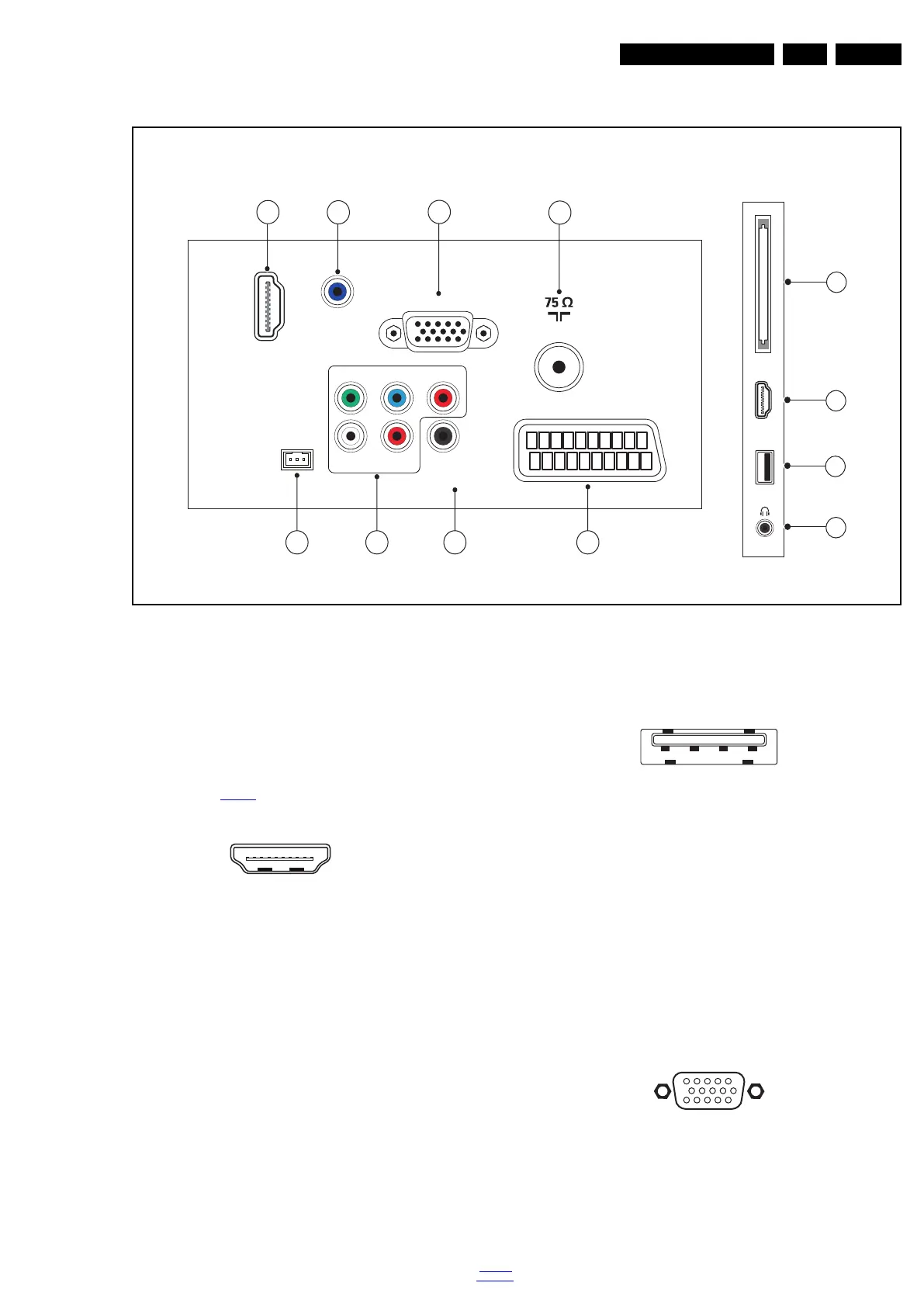
2.3 Connections
Figure 2-1 Connection overview
Note: The following connector colour abbreviations are used
(acc. to DIN/IEC 757): Bk= Black, Bu= Blue, Gn= Green,
Gy= Grey, Rd= Red, Wh= White, Ye= Yellow.
2.3.1 Side Connections
1 - Common Interface
68p- See figure 10-6-3
jk
2 - HDMI: Digital Video - In, Digital Audio - In/Out
Figure 2-2 HDMI (type A) connector
1 - D2+ Data channel j
2-Shield Gnd H
3 - D2- Data channel j
4 - D1+ Data channel j
5-Shield Gnd H
6 - D1- Data channel j
7 - D0+ Data channel j
8-Shield Gnd H
9 - D0- Data channel j
10 - CLK+ Data channel j
11 - Shield Gnd H
12 - CLK- Data channel j
13 - Easylink/CEC Control channel jk
14 - n.c.
15 - DDC_SCL DDC clock j
16 - DDC_SDA DDC data jk
17 - Ground Gnd H
18 - +5V j
19 - HPD Hot Plug Detect j
20 - Ground Gnd H
3 - USB2 2.0
Figure 2-3 USB (type A)
1-+5V k
2 - Data (-) jk
3 -Data (+) jk
4 - Ground Gnd H
4 - Head phone (Output)
Bk - Head phone 80 - 600 / 10 mW ot
2.3.2 Rear Connections
5 - TV ANTENNA - In
Signal input from an antenna, cable or satellite.
6 - PC IN:VGA
Figure 2-4 VGA connector
1 - Video Red 0.7 V
PP
/ 75 W j
2 - Video Green 0.7 V
PP
/ 75 W j
3 - Video Blue 0.7 V
PP
/ 75 W j
4-n.c.
HDMI
USB
CI
TV ANTENNA
DIGITAL
AUDIO OUT
LR
CVBS/Y Pb
Pr
SERV.U
AUDIO IN
DVI
HDMI 1
ARC
SCART
(RGB/CVBS)
19460_001_130314.eps
131205
1
2
3
4
5
6
8
7
9
10
11 12
Side ConnectorsRear Connectors
VGA
(optional)
10000_017_090121.eps
090428
19
1
18 2
1 2 3 4
10000_022_090121.eps
090121
1
6
10
11
5
15
10000_002_090121.eps
090127






 To Next Page