25BDL4050I
6
Customize the carousel prole:
• Follow this format for the cong.xml content:
<?xml version=”1.0”?>
<epd_config>
<sleep on="1"></sleep>
<interval second="30"></interval>
<remember on="1"></remember>
<rotate degree="0"></rotate>
<image path="img1.bmp" x="0" y="0"></image>
<image path="img2.bmp" x="0" y="0"></image>
<image path="img3.bmp" x="0" y="0"></image>
</epd_config>
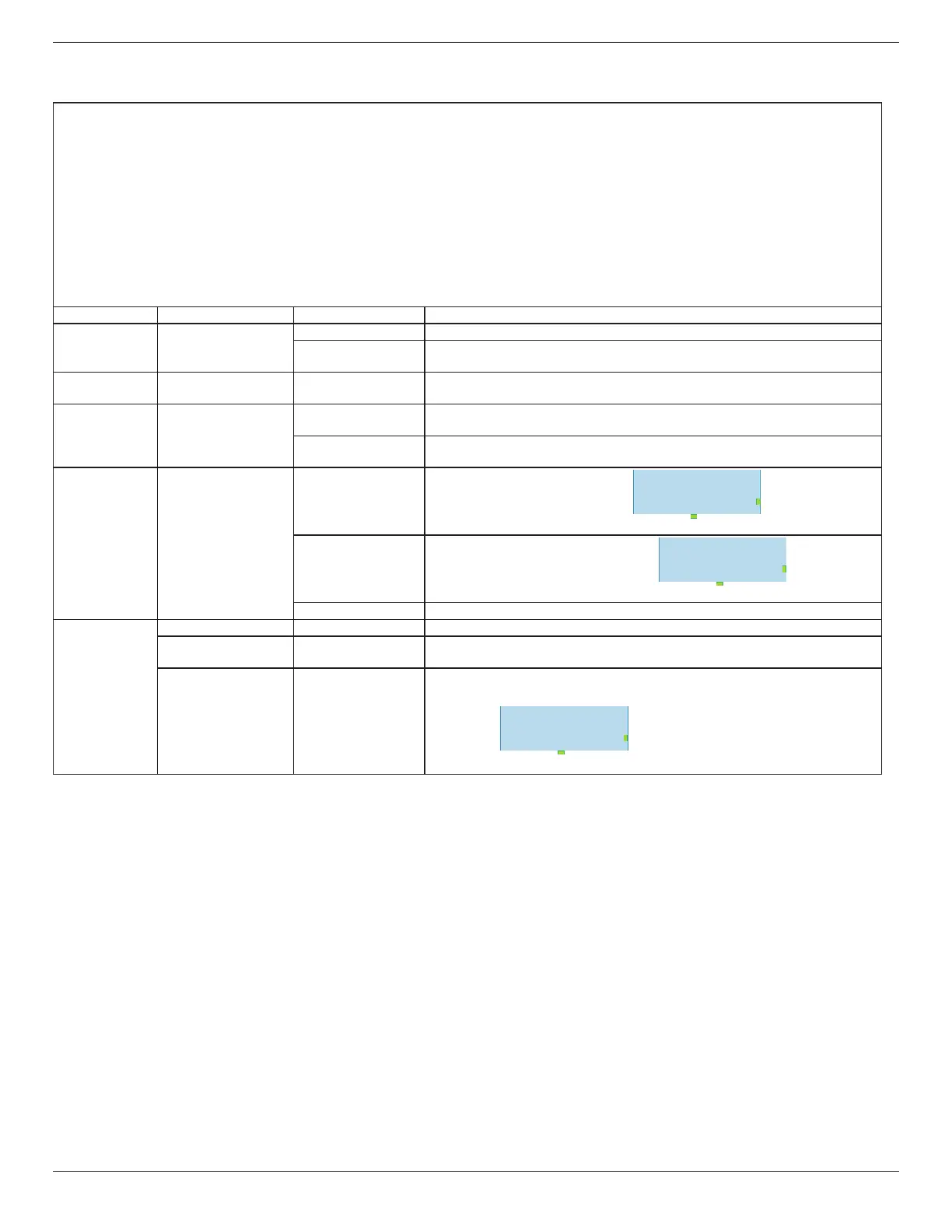
Tag Properties Value Description
sleep on
"0": The EPD device does not enter sleep mode (higher power consumption)
"1" (Default)
The EPD device will enter sleep mode after displaying the pictures (lower power
consumption)
interval second
(user input)
Default: 30
The interval between the completion of a picture display and the start of the next
picture display
remember on
"0"
Turn off the memory function and reboot the EPD device to display the first
picture.
"1" (Default)
Turn on the memory function, and the EPD device will continue to display the next
picture after reboot.
rotate degree
"0" (Default) Display picture rotated by 0 degrees.
ABCDEFG
USB Port
LED light
"180" Display picture rotated by 180 degrees.
ABCDEFG
USB Port
LED light
"auto" Display picture automatically rotated by 0 or 180 degrees.
image
path (user input) Picture name (with extension)
x
(user input)
Default: 0
Abscissa of starting position for picture display.
y
(user input)
Default: 0
Ordinate of starting position for picture display.
EPD Panel
USB Port
LED light
(0,EPD Height)
(EPD Width,EPD Height)
(EPD Width,0)(0,0)


 To Next Page
 Loading...