25BDL4050I
3
2. Parts and Functions
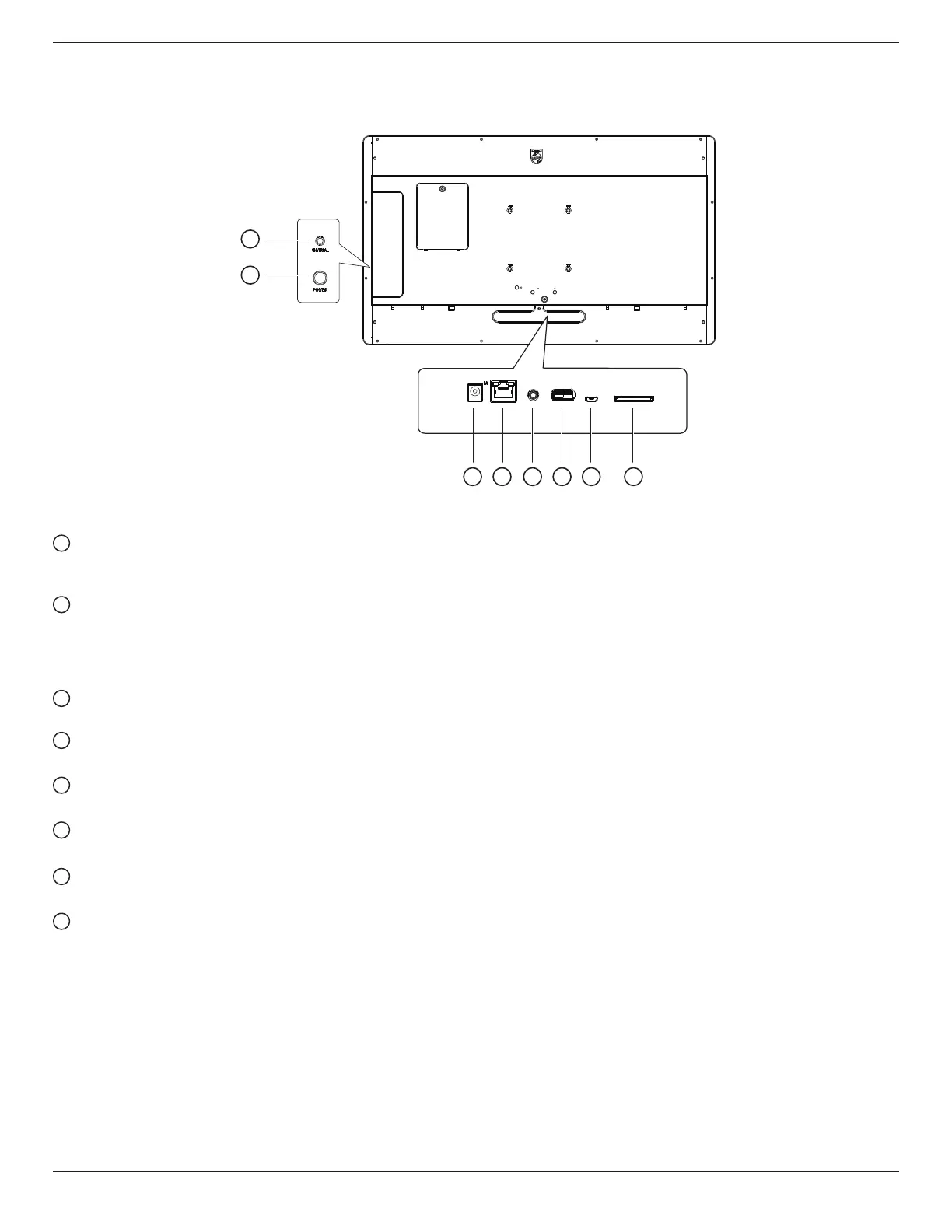
Introduction to the terminals
1
2
3 4 5 6 7 8
1
Universal key
Press the UNIVERSAL key to pause the picture (that is, stay at the current picture and not show the next one). Press it again to continue
displaying the next pictures.
2
Power key
Turn the main power on or off. Long press the power key for 2 seconds to start the device; long press the power key for about 4 seconds to
shut down the device, and the LED light will be off.
Note: When using the power adapter, power on directly, when using 18650 battery (optional) for power supply, press the power key to start
the machine.
3
DC input
DC power input from the power adapter.
4
LAN
Internet function.
5
AUDIO OUT
Audio output for external AV device.
6
USB 2.0 port
Connect to usb storage device and service port
7
MICRO USB port
Insert a Micro USB.
8
SD card
Insert a SD card.










 To Next Page