jbr l,ou to ,sele_tloMl, the TV sta- _f,_ '_.,_
lions in l,ot_r area _hen fhe °_ _ _
C1L4NNEL i+), i-) buttons are , _[_,
pressed,
:Vote: ._lake sure the antenna or
cable signal connection has been
complewd be)bre ,4UTO PRO-
()RAM Ls activmed,
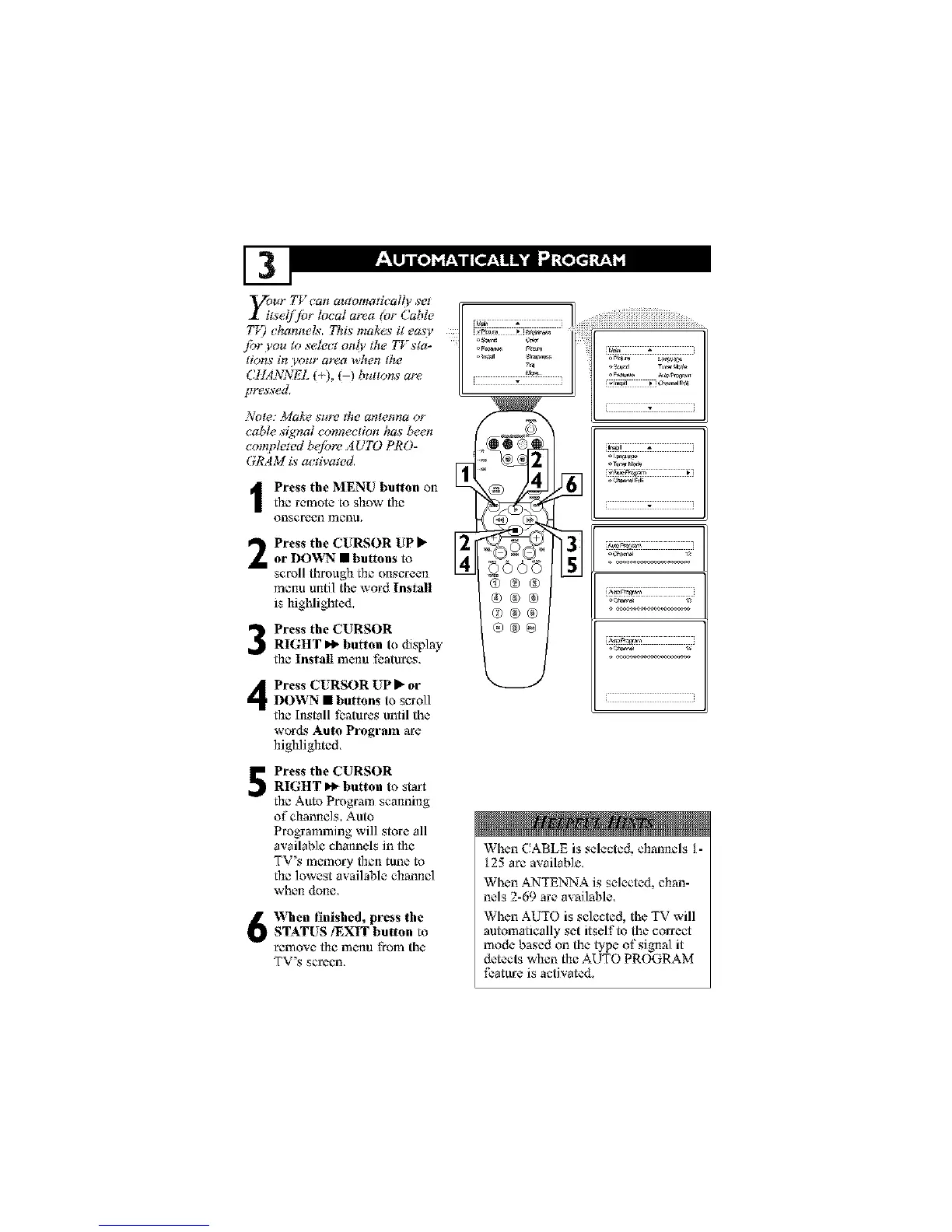
I Press the MENU button onthe remote to show the
onsereen menu.
Press the CURSOR UP _ _42
or DOWN • buttons to
scroll through the onscreen
menu until the word Install
is highlighted.
Press the CURSOR
RIGHT _ button to display
the Install mc-nu features,
Press CURSOR UP _" orIR)WN • buttons to scroll
the Install features until the
wor&_ Auto Program are
highlighted.
®®®
®®®
o®®
®®®
L ', i
*__'_777777777_
ii
Press the CURSOR
RIGHT I_ button to start
the Aura Program scanning
of channels.Auto
Programming will store all
available channels in the
TV's memory then tune to
the lowest available channel
when d(me.
When finished, press the
STATUS/EXIT button to
remove- the menu from the
TV's se rc-en,
When CABLE is selected, channels t -
t 25 are available.
When ANTENq',:Ais selected, chan-
nels 2-69 are available.
When AUTO is selected, the TV will
automatically set itself to the correct
mode based on the type of signal it
detects when the AUTO PROGRAM
feature is activated.



 To Next Page