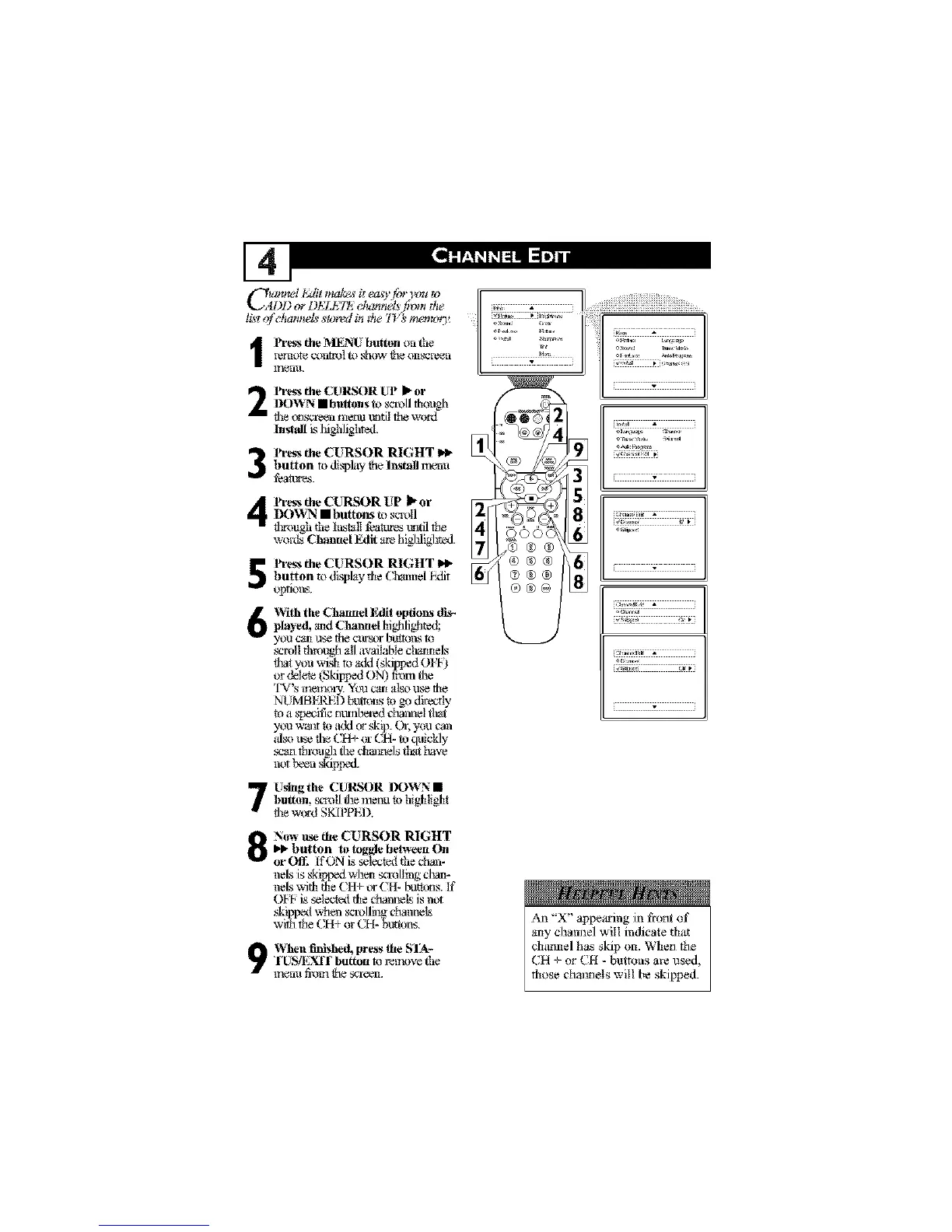
C ummI t,Mitma_ it e_z_yfor Ix_*_o [ _
DD or I)ELI:7_,_ cl_mnel_ l_mt the
li_tof channel_ s_Jred itt _he I'_ _ memor)¢ ........
remote c_m_l to _low Ne onscve_n illli_i illli
l_q_nlL
2
3
4
lh.ess the CURSOR UP I_or
DOWN • buRons to sc.a_ollthough
fi_e_gl_.a'e_nr_lentt_lfi] the word
Install L_Ifighlighted.
lh.ess the CURSOR RIGHT
button to disTdaythe Install n_nu
fea_.
lh.ess the C7U_qtSORUP _ or
DOV_N • buttore_ t_ scroll
tl¢ough rl_eInstall f_a_e_ tmtil the
words Channel Edit are higlfligl_ted.
lh.essthe CURSOR RIGHT I_
button to dLqpl@,theCt_mel hdit
opfitms,
1
Wi|h the Channel liMi| options dis_
pla_ed,aridChanttdhighlighte_
you cartuse the _trsor butto_x4to
_rotl through 'MIavailable ctramels
fl_atyou wish to add (skipped 0 FI-)
or del_ (Skipped ON) t?om the
'IV' S t_(l,_lYl( )1%,. YOU 12_t[1 'diS() LI_ [_fl_
NUMBKI_D buttons to go directly
t_ a s'pecific m_nlxa'ed channel tlr_t
you Wallt to add (_"skip. Or, you can
ida) ltse file CH+ or CH- to quickly
mart through the cMimels tlr_thave
not been skipped.
Usingthe CURSOR DOWN •
button, sm_|l the melm to hi#dight
fl_ew_gd SKI]_PEI),
]]]]]]]]f]]]]]]]]]
[i] G; []_ ;
o
r
Now use the CURSOR RIGHT
I_ button to toggle be|ween On
or Ofll If ON is selectexl the chan-
neb;is skiplxxt wl_ _rolling cl'a_-
01-I-is selectexl the channels is not
ski _xxl ,.vh_n sca_)llil_ channels
w t_ the CH+ or CH- _utt_ns.
9 VChen finished, press the SIA-
"l_USq_YdI"button m r_lIuwe the
ff',_nl!fi'offlfl'le SCI'e_L
An "X" api_iu'ing in front of
arty chain]el will indicate that
channel has skip on, When the
CH + or CH - buttons are used,
those channels will be skipped.












 To Next Page