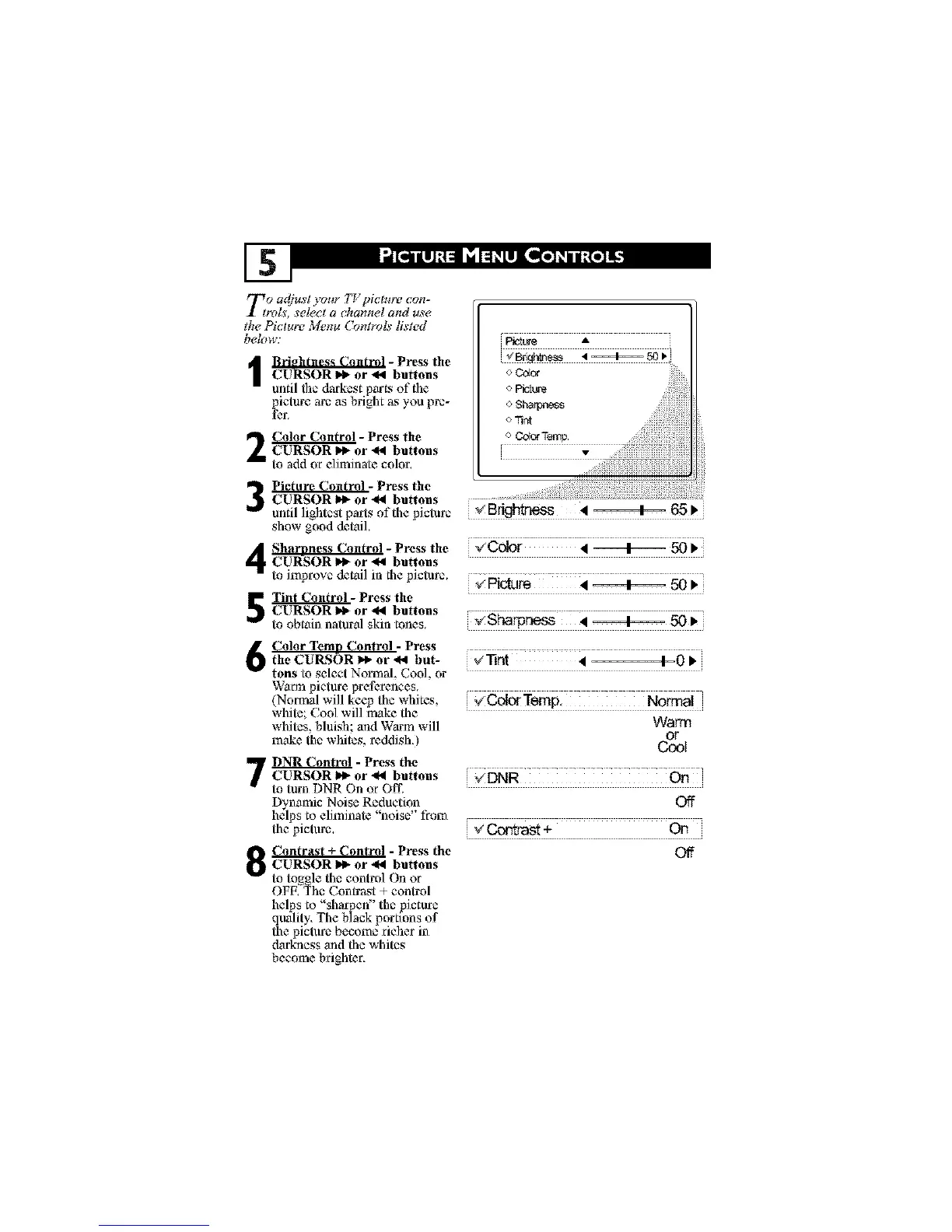
Eo adjust your TV picture con-
_, sel_cl a _hannel and use
the Picture Menu (bntmls listed
belm_:
I rDhtness Control - Press the
CURSOR _ or _ buttons
until the darkest parL_ of the
picture arc as bright as )ou pre-
fer.
_- Press the
CURSOR _1. or 4_1 buttons
to add or e]iminate color.
i_t_ A
o Color
o $ha_ss
o 71nt
o ColorTemp.
Picture Control - Press the
CURSOR I_ or -_l buttons
until lightcst parts of the picture
show good detail.
Sharnness Control - Press the "_ Color 4 + 50 _'
CURSOR I_ or €_1 buttons
to improve detail in the picture. _ _tl_ 4 + 50 l,
_- Press the
CURSOR I_ or _I buttons
to obtain natural skin tones. _ _}'la_rl_ss 4 ========4_ .50 •
,_Bfightaess • =====4=== 65 •
Color Temn Control - Press
the CUI_SOR I_ or €,4 but- _'[]rit • 4=-0 •
tons toselect Normal, Cool,or
Warmpicture preferences.
(Norma!will keep the whites, _ O___ClgTwclp. Normal
white;,:7oolwill makethe
whites, bluish and Warm will Warm
make the whites, reddish.) ____t
' _ - Press theCURSOR I_ or -_ buttons _ DNR On
to turn DNR On or Off.
DynamicNoise Reduction Off
helps to eliminate"noise' from
the picture. V _ +
_1_ Contrast Control - Press the Of_
O CURSOR _1_ or -_ buttons
to to_ole the control On or
OFE_Z_hc Contrast + control
helps to "sharpen" the picture
qtmlity. The black portmns of
the picture become richer in
darkness and the whites
become brighter,





 To Next Page