4
2. Setting up the monitor
2. Setting up the monitor
2.1 Installation
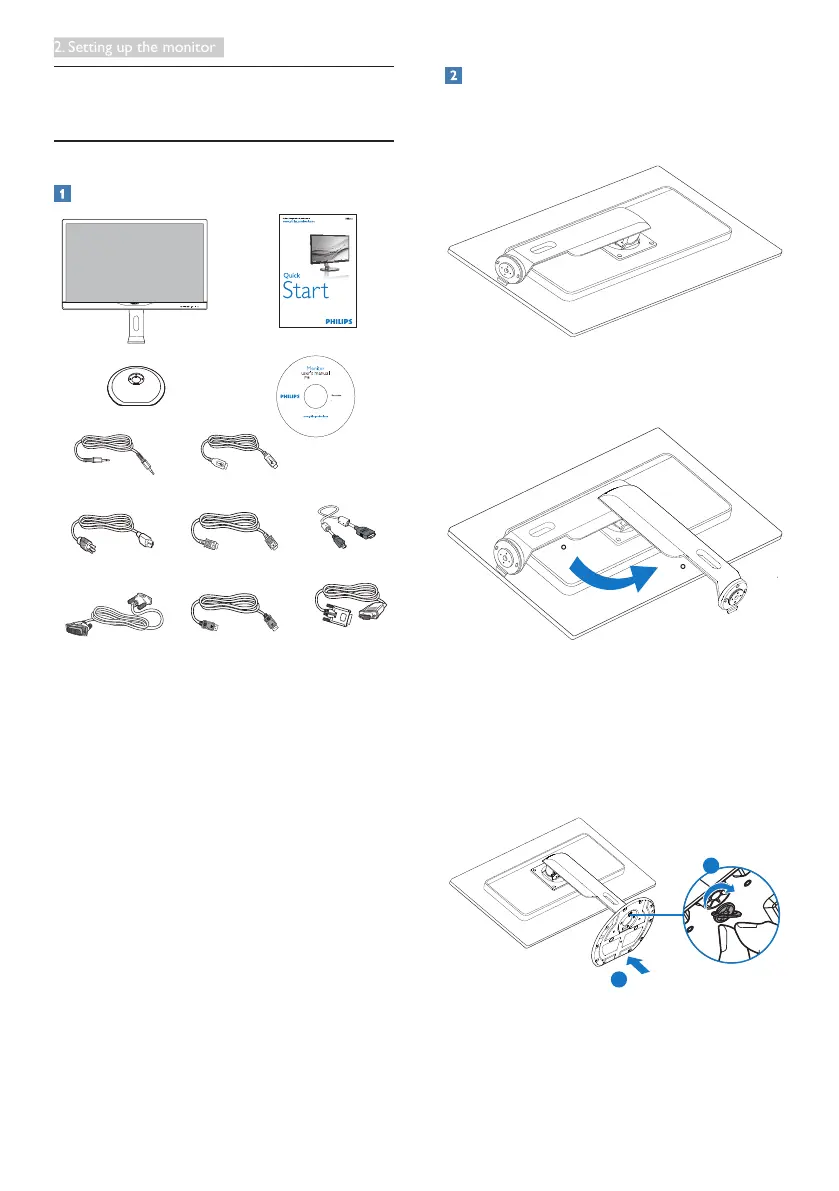
Package contents
288P6LJ
*VGA
©
2
0
1
4
K
o
n
i
n
k
l
i
j
k
e
P
h
i
l
i
p
s
N
.
V
.
A
l
l
r
i
g
h
t
s
r
e
s
e
r
v
e
d
.
U
n
a
u
t
h
o
r
i
z
e
d
d
u
p
l
i
c
a
t
i
o
n
i
s
a
v
i
o
l
a
t
i
o
n
o
f
a
p
p
l
i
c
a
b
l
e
l
a
w
s
.
M
a
d
e
a
n
d
p
r
i
n
t
e
d
i
n
C
h
i
n
a
.
V
e
r
s
i
o
n
Philips and the Philips’ Shield Emblem are registered trademarks of
Koninklijke Philips N.V. and are used under license from Koninklijke
Philips N.V.
Monitor drivers
User’s Manual
使用 前请阅读使用说明
保留备用
Audio
Power *HDMI
*DP
*MHL
*Dual-link DVI
*USB
* Different according to region.
Install the base
1. Place the monitor face down on a smooth
surface. Pay attention not to scratch or
damage the screen.
2. Rotate the neck counterclockwise 90
degree.
90
0
3. Use the assembly screw for base to fasten
the base securely to the monitor.
(1)Gentlyattachthebasetothestand.
(2)Useyourngerstotightenthescrew
located at the bottom of the base, and
secure the base to the stand tightly.
2
1


 To Next Page