34
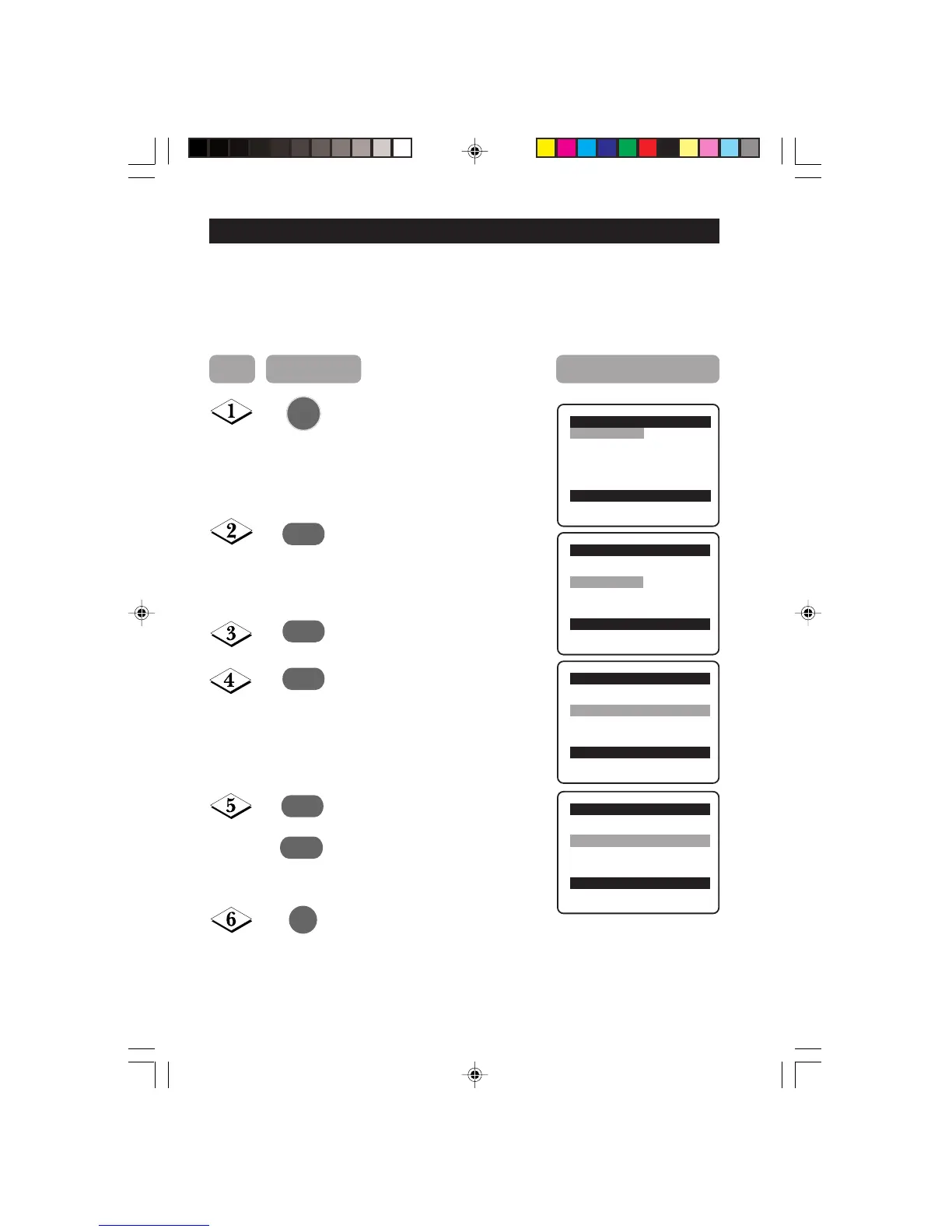
ROTATION
Note: Applicable to certain models only.
Due to the earth’s magnetic field and position of the TV, there may be a slight tilting of the
picture to the left or right when the set is switched on. When this phenomena accurs, select
Rotation in the Features menu and adjust accordingly.
Main o
✔ Picture π Brightness
■ Sound Colour
■ Features Contrast
■ Install Sharpness
Colour Temp.
More...
œ
Main o
■ Picture Timer
■ Sound Child Lock
✔ Features π Rotation
■ Install Format
AutoPic.Booster
œ
Features o
■ Timer
■ Child Lock
✔ Rotation p
❘❘❘❘❘❘❘❘❘❘❘
❘❘
❘❘❘❘❘❘❘❘❘❘❘
0π
■ Format
■
AutoPic.Booster
œ
Step Press button Result on screen
Display the main menu on screen.
Select Features.
Enter the Features menu.
Select Rotation.
Press repeatedly until you deem
picture is in the normal position.
Exit menu from screen.
¸
˙
˙
¸
MENU
m
or
˝
Features o
■ Timer
■ Child Lock
✔ Rotation p
❘❘❘❘❘❘❘❘❘❘❘❘❘❘
❘❘
❘❘❘❘❘❘
40π
■ Format
■
AutoPic.Booster
œ
34-38/E 24/9/01, 11:54 am34



 To Next Page