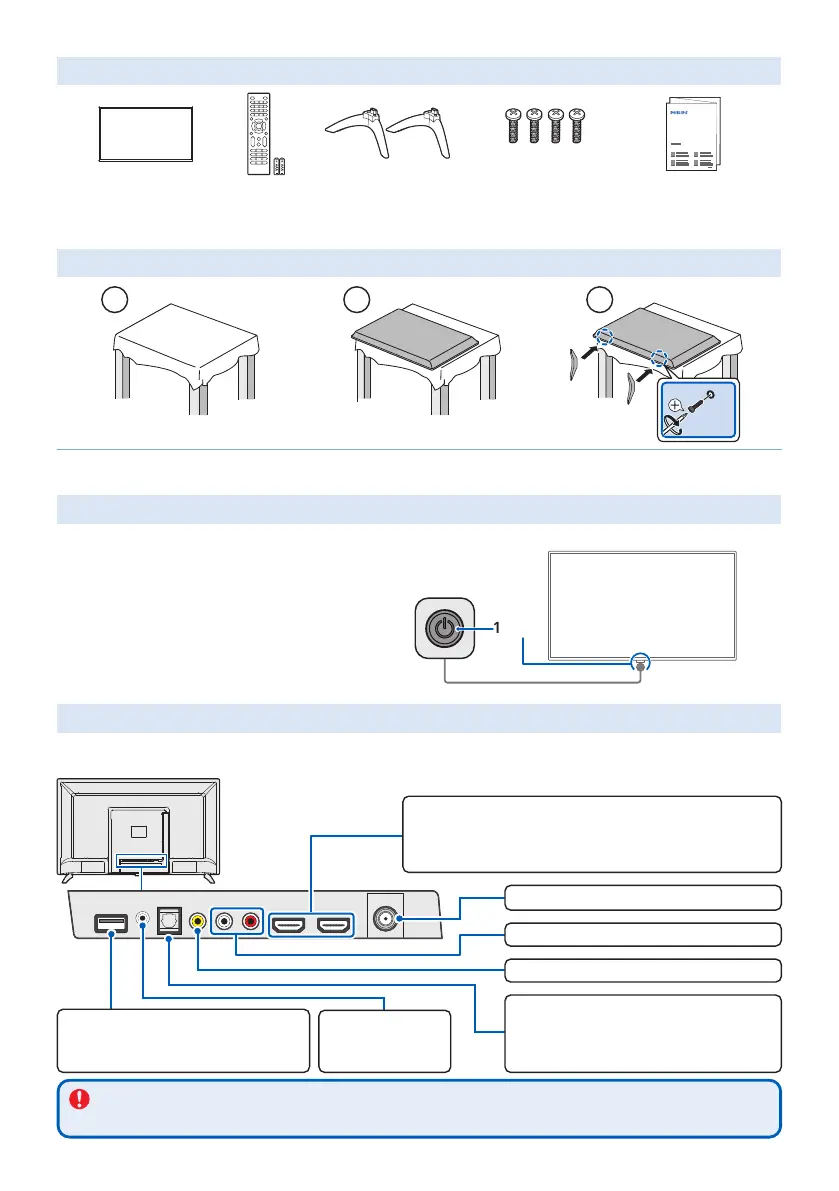
What’s in the box
ST4 x 0.472” (12 mm)
Quick Start Guide
TV TV remote with
batteries
TV stands Screws Quick start guide
• Philips screw driver is needed to mount base.
1 Mount base onto TV
1
2
3
×4
If you plan to wall mount your TV, refer to "Wall mount bracket kit" in "Important safety Instructions" page of this Quick start guide
for recommended wall mount bracket kit.
2-1 Controls
1 Power button
* Power button is located at the bottom side of the TV.
2 Remote control sensor
Front
21*
2-2 Connections
HDMI is the best connection for both audio and video quality. And HDMI can transmit both audio and visual signal with 1 cable.
Composite video and analog audio L/R input jacks are standard quality.
Composite video input jack
Analog audio (L/R) input jacks
HDMI input jacks
High quality audio and video connection.
Connect Blu-ray Disc or DVD player/Cable, satellite or IPTV box/Gaming console, etc.
HDMI1 is available as HDMI-ARC. It outputs TV audio to an HDMI-ARC compliant device,
such as sound bars or home theater system.
USB port
Connect a USB flash drive for playing photos and movies
Following file formats are supported.
• Image – JPEG (.JPG) • Video – MotionJPEG (.AVI)
Digital audio (S/PDIF) output
High quality audio connection with optical (TOSLINK) cable.
Connect sound bars or home theater system.
Note: Use an optical (TOSLINK) to coaxial (RCA) adapter (not
included) for devices which only have a coaxial input.
Headphone audio output
jack
Headphone 3.5 mm stereo
jack for personal listening.
75 ohm cable/Antenna/Satellite box connection
Caution
Disconnect the AC power cord before connecting devices.








 To Next Page