7
Connect Peripheral Equipment
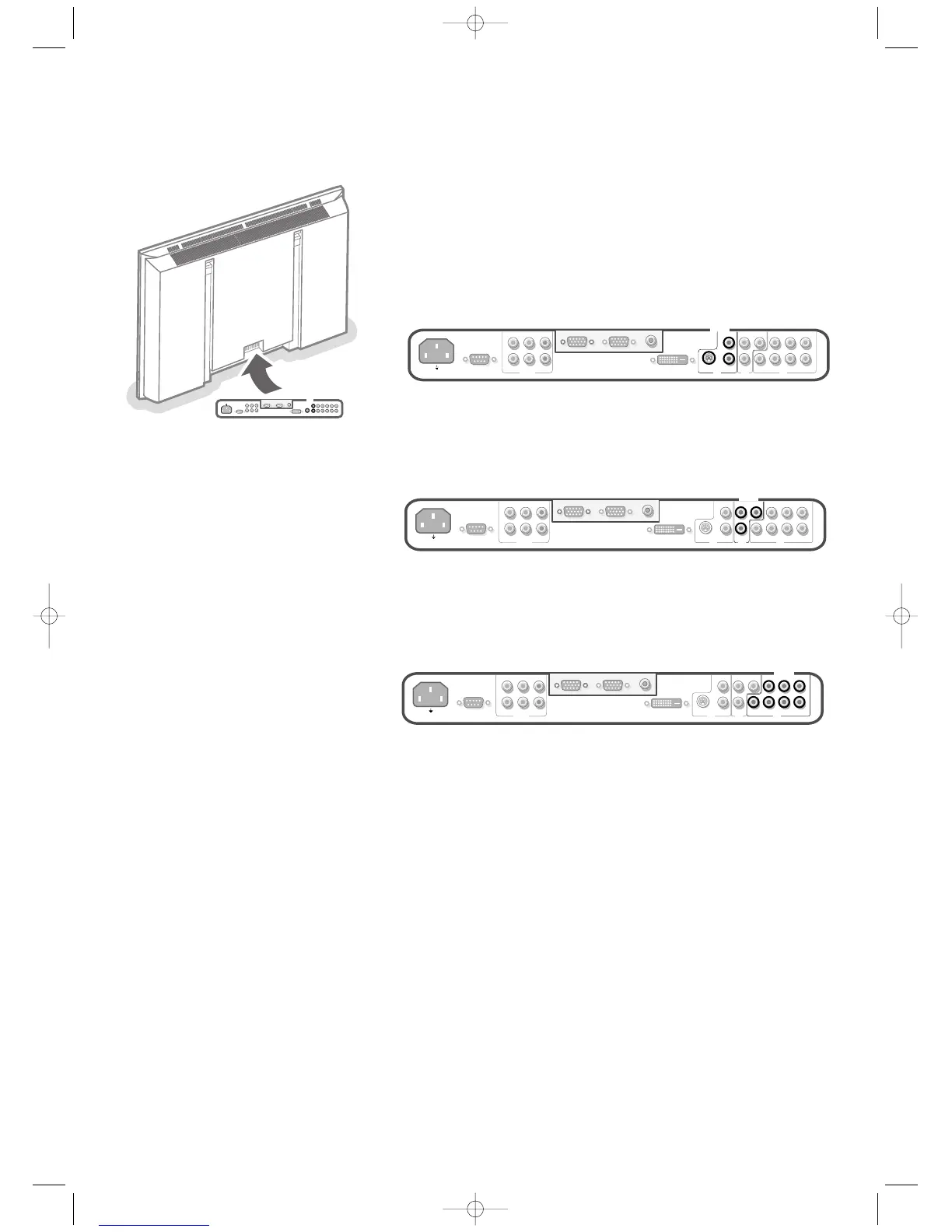
You may connect 3 possible VGA sources (VGA1, VGA2 or DVI-D) and
3 possible video sources (
AV1, AV2 and AV3) to the monitor.
The following diagrams show you where you can connect your peripheral
equipment.
Note: in case the monitor is operating in combination with an electronic receiver box,
the AV inputs on the monitor will be disabled and the VGA2 connector becomes an
output.
Equipment with Y/C-SVHS output connectors
& Connect the video cable to the AV2 connector.
é Connect the audio cables to the equipment’s AUDIO L and R sockets and to
the
AUDIO L and AUDIO R AV2 sockets on the monitor.
Equipment with CVBS output connectors
& Connect the video cable to the AV1 connector.
é Connect the audio cables to the equipment’s AUDIO L and R sockets and to
the
AUDIO L and R AV1 sockets on the monitor.
Equipment with Component Video Output connectors
Note: AV3 can handle the following video signals:YCbCr, HD-YPbPr and HD-RGB.
The discrimination between the various input formats and the appropriate video
processing is done automatically. It is however possible to overrule the automatic
detection. See Setup menu, p. 6.
& Connect the video cables of your equipment with YPbPr output with
composite sync on Y, or of your equipment with YCbCr output with
composite sync on Y to the YPbPr, resp.YCbCr input
AV3 IN sockets of the
monitor.
é Connect the video cables of your equipment with RGB output with separate
Horizontal and Vertical sync to the RGB input sockets and to the H and V
sockets
AV3 of the monitor.
“ Connect the audio cables to the equipment’s AUDIO L and R sockets and to
the
AUDIO IN L and AUDIO IN R AV3 sockets on the monitor.
Note: when High Definition signals are inputted to the monitor via the YCbCr/RGB
input, the monitor switches to the HD Video Mode.
The following HD and ED video modes are supported by the monitor on the YCbCr,
RGB and VGA2 HD input:
1920x1080/60I 720x480/60P
1280x720/60P 720x576/50P
The following SD video modes are supported by the monitor on theYPbPr input:
720x480/60I
720x576/50I
Note: you should make the correct selection for AV3 in the Setup menu, p. 6.







 To Next Page