Service Modes, Error Codes, and Fault Finding
EN 17TPM9.1AL LA 5.
2012-Jun-15
back to
div. table
How to Exit the Factory mode
Use one of the following methods:
• Select EXIT_FACTORY from the menu and press the “OK”
button.
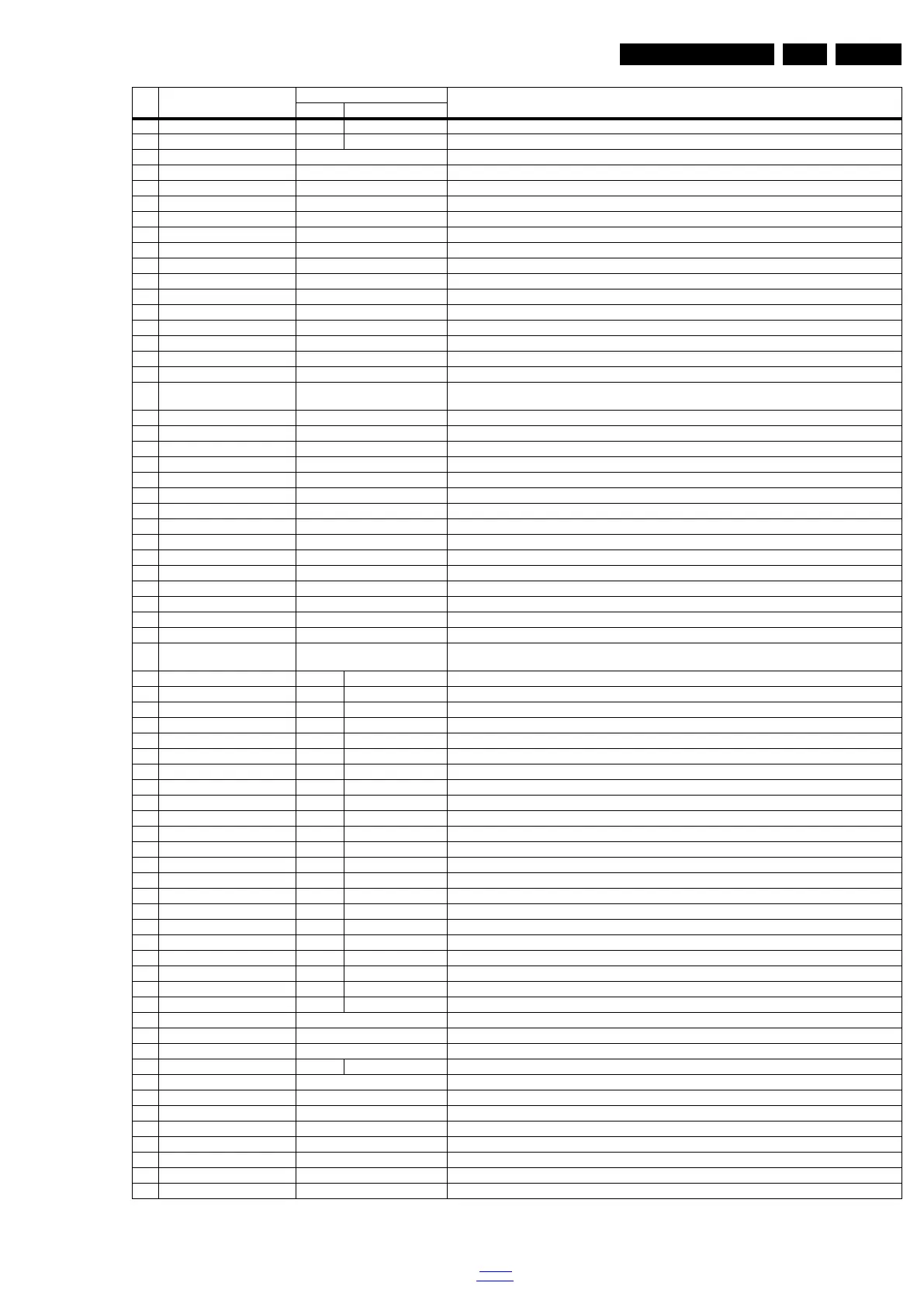
10 CLR_TEMP_G 128 121 Green colour temperature setting
11 CLR_TEMP_B 120 107 Red colour temperature setting
12 AUTO_COLOR Press OK PC: any pattern that has black and white, YPbPr: SMPTE bar (colour bar), any timing.
13 ADC_GAIN_R 0 Red ADC gain
14 ADC_GAIN_G 0 Green ADC gain
15 ADC_GAIN_B 0 Blue ADC gain
16 ADC_OFFSET_R 128 Red ADC offset
17 ADC_OFFSET_G 128 Green ADC offset
18 ADC_OFFSET_B 128 Blue ADC offset
19 GAMMA_TABLE off GAMMA_TABLE
20 E-Fuse on E-fuse mode
21 ORT_MODE off ORT mode
22 RESET_PBS_PWD Press OK Use this to reset the Child Lock
23 V-COM Press OK V-COM
24 VIDEO_PWM_MEDIUM 150 VIDEO PWM Medium value
25 VIDEO_PWM_MINIMUN 178 VIDEO PWM Minimum value
26 VIDEO_PWM_MAXIMUN 0 VIDEO PWM Maximum value
27 PWM_RATIO_BEST_PICTUR
E
100 PWM ratio best picture
28 PWM_RATIO_STD_TOP 80 PWM ratio standard top
29 PWM_RATIO_STD_BOTTOM 70 PWM ratio standard bottom
30 PWM_RATIO_BEST_POWER 70 PWM ratio best power
31 VIDEO_STD_TH_HIGH 97 VIDEO standard threshold high
32 VIDEO_STD_TH_LOW 93 VIDEO standard threshold low
33 YPBPR_PHASE InValid Not available for this chassis
34 AUD_LIMITER_MODE 2 Three modes, 0: off, 1: adaptive mode, 2: fixed mode
35 AUD_THRESHOLD_BYTE1 255 Limit threshold
36 AUD_THRESHOLD_BYTE2 207 Limit threshold
37 AUD_THRESHOLD_BYTE3 5 Limit threshold
38 AUD_GAIN_LINEIN 3 Line-in audio gain
39 AUD_GAIN_HDMI 2 HDMI audio gain
40 AUD_GAIN_ATV 20 Analogue TV audio gain
41 AUD_GAIN_DTV 15 Digital TV audio gain
42 AUD_GAIN_USB 2 USB audio gain
43 TUNER_ID 167 Displays and changes the Tuner ID with the left and right cursor. Not to be changed when the tuner is replaced
with the correct service part
44 ESTICKER NVM1 3 3 ESTICKER value
45 ESTICKER NVM2 6 4 ESTICKER value
46 ESTICKER NVM3 7 6 ESTICKER value
47 ESTICKER NVM4 8 7 ESTICKER value
48 ESTICKER NVM5 9 8 ESTICKER value
49 ESTICKER NVM6 10 9 ESTICKER value
50 ESTICKER NVM7 255 10 ESTICKER value
51 ESTICKER NVM8 255 255 ESTICKER value
52 ESTICKER NVM9 255 255 ESTICKER value
53 ESTICKER NVM10 255 255 ESTICKER value
54 ESTICKER NVM11 255 255 ESTICKER value
55 ESTICKER NVM12 14 14 ESTICKER value
56 ESTICKER NVM13 17 15 ESTICKER value
57 ESTICKER NVM14 18 17 ESTICKER value
58 ESTICKER NVM15 19 18 ESTICKER value
59 ESTICKER NVM16 20 19 ESTICKER value
60 ESTICKER NVM17 21 20 ESTICKER value
61 ESTICKER NVM18 255 21 ESTICKER value
62 ESTICKER NVM19 255 255 ESTICKER value
63 ESTICKER NVM20 255 255 ESTICKER value
64 ESTICKER NVM21 255 255 ESTICKER value
65 ESTICKER NVM22 255 255 ESTICKER value
66 ESTICKER RESET Press OK ESTICKER reset
67 CIPLUS QUERY Press OK Shows the Validity of the CI+ key and the supplier information
68 CIPLUS UPDATE Press OK Used to enter a new CI+ code into the NVM. This can only be used when no CI+ code exists in the NVM
69 AQ_TABLE_INDEX 1 3 Audio Quality index
70 LIGHT SENSOR Press OK Light sensor
71 EDID UPDATE Press OK Used to enter a new EDID codes into the NVM
72 TCON_GAMMA_UPDATE Press OK TCON gamma update
73 AUDIO DEFAULT INIT Press OK AUDIO default initialization
74 TTX Enable On TTX function on/off
75 AGEING MODE Off Use this for ageing a new LCD panel
76 VIRGIN_MODE Off Use this to return the set to virgin mode. Depends whether the set has been used already.
77 EXIT_FACTORY Press OK Exits the Factory mode
Item Item value
Default value
Description32" 42"









 To Next Page