to move the program.
reproduced properly.
Note: For India color system is Auto or
PAL.
•
[Sound System]
: Change the sound
•
[Manual Install]
:Select this for manually
channels.
•
[Auto Install]
:Select the function TV
set will start auto tuning for all available
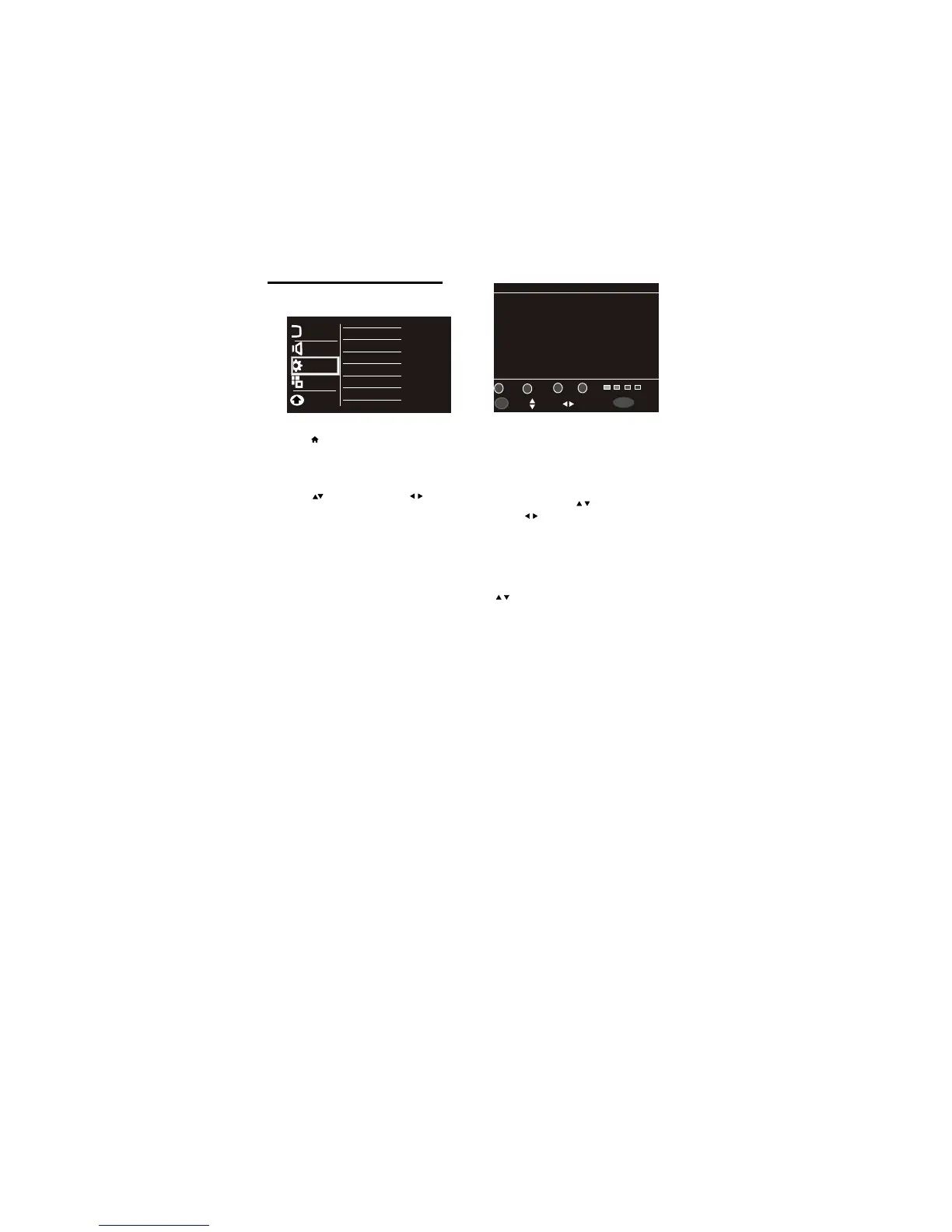
4.9 Installation Menu
1
Press
.
2
Select [Setup] >
[Installation]
then press
OK
3 Select one of the following settings, then
•
[Channel No.] : Display the channel number of
the current channel.
•
[Color System] : Change the color system
(AUTO/PAL/SECAM) setting if the picture is not
sound system (BG/I/DK) setting if sound
is not reproduced properly.
Note: For India sound system is BG.
searching the channels,select the function
from which tuning will start.
[Program Edit]:
You can Delete, Rename,
Move or Skip any programmes.
•
Delete
Select Delete option by Pressing 1 button, the
program will be deleted.
Rename
Move the cursor to the program, Select
Rename option by pressing 2 button to rename
the program. Press to choose the character.
Press to move the cursor.
Press OK button to Enter ,
Press Menu button to Return the Edit Menu.
Move
Move the cursor to the program, Select
Move option by pressing 3 button and press
Skip
Select Skip option by pressing 4 button to
OKOK
SelectSelect
Prev./NextPrev./Next
ReutrnReutrn
MENUMENU
EnterEnter
Program EditProgram Edit
48.25MHZ48.25MHZ
11
83.25MHZ83.25MHZ
22
105.25MHZ105.25MHZ
33
169.25MHZ169.25MHZ
44
175.25MHZ175.25MHZ
55
203.25MHZ203.25MHZ
66
224.25MHZ224.25MHZ
77
463.25MHZ463.25MHZ
88
545.75MHZ545.75MHZ
551.25MHZ551.25MHZ
1010
99
11
22
33
44
DeleteDelete
RenameRename MoveMove
SkipSkip
FAVFAV
12 EN
Press to move, and press to adjust.
Picture
Sound
Installation
Channel No.
Color System
Sound System
Auto Install
Manual Install
Program Edit
Features
Parental
skip this program.
User can prepare 4 independent favourite list.
To define favourite list, Move the cursor to the
To access favourite list press Red/Green/
Favourite List
desired program number & press Red/Green/
Yellow or Cyan color key in which you wish
Yellow/Cyancolor keys on remote.
to add program














 To Next Page