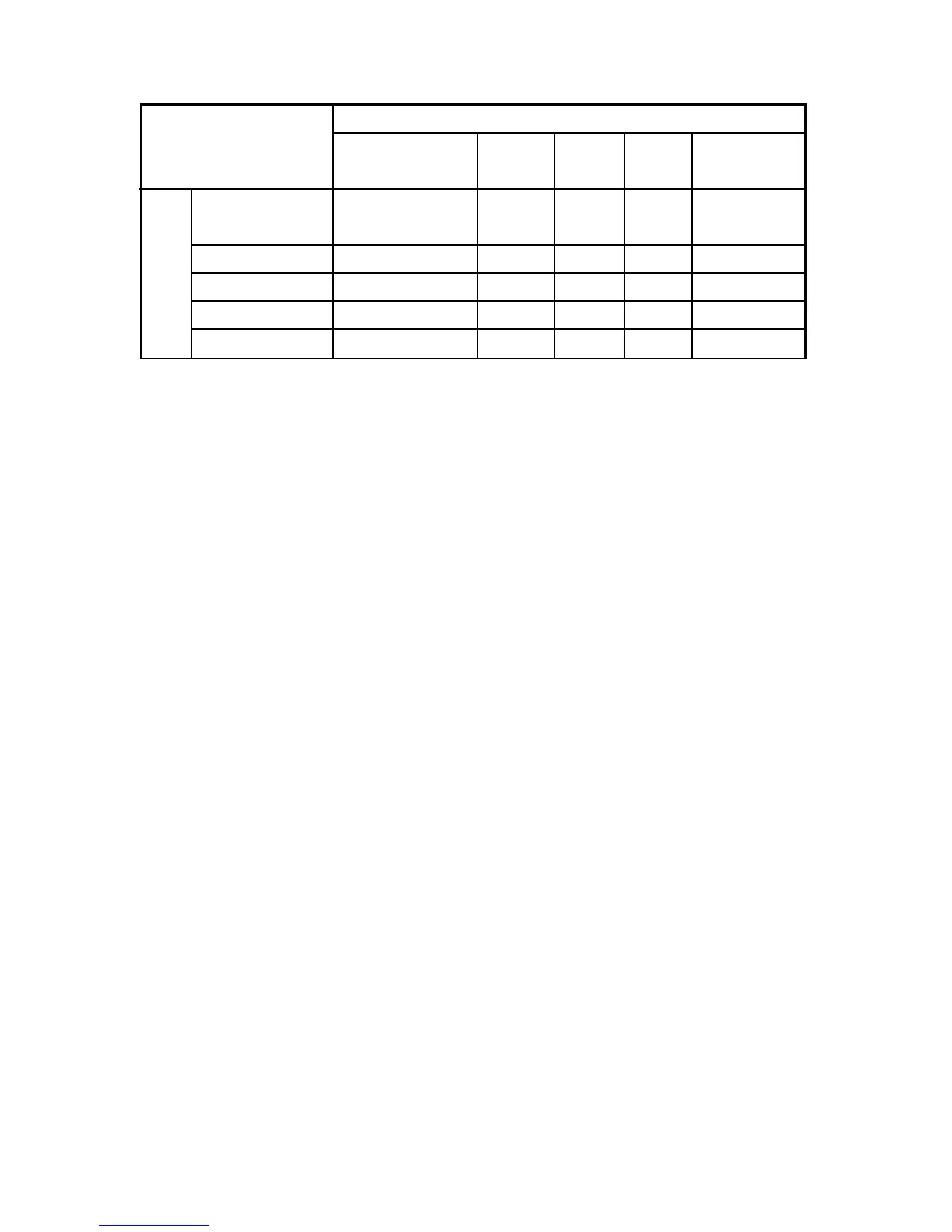
TV/AV
YPbPr VGA HDMI Multimedia
TV/AV
NO YES YES YES NO
YPbPr YES NO NO YES NO
VGA YES NO NO YES NO
HDMI YES YES YES NO NO
Multimedia NO NO NO NO NO
Note :
1) The same source cannot be selected in main as well as PIP/POP
Ex. If TV in main then same cannot be selected in PIP/POP, same
2) PIP/POP is not available in Multimedia source
Main Source
SOURCE
PIP/POP Source Combinations
PIP/POP Source
case is for other sources
16 EN
3) In PIP/POP mode, to select audio of main window use left arrow key and for
PIP/POP sub window use right arrow key.
4) In PIP/POP mode, to change source of main window use left arrow key.
to select main window. Then press source key to open source list & select
window, then press source key to open source list and select desired source.
desired source and for PIP/POP window use right key to select PIP/POP






 To Next Page