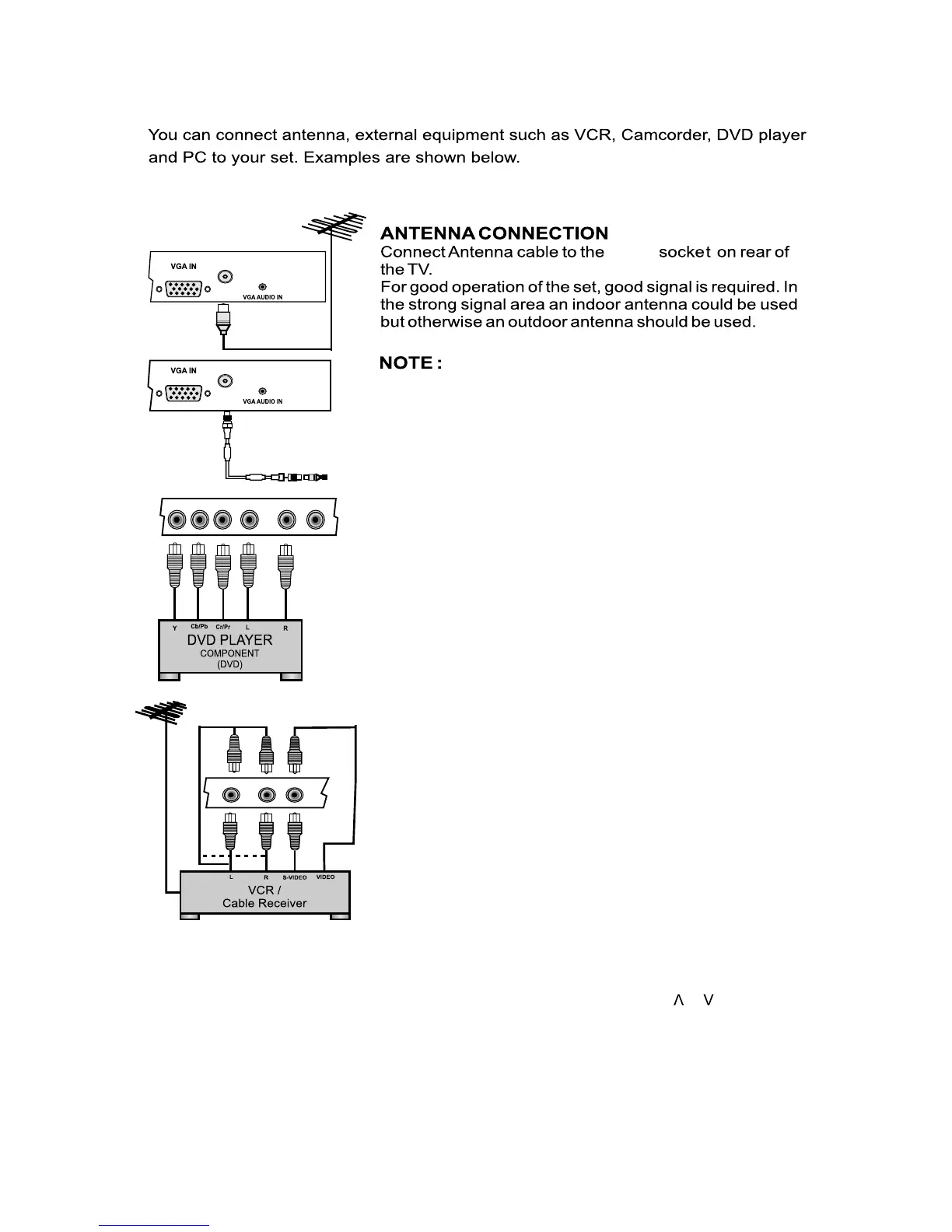
ANT IN
ANT IN
Y1 Pb1 Pr1 L1
YPbPr1
AV1
Av1R1
L
YPbPr1
AV1
Av1R
ANT IN
1. The aerial cable should not be bundled to the power cord.
COMPONENT (YCbCr/YPbPr) DVD INPUT
1. Connect the component outputs (YCbCr / YPbPr) of
DVD player to the component (YPbPr1 / YPbPr2) input of
the TV.
2. Connect audio outputs (L,R) of a DVD player to the
audio input (YPbPr1 / YPbPr2) respectively.
3. Press the PLAY button on the DVD player.
VIDEO INPUT
1. Connect the component outputs VIDEO out
of VCR/Cable receiver to AV1, AV2.
2. Connect audio outputs (L, R) of a DVD player to the
audio input AV1, AV2 respectively.
3. Press the PLAY button on the VCR.
Note : Selecting a Source
Press SOURCE key on remote or on front panel keypad.
Press TV key on the remote to enter into TV source from any other source,
EN 5
3 Antenna and External Equipment Connection
A source OSD will appear. Press Up/Down key on the remote or / on
or '+' key from front panel to enter selected source or press SOURCE key
repeatedly to change and select source.
front panel can be used to select source. Press OK/Right key on the remote
except multimedia source.





 To Next Page