24
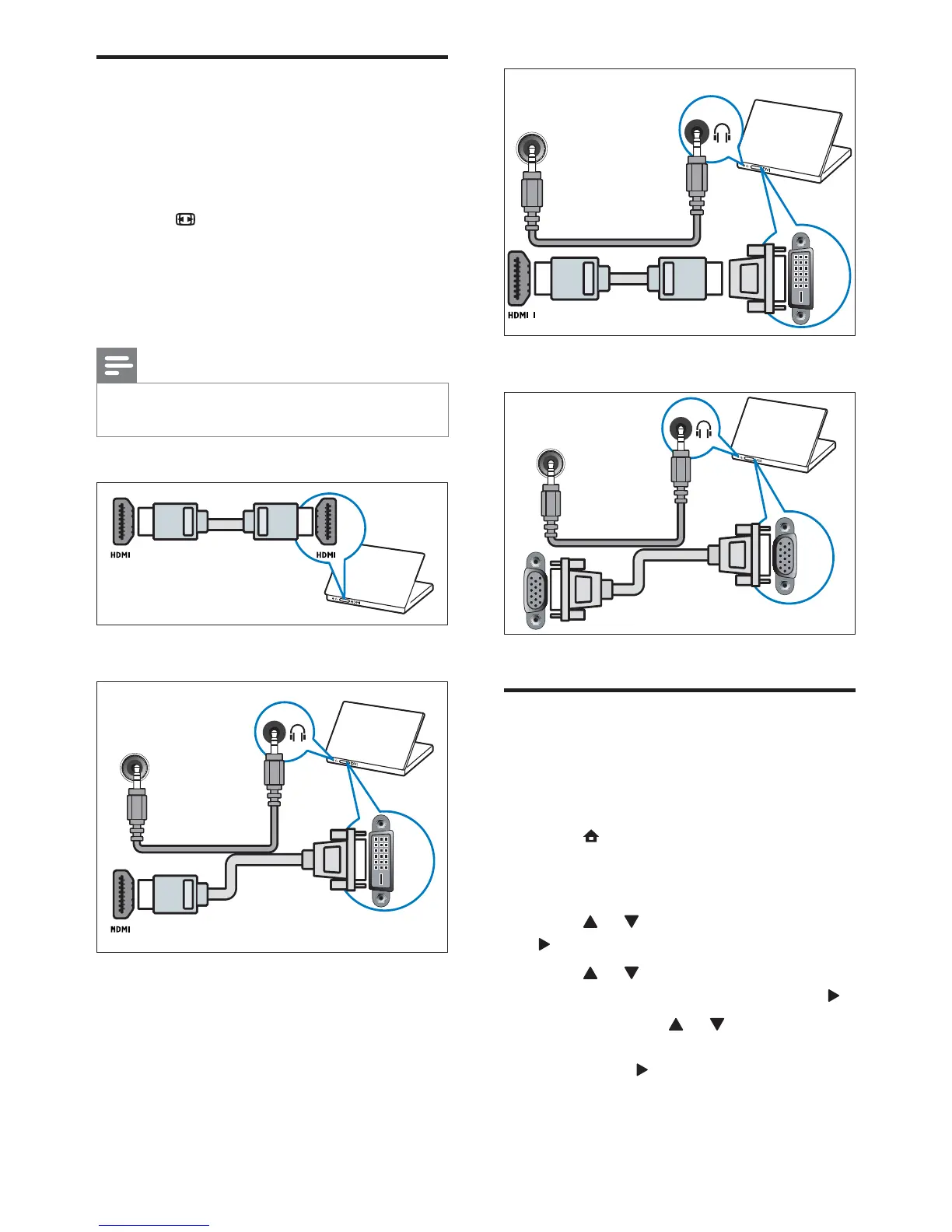
VGA cable
Add devices
After connecting devices, assign the device
attached to each connector. This allows you to
easily identify devices connected to your TV.
1 Press (Home).
2 Select [Add new device] and press OK.
3 Select [Start] and press OK.
4 Press or to select a device and press
.
5 Press or to select the connector
your device is connected to and press
.
6 If available, press or to select the
audio connector your device is connected
to and press
.
7 Switch on your device and check for
video and audio output.
DVI
DVI/VGA
AUDIO IN
VGA
DVI/VGA
AUDIO IN
VGA
Connect a computer
Before you connect a computer to the
TV, set the monitor refresh rate on your
computer to 60Hz.
Connect your computer to the TV.
Press
FORMAT and change the TV
picture format to [Unscaled].
Connect a computer with one of the
following connectors:
Note
Connections via DVI or VGA require an
additional audio cable.
HDMI cable
DVI-HDMI cable
HDMI cable and HDMI-DVI adaptor
DVI
DVI/VGA
AUDIO IN
EN








 To Next Page