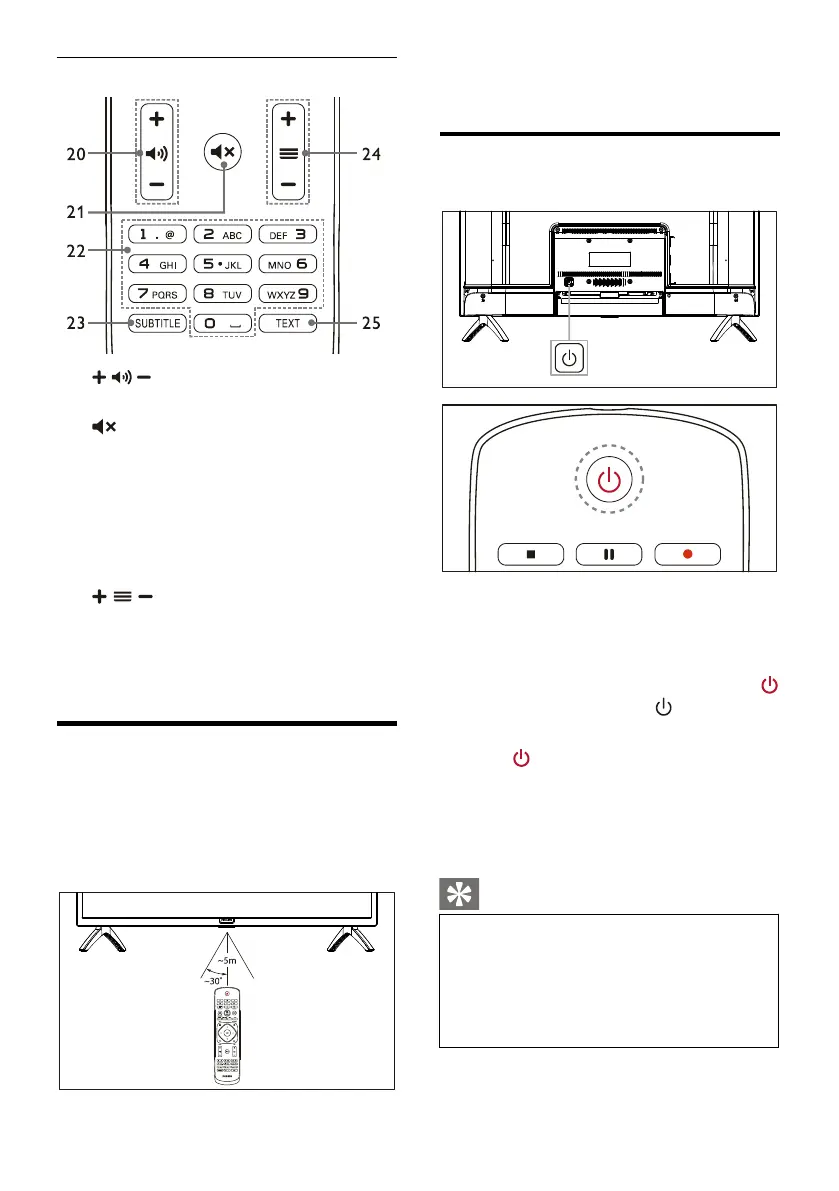
Increase or decrease volume.
Mute or unmute the sound.
Select a channel or input channel number.
Display subtitle message when the current
channel has subtitle option.
Switch to the previous or next channel.
Display graphic function.
Remote Control Usage
When you use the remote control, hold it close
to the TV and point it at the remote control
sensor. Make sure that the line-of-sight between
the remote control and TV is not blocked by
furniture, walls or other objects.
4 Use Your TV
Switch on/off the TV or switch it
to standby
Switch on the TV.
If the indicator is off, plug the TV power
cable into the power socket, then the
If the indicator is turned on, please press
on the remote control or key on the TV.
Switch the TV to standy if it is on.
Press on the remote control.The
“Standby” indicator is turned on.
If you do not use the TV for a long time,
please pull out the power plug.
Though the TV consumes very little
power when in standby mode, energy
continues to be consumed. Disconnect
the TV power cable from the power
outlet when the TV is not used for an
extended period of time.




 To Next Page