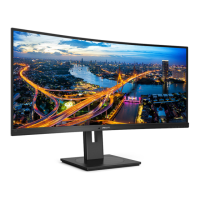
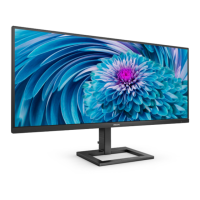
This document describes the Philips E Line 346E2 monitor, a display designed for optimal performance and user convenience.
Function Description
The Philips E Line 346E2 is a monitor that offers a range of features for enhanced viewing and productivity. It supports MultiView, allowing users to connect and view content from multiple devices simultaneously, such as a PC and a notebook, side-by-side. This is particularly useful for complex multi-tasking. The monitor also incorporates SmartImage technology, which optimizes display settings for various content types by dynamically adjusting brightness, contrast, color, and sharpness in real-time. This ensures an optimized viewing experience for applications, images, or videos. SmartContrast further enhances visual clarity by dynamically analyzing displayed content and optimizing the LCD monitor's contrast ratio.
For gamers, the monitor features AMD FreeSync™ Premium technology, which eliminates screen tearing and stuttering by synchronizing the monitor's refresh rate with the graphics card. This provides a smoother and more responsive gaming experience. The monitor also includes USB charging capabilities, allowing users to charge smartphones or power external HDDs directly from the display, provided the monitor is powered on. Smart Power, an exclusive Philips technology, offers flexible power delivery options through the USB-C port, delivering up to 65W for recharging high-performance laptops with a single cable.
Important Technical Specifications
Picture/Display:
- Display Panel Type: VA (346E2LAE)
- Backlight: W-LED system
- Panel Size: 34" W (86.36 cm)
- Aspect Ratio: 21:9
- Pixel Pitch: 0.23175 x 0.23175 mm
- Contrast Ratio (typ.): 4000:1
- Optimum Resolution: 3440 x 1440 @ 60 Hz
- Viewing Angle: 178° (H) / 178° (V) @ C/R > 10 (typ.)
- Picture Enhancement: SmartImage
- Flicker-free: Yes
- Display Colors: 16.7 M (8 bits)
- Vertical Refresh Rate: 48 Hz-100 Hz
- Horizontal Frequency: 30 kHz-160 kHz
- sRGB: Yes
- LowBlue Mode: Yes
- EasyRead: Yes
- AMD FreeSync™ Premium: Yes
Connectivity:
- Signal Input Source: HDMI, DisplayPort, USB-C (DisplayPort Alt mode)
- Connectors: 1 x USB C (upstream), 1 x HDMI 2.0 (HDCP 1.4, HDCP 2.2), 1 x DisplayPort 1.2 (HDCP 1.4, HDCP 2.2), 1 x Audio out, 4 x USB A (downstream with x1 fast charge BC 1.2) (5V/1.5A)
- Sync Input: Separate Sync
- USB Ports: USB C x1 (upstream, DisplayPort Alt mode, HDCP 1.4, HDCP 2.2), USB A x4 (downstream with x1 fast charge B.C 1.2)
- Power Delivery (USB C): USB PD version 3.0, up to 65W (5V/3A, 7V/3A, 9V/3A, 10V/3A, 12V/3A, 15V/3A, 20V/3.25A)
- Power Delivery (USB A): x1 fast charge B.C 1.2, up to 7.5W (5V/1.5A)
- Super Speed: USB C/USB A: USB 3.2 Gen1, 5 Gbps
Convenience:
- MultiView: PIP/PBP mode, 2 x devices
- Built-in speaker: 3 W x 2
- OSD Languages: English, German, Spanish, Greek, French, Italian, Hungarian, Dutch, Portuguese, Brazil Portuguese, Polish, Russian, Swedish, Finnish, Turkish, Czech, Ukrainian, Simplified Chinese, Traditional Chinese, Japanese, Korean
- Other Convenience: Kensington Lock, VESA mount (100 x 100mm)
Stand:
- Tilt: -5° / +20°
- Height adjustment: 100 mm
Power:
- Consumption (Normal Operation): 35.0 W (typ.)
- Consumption (Sleep/Standby mode): 0.5 W
- Consumption (Off mode): 0.3 W
- Power LED indicator: On mode: White, Standby/Sleep mode: White (blinking)
- Power Supply: External, 100-240VAC, 50/60Hz
Dimension & Weight:
- Product with stand (WxHxD): 817 x 491 x 235 mm
- Product without stand (WxHxD): 817 x 365 x 49 mm
- Product with stand: 7.36 kg
- Product without stand: 5.43 kg
Operating Condition:
- Temperature range (operation): 0°C to 40 °C
- Relative humidity (operation): 20% to 80%
Usage Features
The Philips E Line 346E2 offers several user-friendly features:
- OSD Menu Navigation: The monitor is controlled via buttons, allowing users to access and adjust settings such as volume, input source, and OSD menu options.
- MultiView Modes: Users can choose between Picture-in-Picture (PIP) and Picture-by-Picture (PBP) modes to display content from two different sources simultaneously. PIP allows for a sub-window of another signal source, with adjustable sizes (Small, Middle, Large) and positions (Top-Left, Top-Right, Bottom-Left, Bottom-Right). PBP displays two signal sources side-by-side. The audio source can be linked to the main picture source or independently selected.
- SmartImage Presets: Quick access to various SmartImage modes like FPS, Racing, RTS, Gamer 1, Gamer 2, LowBlue Mode, and EasyRead, each optimized for specific content types.
- SmartContrast: Automatically adjusts contrast and backlight intensity for optimal viewing.
- LowBlue Mode: Reduces harmful shortwave blue light rays for improved eye comfort during extended use.
- EasyRead Mode: Optimizes display for text-based applications like PDF e-books by increasing contrast and boundary sharpness.
- USB Charging: USB ports provide standard power output, with some offering fast charging (BC 1.2) for devices like smartphones and external HDDs. The "USB Standby Mode" setting in the OSD menu allows these functions to remain active even when the monitor is in sleep/standby mode.
- Smart Power: Enables flexible power delivery up to 65W through the USB-C port, useful for charging high-performance laptops. The power delivery level can be influenced by the monitor's brightness setting.
- Resolution Notification: An on-screen alert is displayed when the monitor is not running at its native resolution (3440 x 1440), reminding users to adjust for best results. This alert can be disabled.
- Physical Adjustments: The monitor stand allows for tilt adjustments (-5° to +20°) and height adjustments (100mm) for ergonomic viewing.
- VESA Mounting: The monitor supports a 100mm x 100mm VESA-Compliant mounting interface, allowing for wall-mount installations.
Maintenance Features
Maintaining the Philips E Line 346E2 involves simple steps to ensure its longevity and optimal performance:
- Cleaning: For normal cleaning, use a clean, soft cloth. For extensive cleaning, isopropyl alcohol can be used. Avoid other solvents like ethyl alcohol, ethanol, acetone, or hexane.
- Pixel Defect Policy: Philips guarantees repair or replacement under warranty if the number of pixel defects exceeds acceptable levels, as defined in their pixel defect policy. This policy differentiates between bright dot defects (always lit sub-pixels) and black dot defects (always dark sub-pixels), and also considers the proximity of defects.
- Preventing "Burn-in": To prevent "burn-in" or "after-imaging" on the LCD panel, users are advised to:
- Always activate a moving screen saver program when leaving the monitor unattended.
- Always activate a periodic screen refresh application if the monitor will display unchanging static content for extended periods.
- Failure to do so may result in severe "burn-in" symptoms not covered under warranty.
- Handling Precautions:
- Keep the monitor away from direct sunlight, very strong bright lights, and heat sources to prevent discoloration and damage.
- Keep the display away from oil, as it can damage the plastic cover and void the warranty.
- Ensure ventilation holes are not blocked by objects.
- Do not subject the monitor to severe vibration or high impact conditions.
- Avoid tilting the monitor downward by more than -5 degrees to prevent panel peeling.
- Do not press the screen while adjusting the monitor's angle; grasp only the bezel.
- Do not knock or drop the monitor during operation or transportation.
- The casing cover should only be opened by qualified service personnel.
- Power Management: The monitor supports VESA DPM compliance, automatically reducing power consumption when not in use and waking up when input is detected.
- Cable Management: Ensure power and signal cables are properly connected and not bent or pulled to prevent damage and potential hazards. Use approved power cords provided by Philips.
- Driver Installation: The monitor comes with .inf and .icm driver files, which may be required for installation on a computer to ensure proper functionality and optimal resolution.
- Warranty and Support: For warranty coverage and additional support, users can visit the Philips support website or contact their local Philips Customer Care Center. Extended warranty packages are also available.

 Need help?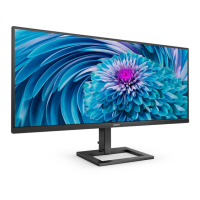



 To Next Page
 General