10
6
Resolution notication
This monitor is designed for optimal
performance at its native resolution:
3440 x 1440.
When the monitor is powered on at a
dierent resolution, an alert is displayed
on the screen as follows: Use 3440 x
1440 for best results.
Display of the native resolution alert can
be switched o from Setup in the OSD
(On Screen Display) menu.
Note
1. The USB hub default setting of USB C
input for this monitor is “High Data
Speed”. The maximum resolution
supported depends on your graphic
card capability.If your PC doesn’t
support HBR 3, select High Resolution
in USB Setting, then the maximum
resolution supported will be 3440 x
1440 @75Hz.Press button > USB
Setting > USB > High Resolution
2. If your Ethernet connection seems
slow, please enter OSD menu and
select High Data Speed which
supports the LAN speed to 1G.
7
Firmware
The over-the-air (OTA) rmware update
is through the SmartControl software
and is easily downloadable through the
Philips website. What does SmartControl
do? It is an additional software that
helps control the photo, audio, and the
other on-screen graphic settings of the
monitor.
In the “Setup” section, you can check
which rmware version you currently
have and if you need to upgrade or not.
In addition, it is important to note that
the rmware upgrades must be done
through the SmartControl software.
It is necessary to be connected to a
network when updating the rmware
on SmartControl over-the-air (OTA).
8
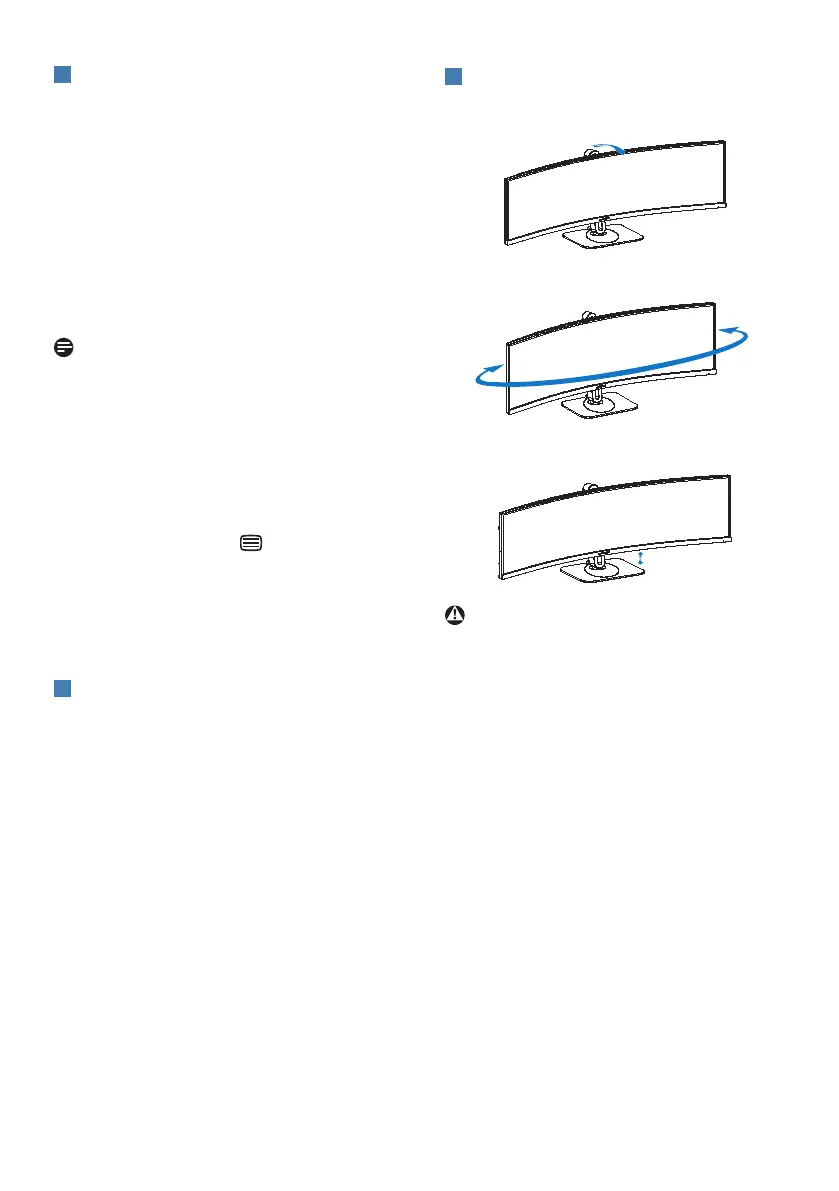
Physical Function
Tilt
Swivel
-180°
+180°
Height adjustment
Warning
• To avoid potential screen damage,
such as panel peeling, ensure that
the monitor does not tilt downward
by more than -5 degrees.
• Do not press the screen while
adjusting the angle of the monitor.
Grasp only the bezel.



 To Next Page