12
for viewing video and audio
content.
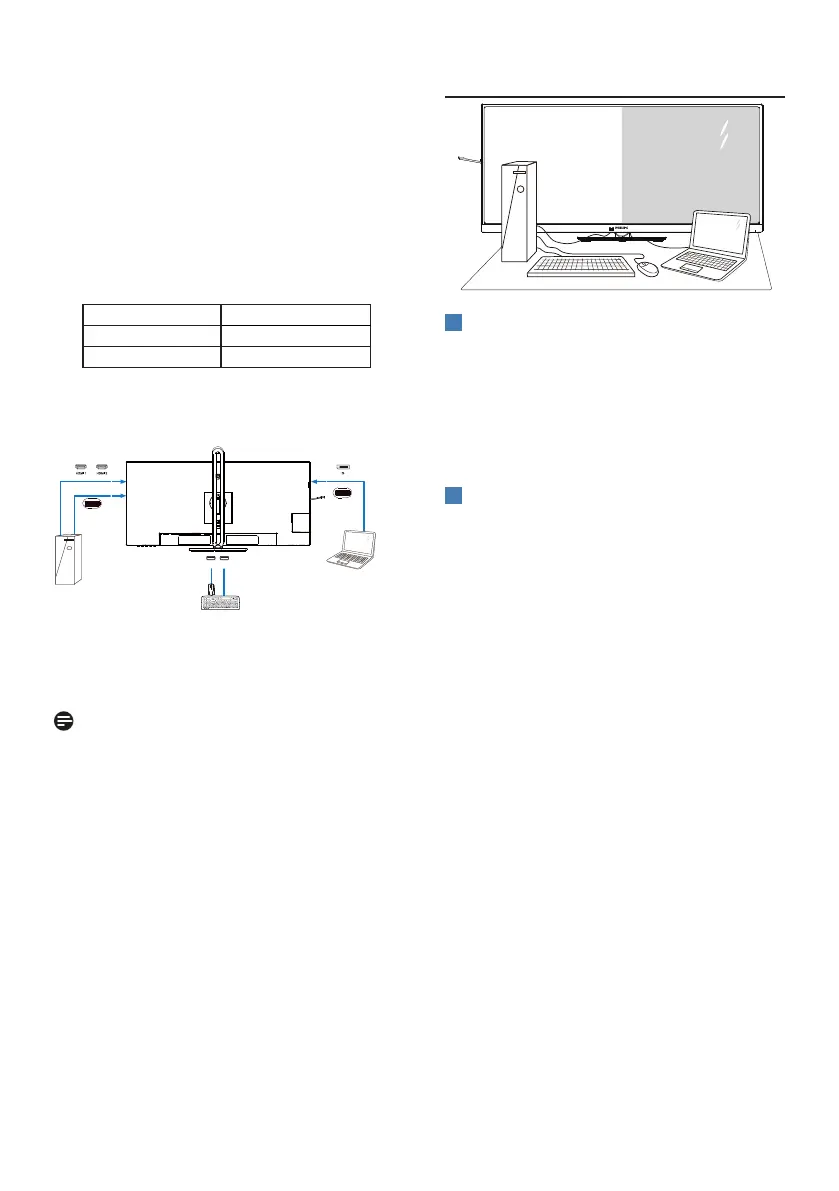
PC2: You can use a USB-C/A or USB-C/C
cable in direction upstream and
a HDMI cable or a DP cable and
connect it to the USB-C2 port on
the monitor for viewing video and
audio content.
For your convenience. Please use the
table below as reference.
Source USB Upstream
HDMI or DP USB C2
DP or HDMI USB C1
2. Connect each PC to the downstream
end of the USB-C cable.
PC1 PC2
OR
USB USB
USB C1
(96W)
USB C2
(DATA )
3. Go to the On-Screen Display
(OSD) menu and follow the same
procedure with the KVM feature as
#2 in the previous section.
Note
• Please note that the connection of
the input source is not automatic
and it is necessary to go to the
On-Screen Display (OSD) to select
the input you are using.
• You can also ads Multiclient
Integrated KVM feature in Picture-
by-Picture (PBP) mode. When you
enable PBP, you are able to view
two different sources projected onto
the same screen. The MultiClient
Integrated KVM feature enhances
productivity by using one screen to
control two PCs via the On-Screen
Display (OSD) menu setting.
2.4 MultiView
1
What is it?
Multiview enables active variety to
connect and view so that you can
work with multiple devices like PC and
Notebook side-by-side simultaneously,
thereby making complex multitasking
work a breeze.
2
Why do I need it?
With the ultra-high-resolution Philips
MultiView display, you can comfortably
experience a world of connectivity in
the office or at home. With this display,
you can conveniently enjoy multiple
content sources on one screen. For
example, You may want to keep an eye
on the live news video feed with audio
in the small window, while working on
your latest blog... or you may want to
edit an Excel file from your Ultrabook,
while logged into a secured company
intranet to access files from a desktop.



 To Next Page