14
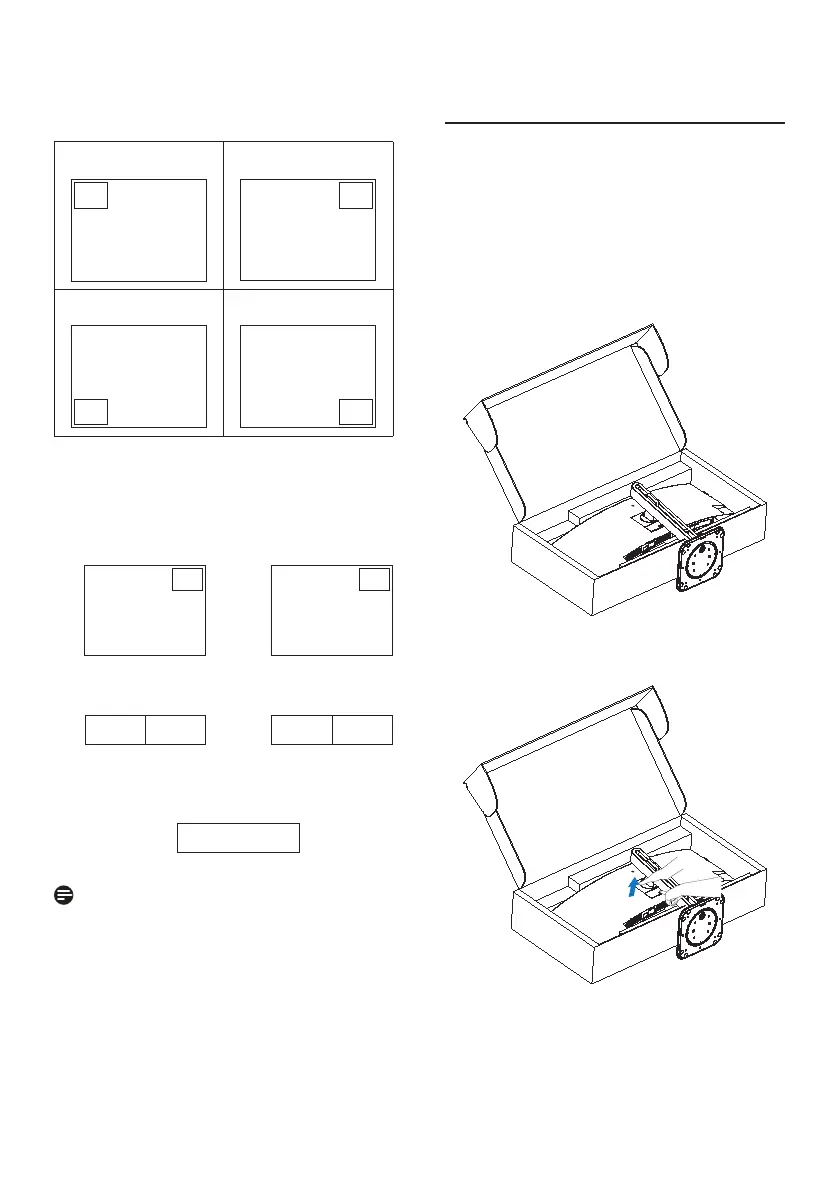
• PIP Position: When PIP is activated,
there are four sub-window positions
to choose from.
Top-Left Top-Right
A (main)
A (main)
Bottom-Left Bottom-Right
A
(main)
A (main)
• Swap: The main picture source and
the sub-picture source are
swapped on the display.
Swap A and B source in [PIP] mode:
A (main)
↔
B (main)
Swap A and B source in [PBP] mode:
A (main) B
↔
B (main) A
• O: Stop MultiView function.
A (main)
Note
When you activate the SWAP function,
the video and its audio source will swap
at the same time.
2.5 Remove the Base Assembly
for VESA Mounting
Before you start disassembling
the display base, please follow the
instructions below to avoid any possible
damage or injury.
1. Place the monitor face down on a
smooth surface. Pay attention not to
scratch or damage the screen. Then
lift the monitor stand.
2. While keeping the release button
pressed, tilt the base and slide it out.



 To Next Page