Exit
SETUP
Initial Setup
Initial Setup
Select
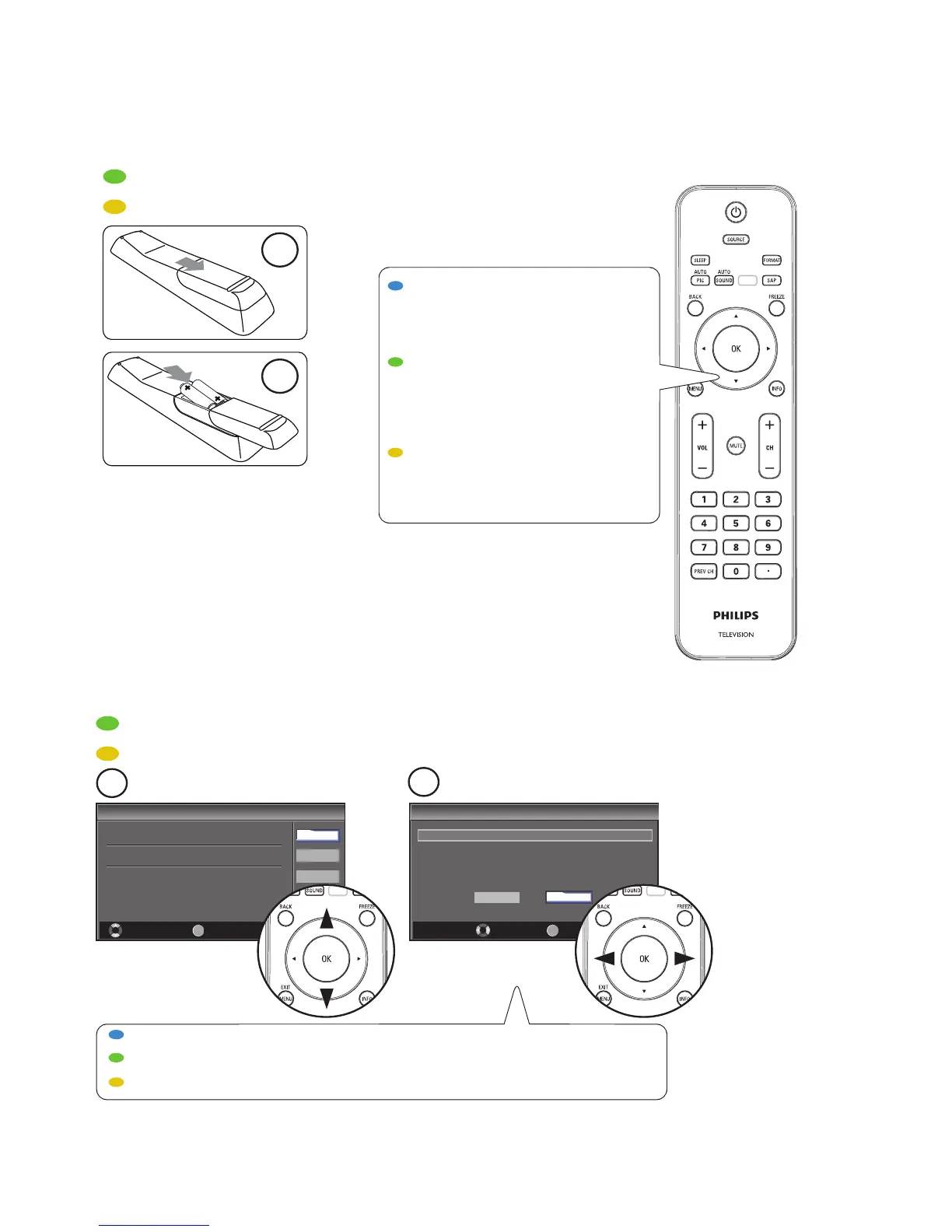
Select “Retail” or “Home” for your location.
OK
OK
Retail
Home
Initial Setup
Initial Setup
Select your menu language.
Seleccione el idioma para el menú.
Sélectionnez la langue du menu.
Français
Español
Select Skip
MENU
OK
OK
English
First time setup
FR
Configuración inicial
ES
Première configuration
Use the remote control
Utilisez la télécommande
FR
Uso del control remoto
ES
1
2
TOUCHES NAVIGATEUR ET OK
Appuyez sur Î,ï ou Í, Æ pour
naviguer dans le menu du
téléviseur. Appuyer sur OK pour
confirmer la sélection.
NAVIGATION AND OK KEYS
Press Î,ï or Í , Æ to navigate
the TV menu. Press OK to
confirm selection.
TECLAS DE NAVEGACIÓN Y OK
Pulse Î,ï o Í , Æ para navegar al
menú del TV. Pulse OK para
confirmar la selección.
1
2
Follow the on-screen instructions to complete your TV setup.
Siga las instrucciones en pantalla para realizar la confi guración de la TV.
Suivez les instructions apparaissant à l’écran pour terminer la confi guration de votre téléviseur.






 To Previous Page