43BDL4051T
33
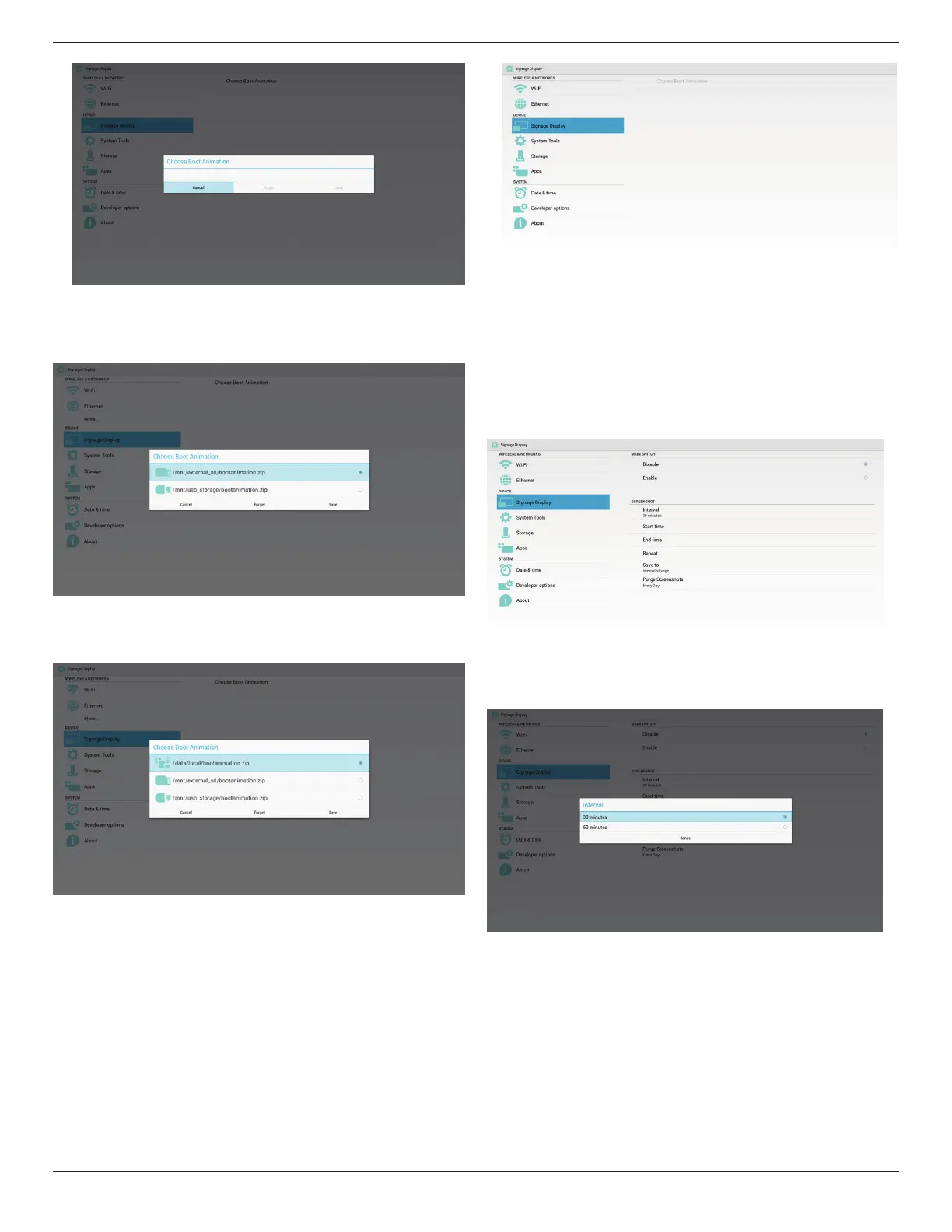
Case2
Theusersdonotsettlecustomizedbootlog,PDndbootanimation.
zipleunderSDorUSB.Thescreenwillshowbootanimation.zipand
selecttherstleautomatically.
Case3
Theusersettlecustomizedbootlogo,Thescreenwillshow/data/local/
bootanimation.zip
3)IfOSDmenuLogoitemisOnorOff,theuserscannotchooseboot
animationinAndroidsettings.
3. Screenshot
ViaEnable/DisabletocontrolscreenshotOn/Off.AfterEnable,usercanset
screenshottimeslotandsavepath.
Note:
Timeslotofdeletionandscreenshot:
(1)Willdeletepictureatinitialtime0sec.
(2)Willscreeshotatrst40sec.
1)Interval
Setupintervaltimeframe.30minsor60mins.
2)StartTime
Setupscreenshotstarttime.
Note:
(1)NoCancel,Conrmbuttonindialog.
(2)JustpressBackkeytoexitdialogforSetup
(3)StarttimecannotbenewerthanEndtime.ItwillshowErrortoast.


 To Next Page