43BDL4051T
32
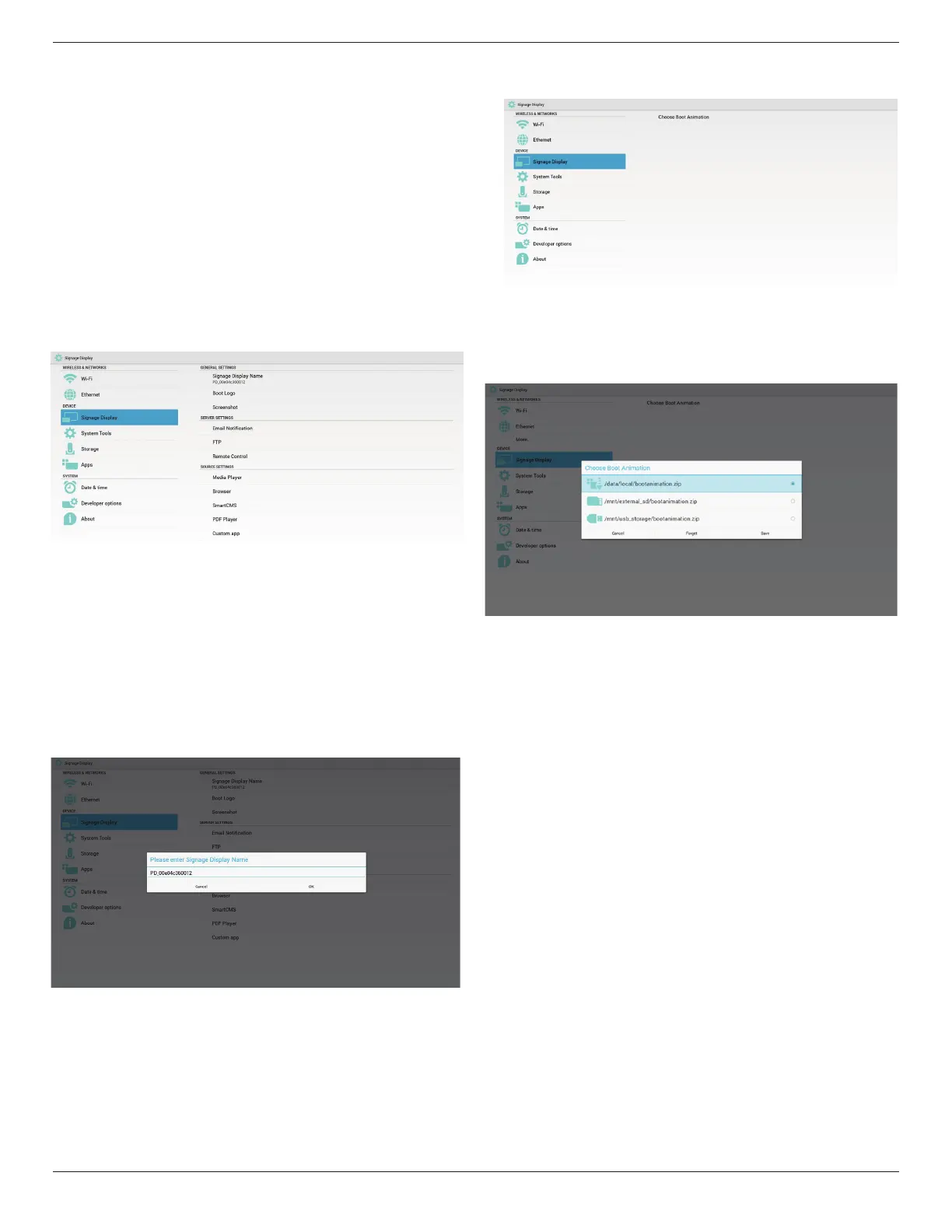
5.4. Signage Display
Divideinto3groups:GeneralSettings/ServerSettings/SourceSettings
(1)GeneralSettings
A. SignageDisplayName
B. BootLogo
C. Screenshot
(2)ServerSettings
A. EmailNotication
B. FTP
C. RemoteControl
(3)SourceSettings
A. MediaPlayer
B. Browser
C. SmartCMS
D. PDFPlayer
E. Customapp
5.4.1. General Settings
1. SignageDisplayName
SetupPDname“PD_”+EthernetMacAddress.
Note:
Inputlimitation:
(1)length:Max36characters
(2)format:nolimit
2. BootLogo
1)ScalarOSDmenutocontrolAndroidbootlogoenable/disable.
ScalarOSDMenuoperation:
RCU:Home->Conguration2->Logo->On/Off/User
InUsermode,usercanchoosetheirownbootlogoanimationle.
Note:
(1)Bootanimationlenamemustbe:bootanimation.zip
(2)Willpop-upawindowforusertoselectUSBandSDcard.No
priorityissue.
2)Whenbootlogoselection,PDwillcheckifthereisbootanimation.zip
underUSBandSDcard.
Functionintroduction:
a. Optiondescription
/data/local
UsecustomizedbootanimationlewhichiscopiedfromSDcardor
USB
/mnt/external_sd
UsebootanimationleunderSDcard
/mnt/usb_storage
UsebootanimationleunderUSB
b. Save
PressSavekeytosaveSDcardorUSBbootanimation.zipto/data/local
andsetitasbootlogo.
c. Forget
PressForgetkeytodelete/data/localbootanimation.zipandnotshow
bootlogo.
d. Cancel
Closedialoguew/ochanges.
Scenariointroduction:
Case1
Theusersdonotsettlecustomizedbootlogo.PDdoesnotndany
bootanimation.zipleunderSDandUSB.TheListwillbeblank.Save
andForgetbuttonwillbegrayanduseless.


 To Next Page