43BDL4051T
40
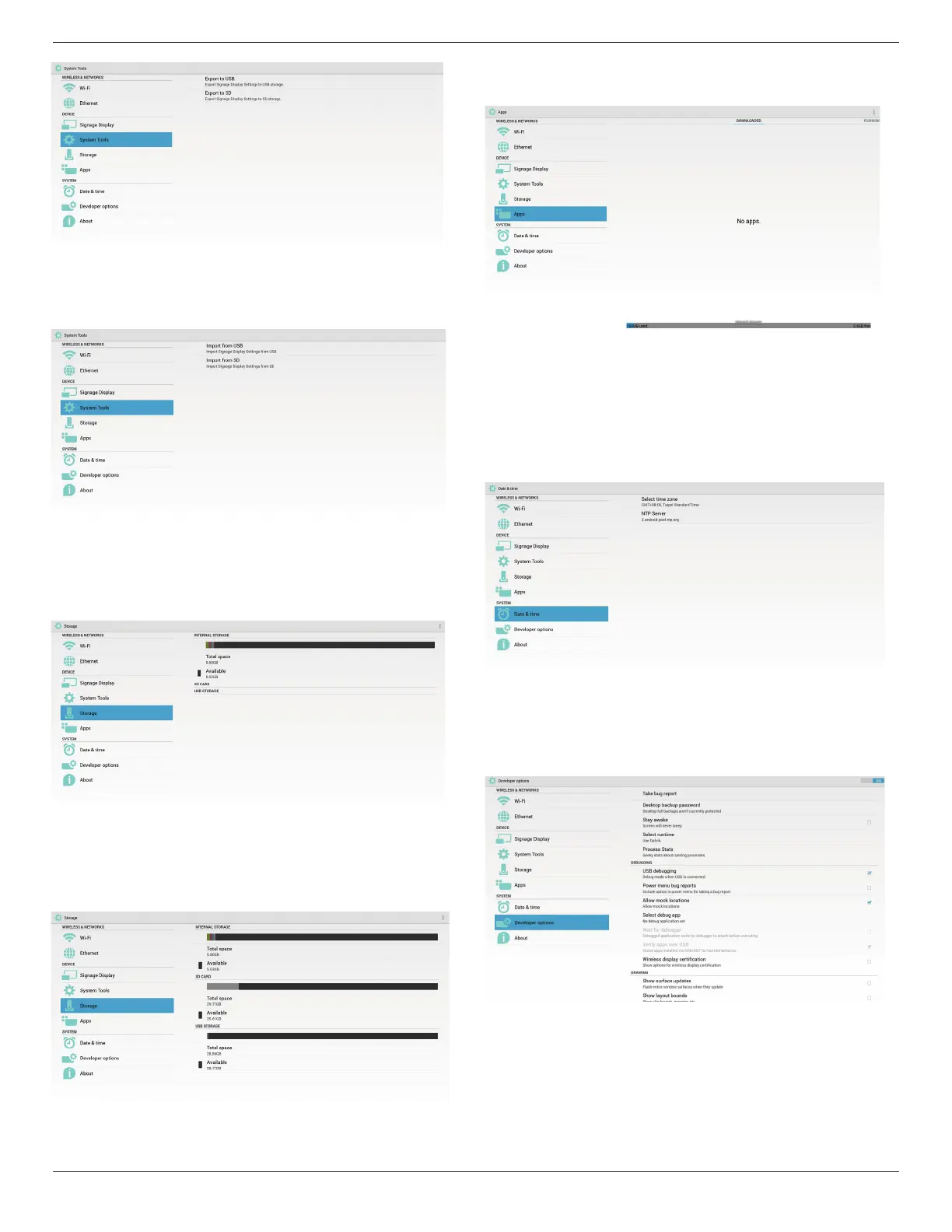
2. Import
Importsettings.dbfromPhilipsfolderunderUSBorSDcard.
5.6. Storage
DisplaycurrentPDAndroidstorageinformation.
SD CARD and USB STORAGE
:
NeedtoinsertSDcardorUSB,theinformationwillshowuptotalspace
andavailableofSDcardorUSBstorage.
5.7. Apps
Displayapplicationsinformation.
5.8. Date & time
ViaScalarOSDmenutocontrolAutoTimeOn/Off.
WhenSalarOSDmenuturnoffAutotime,usercansetupTimeZone
manually.
Note:
AddnewNTPservertodisplaycurrentserverIP
.
5.9. Developer options
Androiddeveloperoptions.
5.10. About
MaininfoinAbout:
(1)Systemupdates
(2)Androidversion
(3)Kernelversion
(4)Buildnumber


 To Next Page