43BDL4650D/50BDL4650D/55BDL4650D
43
6. Setting
6.1. Settings
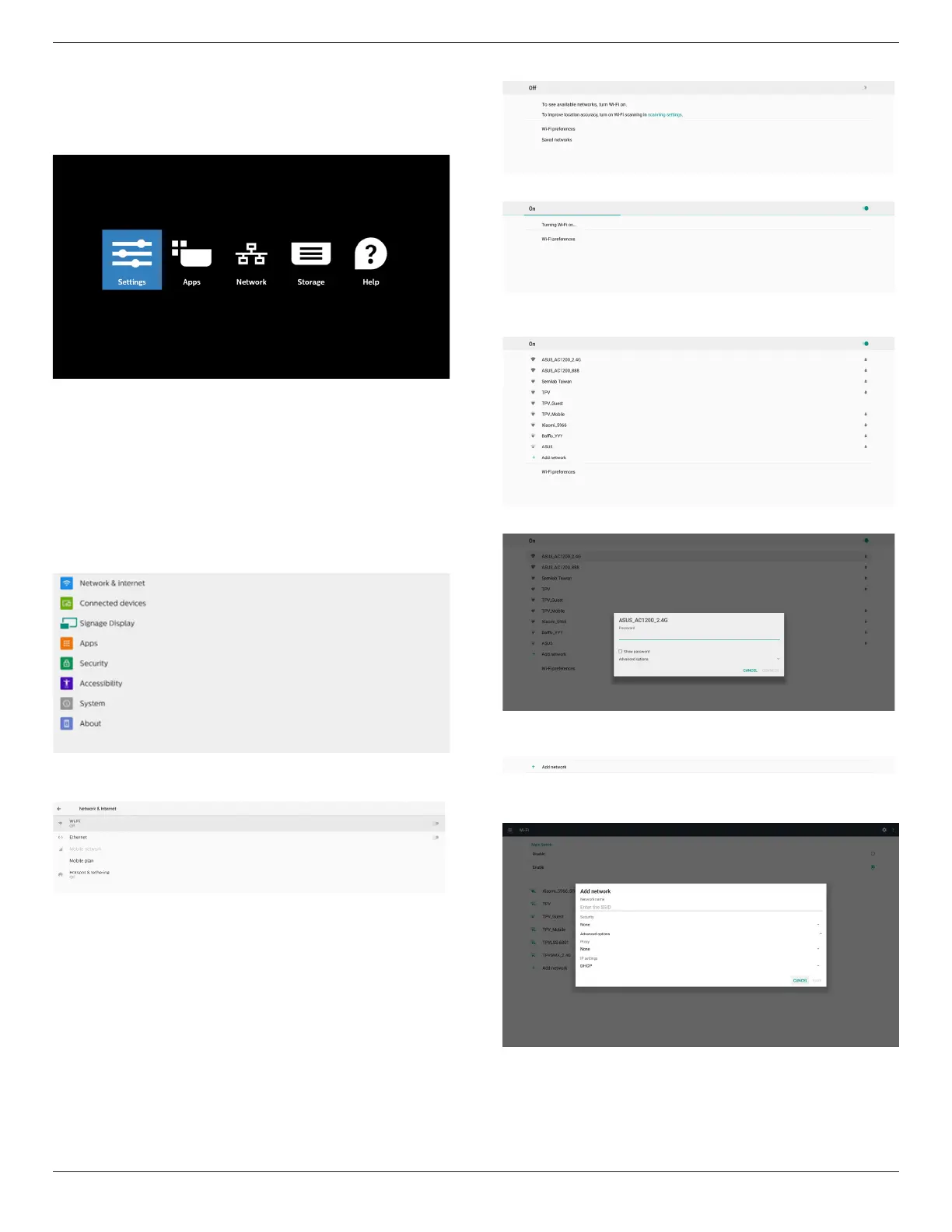
Enter PD settings by clicking “Settings” icon in Admin mode.
Setting menu consists of the following items:
(1) Network & Internet
(2) Connected devices
(3) Signage Display
(4) Apps
(5) Security
(6) Accessibility
(7) System
(8) About
6.1.1. Network & Internet
6.1.1.1. Wi-Fi
Settings -> Network & Internet -> Wi-Fi
Important Note: This option is available only when the
supported Wi-Fi dongle is plugged. Reboot the device
whenever you plug or remove the USB Wi-Fi dongle.
Enable Wi-Fi
Enable/disable Wi-Fi connection through main switch in
Setting -> Network & Internet -> Wi-Fi -> O/On toggle
button.
Wi-Fi O
Wi-Fi On
On the available network list, select an AP (access point) on
an existing wireless network.
Enter the required settings.
There is an “Add network” item at the end of list. If network
is not listed, use “Add Network” to join a hidden network.
You must input network SSID, security type and other
advanced options for this network.
Note:
When Wi-Fi is enabled, Ethernet will be disabled
automatically.













 To Next Page