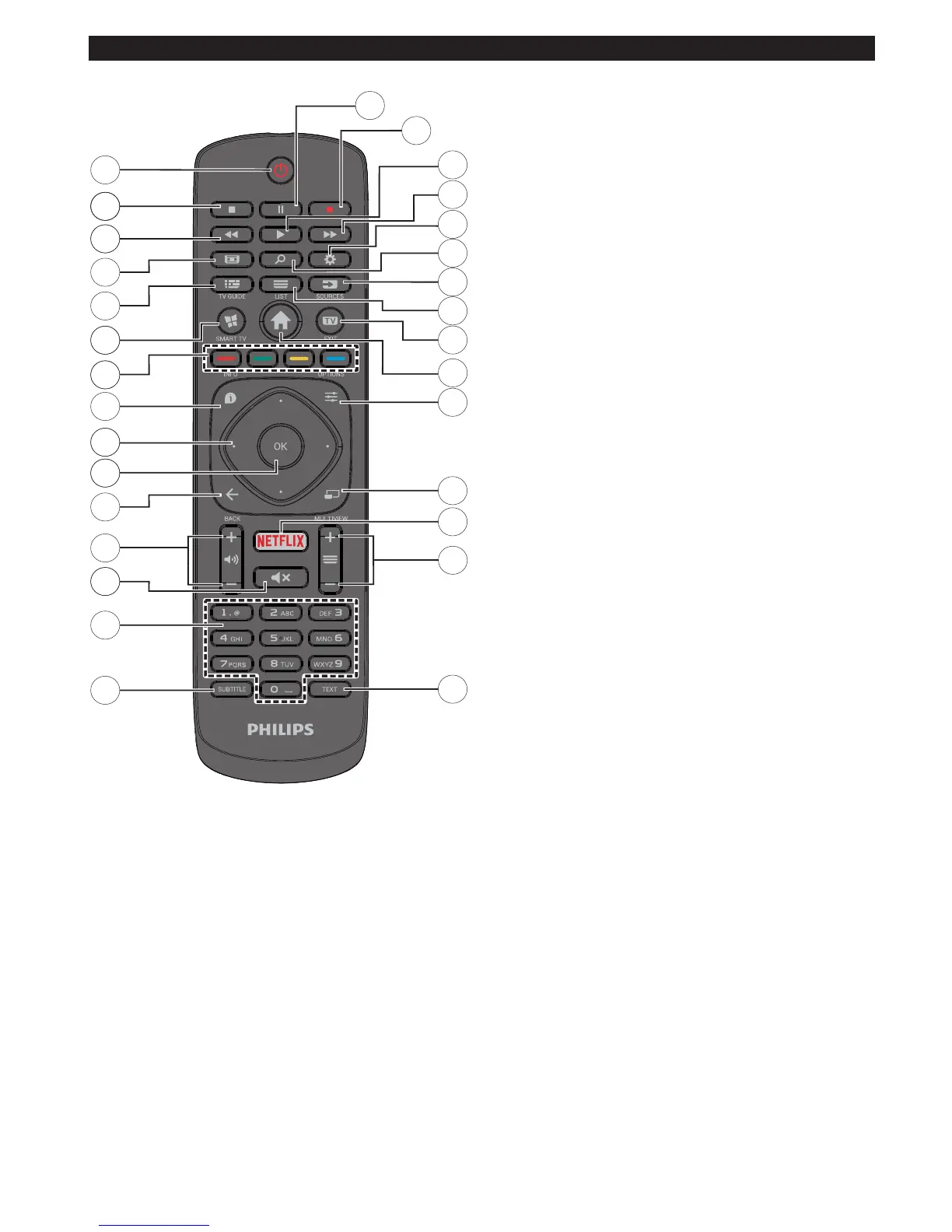
1. Standby: Switches On / Off the TV
2. Stop: Stops the media being played
3. Rapid reverse: Moves frames backwards in media
such as movies
4. Screen: Changes the aspect ratio of the screen
5. EPG (Electronic programme guide): Displays the
electronic programme guide
6. Internet: Opens the portal page, where you can reach
many web based applications
7. Coloured Buttons: Follow the on-screen instructions
for coloured button functions
8. Info: Displays information about on-screen content,
shows hidden information (reveal - in TXT mode)
9. Directional buttons: Helps navigate menus, content
etc. and displays the subpages in TXT mode when
pressed Right or Left
10. OK: Conrms user selections, holds the page (in TXT
mode), views channel list (DTV mode)
11. Back/Return: Returns to previous screen, opens
index page (in TXT mode)
12. Volume +/-
13. Mute: Completely turns off the volume of the TV
14. Numeric buttons: Switches the channel, enters
a number or a letter in the text box on the screen,
switches the TV on when in standby mode.
15. Subtitles: Turns subtitles on and off (where available)
16. Text: Displays teletext (where available), press again
to superimpose the teletext over a normal broadcast
picture (mix)
17. Programme +/-: Programme up-down, Page up-down
(in TXT mode), switches the TV on when in standby
mode
18. Netix: Launches the Netix application
19. No function
20. Quick Menu: Displays a list of menus for quick access
21. Menu: Displays TV menu
22. TV: Switches to TV Source, closes the Portal page
23. List: Views channel list
24. Source: Shows all available broadcast and content
sources
25. Google Search: Opens the Google website on the TV
browser
26. Settings: Opens the settings menu
27. Rapid advance: Moves frames forward in media such
as movies
28. Play: Starts to play selected media
29. Record: Records programmes
30. Pause: Pauses the media being played, starts
timeshift recording




 To Next Page