15
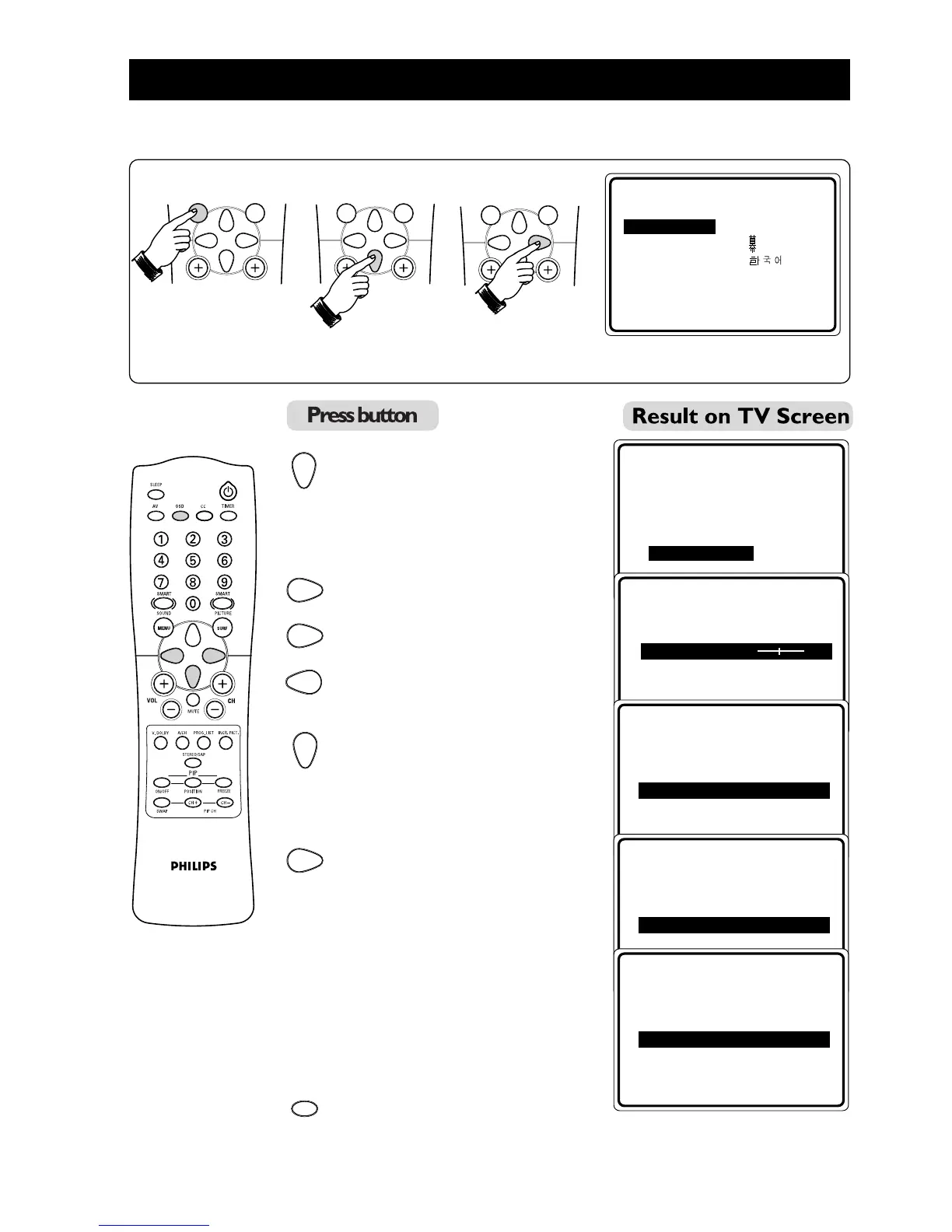
FINE TUNING OF CHANNELS
This feature allows you to adjust picture reception in areas of weak reception.
1. Enter main menu. 2. Select INSTALL. 3. Enter install menu.
4. Press button repeatedly
until MANUAL is selected.
5. Enter MANUAL menu.
6. Start fine-tuning until desired
picture and sound are obtained.
7. Select STORE.
8. Store last fine-tuned status.
9. Exit menu from screen.
➠
➠
MENU
SURF
MENU
SURF
MENU
SURF
➠
OR
▲
É
▼
INSTALL
•
LANGUAGE
FINE TUNE
•
TUNER MODE STORE
•
AUTO PROGRAM
•
CHANNEL EDIT
•
MANUAL
•
▼
▲
Ñ
É
INSTALL
MANUAL
FINE TUNE 0
•
STORE
▲
Ñ
É
INSTALL
MANUAL
•
FINE TUNE
STORE
•
▲
Ñ
É
INSTALL
MANUAL STORE
•
FINE TUNE
STORE
•
STORED
▲
Ñ
É
INSTALL
MANUAL
•
FINE TUNE
STORE
•
OSD



 To Next Page