65BDL4650D/75BDL4650D/86BDL4650D
12
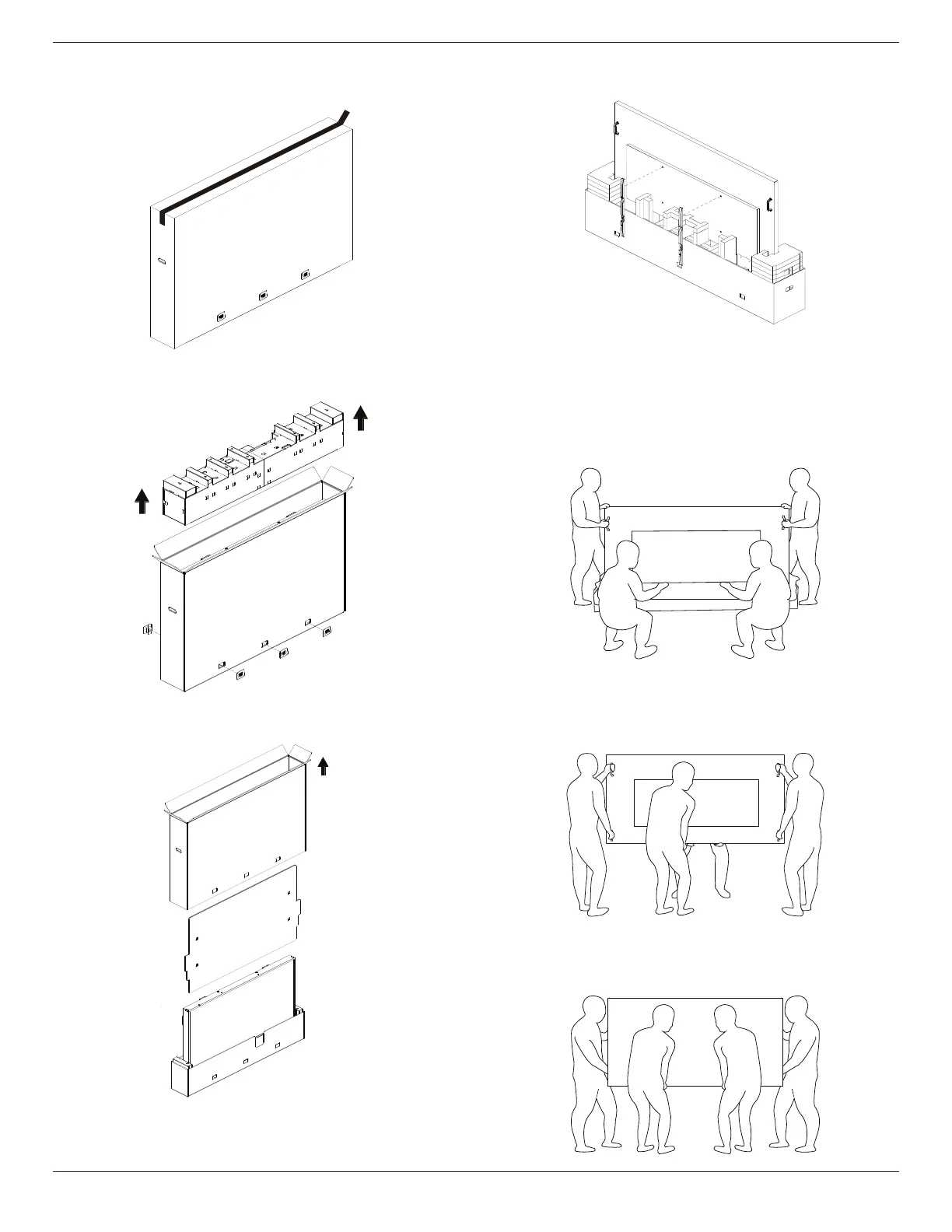
Unpacking Process
1. Remove the tape.
2. Remove all accessories and top cushion from the top
opening of the packaging.
3. Discard the cardboard and open the packing bag.
4. Install the wall mount kit (*) while the display is still in the
bottom cushion.(* need to purchase separately)
* The recommended number of professional personnel for
unpacking and installation requirements is at least 2 for 65"
& 75" models, and 4 for the 86" model.
5. Two people on the sides should hold the top handles
from the back of the display, while two others help hold
the display from the bottom.
6. Carefully move the display until the bottom handles are
out of the box. Two people on the sides should hold the 4
handles, while two others stand at the front and back of
the display to support the bottom.
7. The person who was initially at the back of the display
should move to the front, so that all four people can
mount the display onto the wall.













 To Next Page