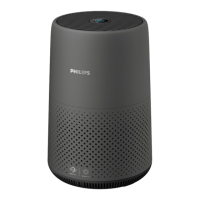
The Philips AC0850 is an air purifier designed to improve indoor air quality. It features a compact, cylindrical design with a control panel on the top and air inlets around the base, and an air outlet at the top. The device utilizes a NanoProtect filter Series 2 (FY0293) for purification.
Function Description
The primary function of the Philips AC0850 air purifier is to remove pollutants from the air, contributing to a healthier indoor environment. It operates by drawing in ambient air, passing it through its filter system, and then releasing purified air. The appliance is equipped with an air quality sensor that continuously monitors the ambient air quality. Based on the detected air quality, the device can adjust its operation, particularly in Auto mode, to optimize purification performance.
The air purifier features an air quality light that visually indicates the current air quality level. The color of this light changes according to the PM2.5 level: blue for good air quality (PM2.5 <12), blue-purple for fair (PM2.5 13-35), purple-red for poor (PM2.5 36-55), and red for very poor (PM2.5 >55). The brightness of this light also reflects the current running mode, with Sleep mode having the lowest brightness, Auto mode a mid-level brightness, and Turbo mode the highest brightness.
The device also includes Wi-Fi connectivity, allowing users to control and monitor the air purifier remotely via the Philips “Air+” app on a smartphone or tablet. The Wi-Fi indicator on the control panel shows the connection status, blinking orange when connecting to a smartphone, stable orange when connected to a smartphone, blinking white when connecting to the server, and stable white when connected to the server. If the Wi-Fi function is disabled, the indicator will be off.
Usage Features
The Philips AC0850 offers several modes of operation to suit different user needs and environmental conditions:
- Turning On and Off: The air purifier can be switched on or off using the power button located on the back of the appliance. Upon turning on, it defaults to Auto mode.
- Mode Settings: Users can select between Auto mode, Turbo mode, and Sleep mode by pressing the mode switch button on the control panel.
- Auto Mode: In this mode, the appliance automatically adjusts its fan speed based on the ambient air quality detected by the air quality sensor. This ensures efficient purification without constant manual intervention.
- Turbo Mode: For situations requiring rapid air purification, Turbo mode operates the air purifier at its highest fan speed, providing maximum cleaning power.
- Sleep Mode: Designed for quiet operation, especially during nighttime, Sleep mode runs the air purifier at a low speed, minimizing noise while still purifying the air.
- Wi-Fi Connection: The air purifier can be connected to a Wi-Fi network using the Philips “Air+” app. This allows for remote control, monitoring of air quality, and potentially access to additional features or updates through the app. The setup involves downloading the app, plugging in the purifier, and following on-screen instructions to connect to the network. Resetting the Wi-Fi connection is possible if the network changes or if setup needs to be redone.
- Filter Installation: Before first use, all packaging materials of the NanoProtect filter must be removed. The filter is installed by rotating the base anti-clockwise, pulling out the filter, removing its packaging, placing the filter back, and then reattaching and fastening the base clockwise. It is crucial to ensure the air purifier is unplugged during filter installation.
- Healthy Air Protect Lock: This feature ensures that the air purifier operates only when the filter is in optimal condition. When the filter is nearing its end of life, a filter replacement alert (◉) lights up red. If the filter is not replaced in time, the alert will flash, and the appliance will stop operating and lock, preventing use with an ineffective filter.
- Filter Reset: After replacing the filter, the filter lifetime counter must be manually reset. This is done by turning on the appliance and then pressing and holding the mode switch button for 5 seconds within 10 seconds of power-on.
Maintenance Features
Regular maintenance is essential to ensure the optimal performance and longevity of the Philips AC0850 air purifier.
- Cleaning Schedule:
- When necessary: The surface of the appliance and the air outlet cover should be wiped with a soft dry cloth.
- Every two months: The air quality sensor needs to be cleaned with a dry cotton swab.
- Every four weeks: The surface of the filter should be cleaned.
- Cleaning the Body: Both the interior and exterior of the air purifier should be regularly cleaned with a soft, dry cloth to prevent dust accumulation. The air outlet can also be cleaned with a dry, soft cloth. Abrasive, aggressive, or flammable cleaning agents should never be used.
- Cleaning the Air Quality Sensor: For optimal functioning, the air quality sensor should be cleaned every two months. This involves switching off and unplugging the air purifier, then using a soft brush to clean the inlet and outlet of the sensor. The sensor cover is then opened, and the sensor, dust inlet, and dust outlet are cleaned with a damp cotton swab, followed by thorough drying with a dry cotton swab before reattaching the cover. More frequent cleaning may be necessary in dusty environments. If high humidity causes condensation and inaccurate air quality readings, cleaning the sensor or using a manual speed setting is recommended.
- Cleaning the Filter Surface: The surface of the filter can be wiped with a soft wet cloth or cleaned with a vacuum cleaner. Caution is advised against using high-power or industrial vacuum cleaners, as they may damage the filter.
- Replacing the Filter: The NanoProtect filter is not washable or reusable and must be replaced when indicated by the filter replacement alert. The replacement process involves turning off and unplugging the air purifier, removing the old filter by rotating the base anti-clockwise, discarding it, removing packaging from the new filter, placing the new filter in, reattaching the base, plugging in the purifier, and then resetting the filter lifetime counter. Hands should be thoroughly washed after handling the filter.
- Storage: When storing the air purifier, it should first be turned off and unplugged. The appliance, air quality sensor, and filter surface should be cleaned and thoroughly air-dried. The filter should be wrapped in airtight plastic bags, and the entire unit stored in a cool, dry location. Hands should always be washed after handling a filter.

 Need help?
 General








 To Next Page