EasyManua.ls Logo

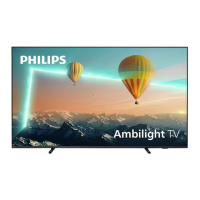
Philips 8118 Series - User Manual

Philips 8118 Series
76 pages
Print Icon
To Next Page IconTo Next Page
Loading...
Register your product and get support at
www.philips.com/TVsupport
User Manual
43PUS8118
50PUS8118
55PUS8118
65PUS8118
70PUS8118
75PUS8118
8118 Series

Other manuals for Philips 8118 Series

Question and Answer IconNeed help?

Do you have a question about the Philips 8118 Series and is the answer not in the manual?

Summary

2. Get Support

2.3. TV Diagnose and Self-diagnose

Running diagnostic tests to check TV performance and settings.

2.4. Consumer Care; Repair

3. Quick Guide

3.1. Remote Control

Key overview and functions of the remote control for different models.

3.4. Joystick - Local Control

How to use the TV's built-in joystick for basic operations when the remote is unavailable.

4. Setting Up

4.1. Read the Safety Instructions

Emphasizes reading safety instructions before using the TV.

4.2. TV Placement

Tips for optimal TV placement and wall mounting dimensions.

4.3. Turn on TV

Instructions for connecting the power cable and turning on the TV.

5. Connections

5.4. Video Device

Information on using HDMI connections and understanding HDCP copy protection.

5.5. Audio Device

5.6. Mobile Device

5.8. Bluetooth

Pairing a Device

Step-by-step guide to pair Bluetooth devices like speakers or headphones.

5.9. Computer

6. Switch Source

7. Channels

7.2. Install Channel

Steps for installing channels via Antenna/Cable, including manual search.

7.3. Channel List

Managing and viewing the TV's channel lists.

7.4. Favourite Channels

Creating, managing, and reordering favorite channel lists.

Satellite

8. TV Guide

8.2. Using the TV Guide

How to open, navigate, and tune to programs using the TV Guide.

9. Freeview Play (for UK models)

9.2. Using Freeview Play

Step-by-step instructions for navigating and using Freeview Play.

10. Videos, Photos and Music

10.3. Photos

Viewing photos, slideshow options, and photo management.

10.4. Videos

Playing video files, including playback controls and subtitle/audio options.

10.5. Music

Playing music files and managing music playback options.

11. Open TV Setting Menus

Picture Settings

Adjusting picture quality settings like style, colour, contrast, and sharpness.

Sound Settings

Configuring various sound styles and personal sound settings.

Colour Settings

Contrast Settings

HDR Settings

Picture Clean

Video Contrast, Gamma

Picture Format

Sound Style

Personal Sound Settings

EasyLink 2.0

Audio Out Settings

Digital Output Settings

HDMI Ultra HD

Universal Access Settings

Lock Settings

Setting up child lock codes, parental ratings, and app locks.

12. Gaming Control Bar

Settings

Adjusting gaming-specific settings for optimal performance.

13. Wireless and Networks

13.2. Connect to Network

Steps for connecting the TV wirelessly or via Ethernet.

13.3. Wireless and Network Settings

Viewing network settings and configuring static IP addresses.

14. Smart TV and Apps

14.1. Setup Smart TV

Initial setup process for Smart TV, including connection and terms agreement.

14.2. Store of Apps

Browsing and installing apps from the TV's app store.

15. Ambilight

15.1. Ambilight Style

Selecting different Ambilight styles, including follow app/video/audio.

15.2. Personal Colour

Setting a custom static color for Ambilight.

15.4. Advanced Ambilight Settings

16. Netflix

17. Rakuten TV

18. Amazon Prime Video

19. YouTube

20. Alexa

20.2. Using Alexa

Step-by-step guide to set up and use Alexa voice commands on the TV.

20.3. Alexa Voice Commands

21. Google Assistant

22. Software

22.1. Update Software

Procedures for updating software via the internet or USB.

24. Specifications

24.5. Sound

Specifications for the TV's audio system, including output power and supported formats.

24.7. Connectivity

25. Troubleshooting

25.2. Switch On

Troubleshooting steps if the TV does not switch on or makes creaking sounds.

25.5. Satellite

25.6. Picture

25.7. Sound

25.8. HDMI - UHD

25.9. USB

25.10. Wi-Fi and Internet

25.11. Wrong Menu Language

26. Safety and Care

26.1. Safety

General safety warnings regarding electric shock, fire, injury, and TV damage.

Stability Hazards

Warnings about TV stability and preventing falls to avoid injury.

Risk of Batteries

Safety precautions related to batteries in the remote control.

Risk of Overheating

Lightning Storms

Risk of Hearing Damage

26.2. Screen Care

Summary

2. Get Support

2.3. TV Diagnose and Self-diagnose

Running diagnostic tests to check TV performance and settings.

2.4. Consumer Care; Repair

3. Quick Guide

3.1. Remote Control

Key overview and functions of the remote control for different models.

3.4. Joystick - Local Control

How to use the TV's built-in joystick for basic operations when the remote is unavailable.

4. Setting Up

4.1. Read the Safety Instructions

Emphasizes reading safety instructions before using the TV.

4.2. TV Placement

Tips for optimal TV placement and wall mounting dimensions.

4.3. Turn on TV

Instructions for connecting the power cable and turning on the TV.

5. Connections

5.4. Video Device

Information on using HDMI connections and understanding HDCP copy protection.

5.5. Audio Device

5.6. Mobile Device

5.8. Bluetooth

Pairing a Device

Step-by-step guide to pair Bluetooth devices like speakers or headphones.

5.9. Computer

6. Switch Source

7. Channels

7.2. Install Channel

Steps for installing channels via Antenna/Cable, including manual search.

7.3. Channel List

Managing and viewing the TV's channel lists.

7.4. Favourite Channels

Creating, managing, and reordering favorite channel lists.

Satellite

8. TV Guide

8.2. Using the TV Guide

How to open, navigate, and tune to programs using the TV Guide.

9. Freeview Play (for UK models)

9.2. Using Freeview Play

Step-by-step instructions for navigating and using Freeview Play.

10. Videos, Photos and Music

10.3. Photos

Viewing photos, slideshow options, and photo management.

10.4. Videos

Playing video files, including playback controls and subtitle/audio options.

10.5. Music

Playing music files and managing music playback options.

11. Open TV Setting Menus

Picture Settings

Adjusting picture quality settings like style, colour, contrast, and sharpness.

Sound Settings

Configuring various sound styles and personal sound settings.

Colour Settings

Contrast Settings

HDR Settings

Picture Clean

Video Contrast, Gamma

Picture Format

Sound Style

Personal Sound Settings

EasyLink 2.0

Audio Out Settings

Digital Output Settings

HDMI Ultra HD

Universal Access Settings

Lock Settings

Setting up child lock codes, parental ratings, and app locks.

12. Gaming Control Bar

Settings

Adjusting gaming-specific settings for optimal performance.

13. Wireless and Networks

13.2. Connect to Network

Steps for connecting the TV wirelessly or via Ethernet.

13.3. Wireless and Network Settings

Viewing network settings and configuring static IP addresses.

14. Smart TV and Apps

14.1. Setup Smart TV

Initial setup process for Smart TV, including connection and terms agreement.

14.2. Store of Apps

Browsing and installing apps from the TV's app store.

15. Ambilight

15.1. Ambilight Style

Selecting different Ambilight styles, including follow app/video/audio.

15.2. Personal Colour

Setting a custom static color for Ambilight.

15.4. Advanced Ambilight Settings

16. Netflix

17. Rakuten TV

18. Amazon Prime Video

19. YouTube

20. Alexa

20.2. Using Alexa

Step-by-step guide to set up and use Alexa voice commands on the TV.

20.3. Alexa Voice Commands

21. Google Assistant

22. Software

22.1. Update Software

Procedures for updating software via the internet or USB.

24. Specifications

24.5. Sound

Specifications for the TV's audio system, including output power and supported formats.

24.7. Connectivity

25. Troubleshooting

25.2. Switch On

Troubleshooting steps if the TV does not switch on or makes creaking sounds.

25.5. Satellite

25.6. Picture

25.7. Sound

25.8. HDMI - UHD

25.9. USB

25.10. Wi-Fi and Internet

25.11. Wrong Menu Language

26. Safety and Care

26.1. Safety

General safety warnings regarding electric shock, fire, injury, and TV damage.

Stability Hazards

Warnings about TV stability and preventing falls to avoid injury.

Risk of Batteries

Safety precautions related to batteries in the remote control.

Risk of Overheating

Lightning Storms

Risk of Hearing Damage

26.2. Screen Care

Philips 8118 Series Specifications

General IconGeneral
Display TypeLED
Screen Size55 inches
Smart TVYes
Operating SystemAndroid TV
Ambilight3-sided
HDMI Ports4
USB Ports2
Wi-FiYes
Sound TechnologyDolby Atmos
Refresh Rate60 Hz
BluetoothYes
Sound Output20W
Resolution3840 x 2160 (4K Ultra HD)
HDRHDR10+
ProcessorQuad-core

Related product manuals