Settings 39
This menu allows you to select a language for all menu
text. Press
+
or
-
to select the language of your
choice, then press
,
to confirm.
This menu allows you to access a group of predefined
settings, which let you quickly adapt your phone to
your environment by changing several settings at
once. For example, selecting
Meeting
will set your
ringer volume to silent, activate vibra and deactivate
the key tones (the other items are set according to the
settings you configured). When your meeting is over,
selecting
Personal
will reactivate all your usual settings.
When you associate a hotkey to a profile (e.g. long press
key
3
activates
Meeting
, see “Hotkeys” page 29),
also long press this key to deactivate it and go back to
the
Personal
settings.
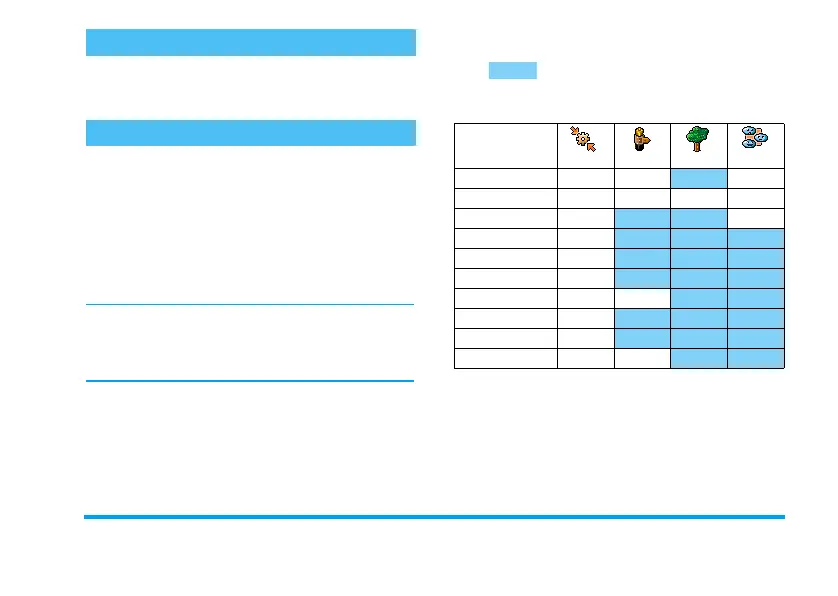
The settings listed in the column
Personal
, in the
following table, are default settings preset during
production. As you can change them, the personal
settings in your phone may differ from the table.
Each box of the table refers to the settings as
stored in the
Personal
menu (whether you have
changed the settings or not).
Language
Profiles
Profiles
Vibra alert
On Off On
Ringer volume
Medium Medium
High Silent
Key tones
On Off
Organiser alerts
On
Battery low alert
On
Message alert
On
Backlight
10 sec Off
Zoom
Off
Any key answers
Off
Animation
On Off
Personal
Autonomy Outdoors
Meeting
Philips855_GB_MKG_4311 255 58331.book Page 39 Mercredi, 17. décembre 2003 4:32 16



 To Next Page