98BDL4650D
35
5.5. Browser
Before using this feature, ensure that the system is connected
successfully to the network.
(See 6.1.1.1. Wi-Fi & 6.1.1.2. Ethernet)
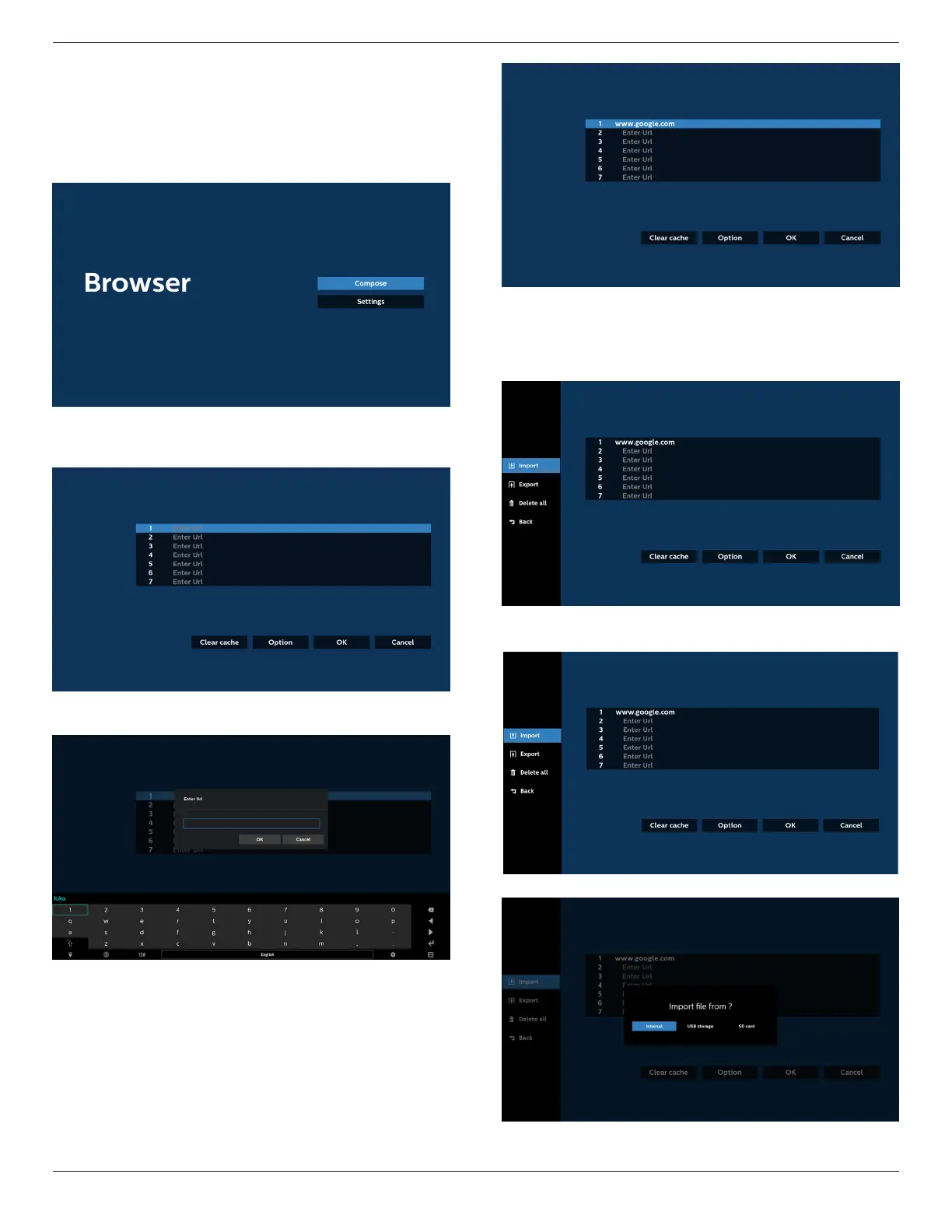
1. Main page of “Browser” App which allows you to make
related settings.
2. Press “Compose” then enter the next page.
Users can choose between 1~7.
A dialog box appears after the selection is made.
3. Use the on-screen keyboard to enter URL and press the
OK button, the data will be saved in the List.
4. Press “Option” and a list will appear on the left side.
Import: Import the le of URL list
Export: Export the le of URL list
Delete all: Delete all URL records from the main screen
Back: Close the side menu bar
4.1 Import
• Select import.
• Select the storage from which the le will be imported.







 To Next Page