7 TR
Option 2: Battery power
Caution
Batteries (battery pack or batteries installed) shall not
the like.
Danger of explosion if battery is incorrectly replaced.
Replace only with the same equivalent type.
Do not mix batteries (old and new or carbon and
alkaline, etc.).
Remove batteries if they are exhausted or if the unit is
not to be used for a long time.
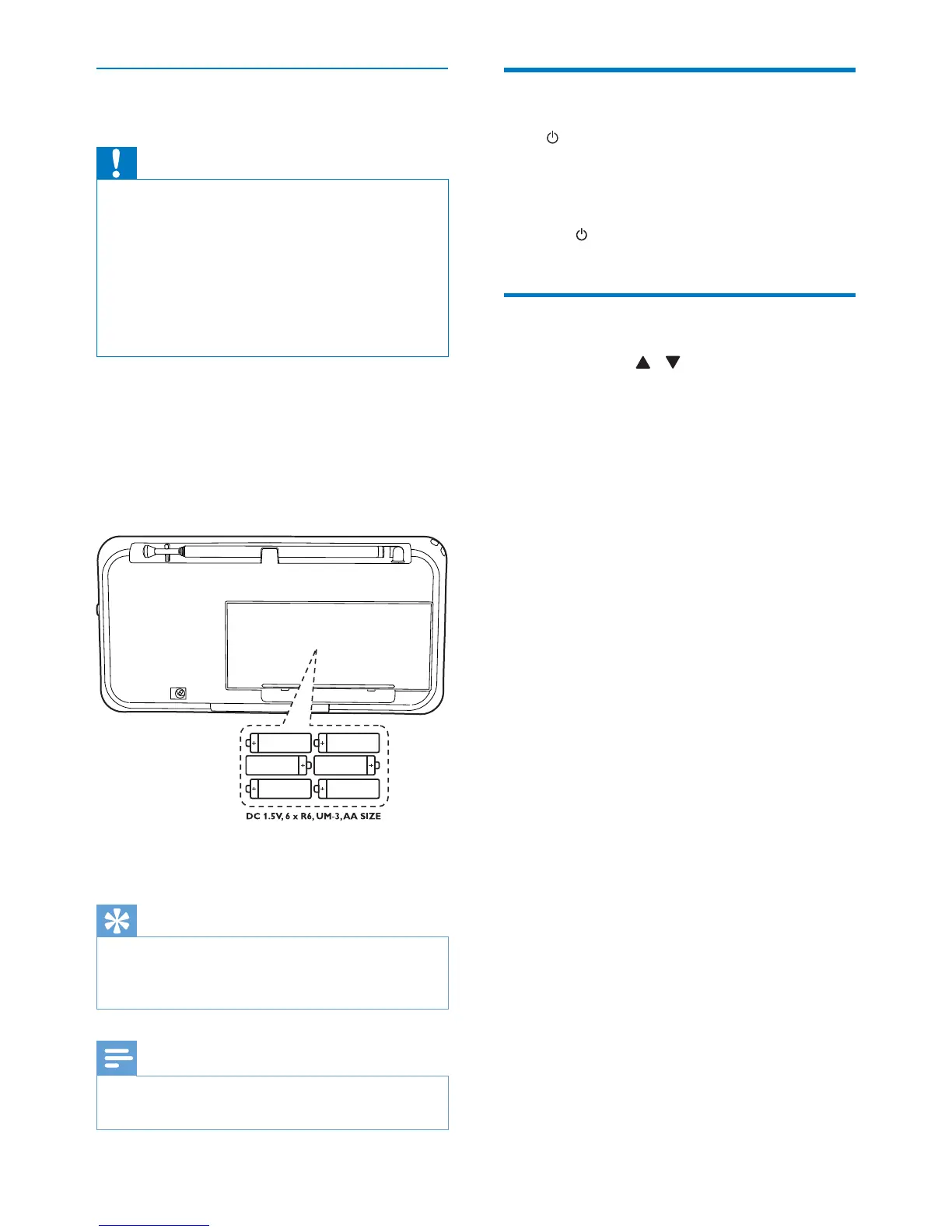
1
Open the battery compartment at the
back of the unit.
2
Insert 6 R6/UM-3/AA size batteries (not
supplied) with correct polarity
(+/-) as indicated, then close the battery
compartment.
3
The unit is ready to operate.
Tip
„Battery low“ message is shown when the battery
power is low. Change batteries to ensure normal
operation.
Note
Batteries contain chemical substances, so they should
be disposed of properly.
Turn on
Press .
»
The unit switches to the last selected
source.
To turn off the unit:
»
Press
again.
Adjust the volume level
During play, press / VOL to increase/
decrease the volume level.


 To Next Page