8
Turn on
Press .
» The unit switches to the last selected
source.
Adjust volume
Listen through the headphone
Plug a headphone into the socket on the unit.
Tip
• When the unit is powered by AC mains supply, the
display backlight is always on.
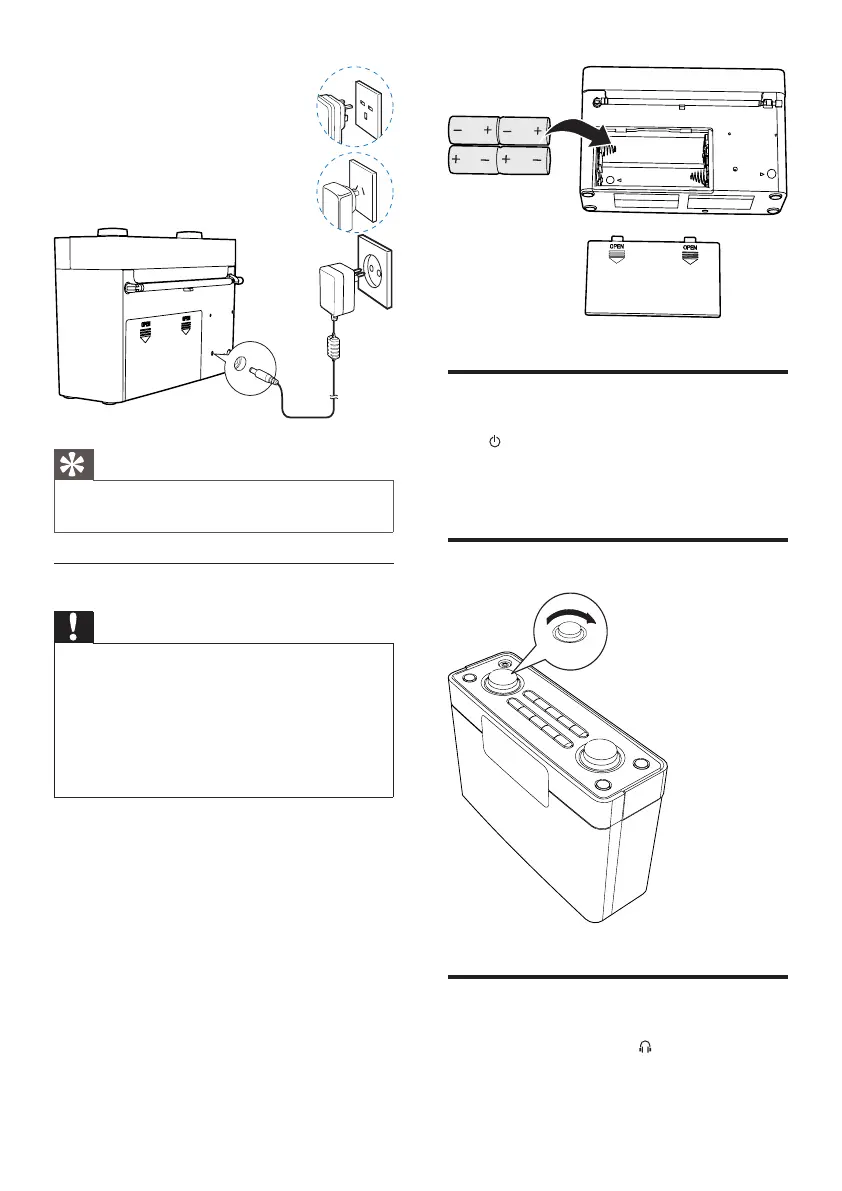
Option 2: Battery power
Caution
• Risk of explosion! Keep batteries away from heat,
sunshineorre.Neverdiscardbatteriesinre.
• Do not mix batteries (old and new or carbon and
alkaline,c.).
• Remove batteries if they are exhausted or if the unit is
not used for a long time.
• Batteries contain chemical substances, so they should be
disposed of properly.
1 Open the battery compartment.
2 Insert 4 x 1.5V R14/UM2/C batteries (not
supplied)withcorrectpolarity(+/-)as
indicated.
3 Close the battery compartment.
EN



 To Next Page